AirCull: Browse photos and organize your photo library App Market Image AirCull: Browse photos and organize your photo library App Market Image AirCull: Browse photos and organize your photo library App Market Image AirCull: Browse photos and organize your photo library App Market Image AirCull: Browse photos and organize your photo library App Market Image

Product story

🏷️ Lightweight organization / Local analysis / Peace of mind with recovery✅ iPhone🇨🇳 Chinese developer📱「AirCull」 Developer:"Many people don't want to organize their photo albums no...

One replay per day

📅

Review a small batch of photos each day without having to face your entire gallery

Local Analysis

🔒

Photo checks are performed locally on the device and are not uploaded to the cloud.

Restorable content

♻️

Removed photos are first moved to the Recycle Bin, where they can be restored or permanently deleted.

Why try it?

AirCull is a photo album organization assistant designed for iPhone users. It breaks down large volumes of photos and videos into manageable, easy-to-complete tasks. Users can star...

📅

One replay per day

Review a small batch of photos each day without having to face your entire gallery
🔒

Local Analysis

Photo checks are performed locally on the device and are not uploaded to the cloud.

♻️

Restorable content

Removed photos are first moved to the Recycle Bin, where they can be restored or permanently deleted.

Product Story

239th Issue | AirCull: Instantly Identify Duplicates and Similar Images, Local Intelligent Analysis Brings Clarity Back to Your Photo Album

🏷️ Lightweight organization / Local analysis / Peace of mind with recovery

✅ iPhone

🇨🇳 Chinese developer


📱「AirCull」 Developer:"Many people don't want to organize their photo albums not because they don't want to, but because there are too many photos, they don't know where to start, and they worry about accidental deletion. I hope to turn a heavy album cleanup into"small tasks that can be completed in just a few minutes each day. AirCull is a more restrained on-device smart album organization assistant. It won't make decisions for you; every removal requires your personal confirmation, and removed content can be recovered at any time."


🎯「AirCull」's most artisanal feature lies in its multi-scenario adaptation and card-style interaction:

  1. Three main entry points precisely align with needs: Designed separately according to users' different mindsets, offering "Clean," "Organize," and "Memories" entry points. You can efficiently handle screenshots and duplicate photos with clear tasks, ororganize monthly albums step by step, or casually browse old memory photos without pressure.
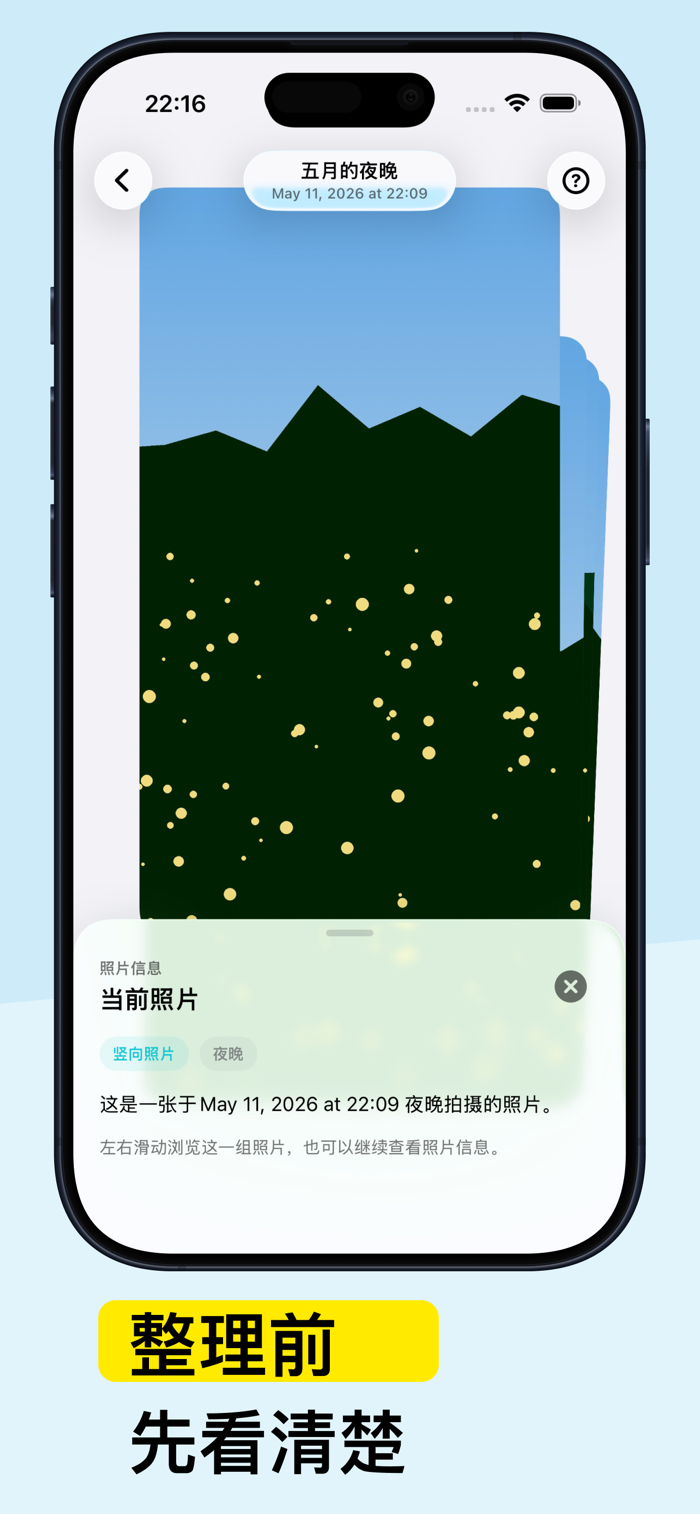
  2. Unified and smooth card-style experience: All three entry points adopt an intuitive and elegantcard-style browsing method. Swipe left/right to view, swipe up to add to pending removal, or conveniently retain, favorite, add to album, or view photo details, without repeatedly learning complex operations.
  3. Interaction details tailored to scenarios: For different purposes—cleaning (focusing on retaining and removing), organizing (focusing on favoriting and categorizing), and memories (casually browsing history)—we have meticulously redesigned the corresponding action buttons, prompts, and completion feedback, making each scenario simple and handy.


📋 Other feature highlights:

  1. Pure local on-device smart analysis: All clarity, aesthetic scoring, similarity, and duplicate photo analyses are completed locally on the device. No personal photos are ever uploaded, comprehensively guarding privacy and security.
  2. Precise classification and deep inspection: Specifically classifies and summarizes screenshots, duplicate photos, similar burst shots, and photos awaiting confirmation,providing a clear overview of the entire album, avoiding the hassle of flipping back and forth through lengthy albums.
  3. A daily set of low-pressure reviews: Breaks down large photo libraries into easy-to-complete small tasks. Spend just a few minutes each day reviewing a small group of photos, gradually building the good habit of consistent album organization and review.
  4. Complete control with secondary confirmation and recovery: Provides only reference basis and never automatically deletes photos for users. Removed photos are first stored in "Recoverable Content," allowing easy viewing, recovery, or permanent cleanup at any time, with zero pressure from accidental deletion.


📜 More product background:

  1. Ultimate restraint and sense of control: AirCull's core intention is not to empty the album with one click, but to advocate "organizing slowly." By giving users full control, it reduces anxiety over accidental deletion and helps reclaim the beautiful memories behind the album.
  2. Cross-device experience and large-screen organization: The team will continue to optimize operational fluidity and minimalist experience in the future, with plans to launch an iPad version, allowing users to easily browse albums on larger screens and continue their organization progress across Apple devices.


What People Are Saying

15 enthusiasts have claimed

白茶⚡️ 2026-10-21

10.0 Rating 界面优美 超级喜欢

User experience screenshots
Blank Space 2026-09-06

9.0 Rating 简洁的页面,挺好的,用起来很简单,蛮好的

User experience screenshots
单单⚡️ 2026-07-31

10.0 Rating 删除前再次确认非常好

User experience screenshots
DODO_CDZRYYVU 2026-07-28

10.0 Rating 相机照片清理太省心了!自动筛重复、虚焦、废片,10分钟清完几百张,误删的还能扫出来,效率拉满,必入!

User experience screenshots
🔳🏠 2026-07-27

10.0 Rating 审美太好了,界面简洁,现代

User experience screenshots User experience screenshots 2 screenshots
Keep Browsing

Recently Added Exclusive Giveaways

Exclusive Giveaways in progress today 98 items. Keep browsing to see if the next one is what you're looking for.

View More
MERGEEK Exclusive Giveaways
Issue 239 · Curated picks · Limited-time giveaway
AirCull: Browse photos and organize your photo library icon

AirCull: Browse photos and organize your photo library

Official Collaboration

Annual Premium Edition

Official Exclusive Benefits
Limited Time & QuantityClaim for Free
+12
15 enthusiasts have claimed
Get a Feel for It First
Product screenshots, core features, and experience highlights—take a full look first.
Why try it?
Focus on the most valuable points to experience in this event first.
📅
One replay per dayReview a small batch of photos each day without having to face your entire gallery
🔒
Local AnalysisPhoto checks are performed locally on the device and are not uploaded to the cloud.
♻️
Restorable contentRemoved photos are first moved to the Recycle Bin, where they can be restored or permanently deleted.
Story with Images and Text
Understand AirCull: Browse photos and organize your photo library's product experience in more detail.

239th Issue | AirCull: Instantly Identify Duplicates and Similar Images, Local Intelligent Analysis Brings Clarity Back to Your Photo Album

🏷️ Lightweight organization / Local analysis / Peace of mind with recovery

✅ iPhone

🇨🇳 Chinese developer


📱「AirCull」 Developer:"Many people don't want to organize their photo albums not because they don't want to, but because there are too many photos, they don't know where to start, and they worry about accidental deletion. I hope to turn a heavy album cleanup into"small tasks that can be completed in just a few minutes each day. AirCull is a more restrained on-device smart album organization assistant. It won't make decisions for you; every removal requires your personal confirmation, and removed content can be recovered at any time."


🎯「AirCull」's most artisanal feature lies in its multi-scenario adaptation and card-style interaction:

  1. Three main entry points precisely align with needs: Designed separately according to users' different mindsets, offering "Clean," "Organize," and "Memories" entry points. You can efficiently handle screenshots and duplicate photos with clear tasks, ororganize monthly albums step by step, or casually browse old memory photos without pressure.
  2. Unified and smooth card-style experience: All three entry points adopt an intuitive and elegantcard-style browsing method. Swipe left/right to view, swipe up to add to pending removal, or conveniently retain, favorite, add to album, or view photo details, without repeatedly learning complex operations.
  3. Interaction details tailored to scenarios: For different purposes—cleaning (focusing on retaining and removing), organizing (focusing on favoriting and categorizing), and memories (casually browsing history)—we have meticulously redesigned the corresponding action buttons, prompts, and completion feedback, making each scenario simple and handy.


📋 Other feature highlights:

  1. Pure local on-device smart analysis: All clarity, aesthetic scoring, similarity, and duplicate photo analyses are completed locally on the device. No personal photos are ever uploaded, comprehensively guarding privacy and security.
  2. Precise classification and deep inspection: Specifically classifies and summarizes screenshots, duplicate photos, similar burst shots, and photos awaiting confirmation,providing a clear overview of the entire album, avoiding the hassle of flipping back and forth through lengthy albums.
  3. A daily set of low-pressure reviews: Breaks down large photo libraries into easy-to-complete small tasks. Spend just a few minutes each day reviewing a small group of photos, gradually building the good habit of consistent album organization and review.
  4. Complete control with secondary confirmation and recovery: Provides only reference basis and never automatically deletes photos for users. Removed photos are first stored in "Recoverable Content," allowing easy viewing, recovery, or permanent cleanup at any time, with zero pressure from accidental deletion.


📜 More product background:

  1. Ultimate restraint and sense of control: AirCull's core intention is not to empty the album with one click, but to advocate "organizing slowly." By giving users full control, it reduces anxiety over accidental deletion and helps reclaim the beautiful memories behind the album.
  2. Cross-device experience and large-screen organization: The team will continue to optimize operational fluidity and minimalist experience in the future, with plans to launch an iPad version, allowing users to easily browse albums on larger screens and continue their organization progress across Apple devices.


What People Are Saying
15 enthusiasts have claimed
白茶⚡️
2026-10-21

10.0 Rating 界面优美 超级喜欢

User experience screenshots
Blank Space
2026-09-06

9.0 Rating 简洁的页面,挺好的,用起来很简单,蛮好的

User experience screenshots
单单⚡️
2026-07-31

10.0 Rating 删除前再次确认非常好

User experience screenshots
Keep Browsing

Recently Added Exclusive Giveaways

Exclusive Giveaways in progress today 98 items. Keep browsing to see if the next one is what you're looking for.

View More

提交反馈

每一个想法,都让 Mergeek 更好一点。