


Visual Timeline
📊
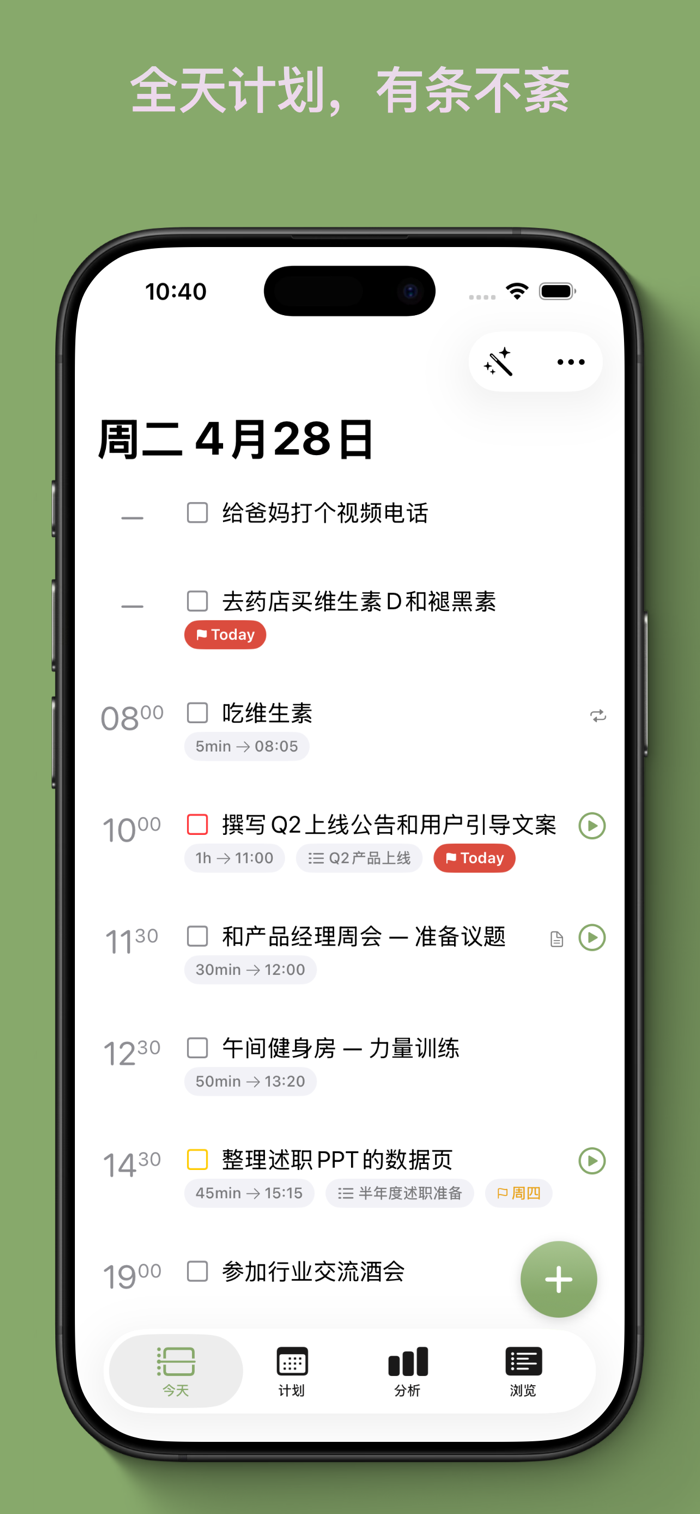
Intuitively displays the structure of your daily schedule



🏷️ Time Boxing Method / Visual Timeline / Eisenhower Quadrants ✅ iPhone / iPad / Apple Watch - iOS18.6 and above🇨🇳 Chinese Developers📱 Developer Note for "Flowiz":"Flowiz is a sche...
Intuitively displays the structure of your daily schedule
Intelligently fills idle time slots with to-do items
Built-in multiple colors that are sensory-friendly
Flowiz is a sleek and elegant scheduling iOS app that utilizes Elon Musk's Timeboxing method. It seamlessly integrates calendar events and to-do tasks into a single timeline, allow...
Intuitively displays the structure of your daily schedule
Intelligently fills idle time slots with to-do items
Built-in multiple colors that are sensory-friendly
🏷️ Time Boxing Method / Visual Timeline / Eisenhower Quadrants
✅ iPhone / iPad / Apple Watch - iOS18.6 and above
🇨🇳 Chinese Developers
📱 Developer Note for "Flowiz":"Flowiz is a schedule management app based on the Timeboxing method. I used to habitually use traditional Todo apps, but I often felt frustrated by task overload from long lists and constant postponements. It wasn't until I saw Musk mention his timeboxing method in an interview—dividing the day into controllable small blocks and assigning tasks to them, locking in energy in advance, thereby completely letting go of unrealistic self-imposed pressure—that I found inspiration. To perfectly practice this method, I developed Flowiz, hoping it will become the ultimate tool to help everyone clear away mental fog and take control of their lives."
🎯 The most匠心 (craftsmanship) features of "Flowiz" are [Batch Time Sliders] and [Timeline Linkage]:
📋 Other Feature Highlights:
📜 More Product Background and Future Plans:
10 enthusiasts have claimed
8.0 Rating Flowiz 的时间盒理念真的太合我心意!批量时间滑尺、一键智能排期、艾森豪威尔四象限都做得很用心,清单与日历双视图切换顺滑,配色舒适,用起来体验很好。 希望开发者优化两点: 1. 没有云同步是硬伤,跨设备使用很不方便,如果能加入 iCloud 同步就太好了; 2. 正计时和番茄钟现在是分开的,建议整合到同一个入口。我个人更偏爱正计时,合并之后界面会更加简洁,查找起来也更顺手。 整体底子很棒,期待后续更新!


 3 screenshots
9.0 Rating 简洁明快,管理不容易混乱。使用后方便统计,提高效率,建议实时查看统计好归类,提高效率

 2 screenshots
8.0 Rating 第一印象:交互简洁直观,时间线模式一眼看清全天安排。自定义时间块+每日重复任务,刚好匹配我固定的图书馆学习作息,用来拆分刷题与看课内容任务很方便。 但会觉得计时的功能用起来怪怪的?期待后续增加类似于番茄计时功能。


 3 screenshots
10.0 Rating 颜值高,界面简洁易用,能很方便地规划一整天的日程。它能很方便地为待办事项分配开始时间和时长,如果日程发生变化,也能很方便地调整时间,能通过日历视图来预览未来一周或者一个月的事项。


 3 screenshots
6.0 Rating 设计简洁,查看添加任务方便,有几个位置可添加,提醒需开通会员,有待测试,最好可以用自定义提示音


 3 screenshots
Exclusive Giveaways in progress today 101 items. Keep browsing to see if the next one is what you're looking for.
 Tools

Camera photos with GPS correction, relive your travel footprints, supports GPX
 Tools

Habits, To-Do Lists, Memos, and Countdowns
 效率

100% offline, no full access required
 Tools

Cats accompany you to stay focused, using calendars and plans to manage time
 Tools

Relaxing Woodfish and Piano | Watch Faces | Stress Alerts | Breathing Relaxation | Heart Rate & Blood Oxygen | Stress Relief
 效率

Strictly reviewing every time you open a mobile application
 Tools

Study, work, and read in your favorite settings
 Tools

Photo, Live Photo, and Video Collage


🏷️ Time Boxing Method / Visual Timeline / Eisenhower Quadrants
✅ iPhone / iPad / Apple Watch - iOS18.6 and above
🇨🇳 Chinese Developers
📱 Developer Note for "Flowiz":"Flowiz is a schedule management app based on the Timeboxing method. I used to habitually use traditional Todo apps, but I often felt frustrated by task overload from long lists and constant postponements. It wasn't until I saw Musk mention his timeboxing method in an interview—dividing the day into controllable small blocks and assigning tasks to them, locking in energy in advance, thereby completely letting go of unrealistic self-imposed pressure—that I found inspiration. To perfectly practice this method, I developed Flowiz, hoping it will become the ultimate tool to help everyone clear away mental fog and take control of their lives."
🎯 The most匠心 (craftsmanship) features of "Flowiz" are [Batch Time Sliders] and [Timeline Linkage]:
📋 Other Feature Highlights:
📜 More Product Background and Future Plans:

8.0 Rating Flowiz 的时间盒理念真的太合我心意!批量时间滑尺、一键智能排期、艾森豪威尔四象限都做得很用心,清单与日历双视图切换顺滑,配色舒适,用起来体验很好。 希望开发者优化两点: 1. 没有云同步是硬伤,跨设备使用很不方便,如果能加入 iCloud 同步就太好了; 2. 正计时和番茄钟现在是分开的,建议整合到同一个入口。我个人更偏爱正计时,合并之后界面会更加简洁,查找起来也更顺手。 整体底子很棒,期待后续更新!
3 screenshots

9.0 Rating 简洁明快,管理不容易混乱。使用后方便统计,提高效率,建议实时查看统计好归类,提高效率
2 screenshots

8.0 Rating 第一印象:交互简洁直观,时间线模式一眼看清全天安排。自定义时间块+每日重复任务,刚好匹配我固定的图书馆学习作息,用来拆分刷题与看课内容任务很方便。 但会觉得计时的功能用起来怪怪的?期待后续增加类似于番茄计时功能。
3 screenshots
Exclusive Giveaways in progress today 101 items. Keep browsing to see if the next one is what you're looking for.
Copy the code below and send it in the Mergeek WeChat Official Account chat box
to check the activity status,Claim Redemption Code。

Your activity participation record has been saved. You can return to the Official Account to continue checking the redemption status.
Flowiz
0 Gems
--
--
The redemption code will be sent via the Mergeek WeChat official account.
We recommend pinning the 「Mergeek」 WeChat official account and ensuring message notifications are not muted, so you can receive redemption code alerts promptly.
You can also check the current status in the 'Personal Center'.
--
Please scan the QR code within 24 hours to visit the Mergeek WeChat official account and send the code to check the activity status.
Some app store links cannot be opened directly within the mini program. Please long-press and scan the QR code below, go to the Mergeek WeChat official account, and automatically obtain the download link for this product.
More convenient on mobile


