Minimalist Pomodoro Timer
⏱️
One-click timer start reduces friction to enter focus mode




🏷️ Quiet and Restrained / Orderly Desktop Aesthetics / Annual Heatmap✅ iPhone - iOS 16.0 or later🇨🇳 Chinese Developers📱"ZenPomo" Developer: “ZenPomo is an iOS focus application des...
One-click timer start reduces friction to enter focus mode
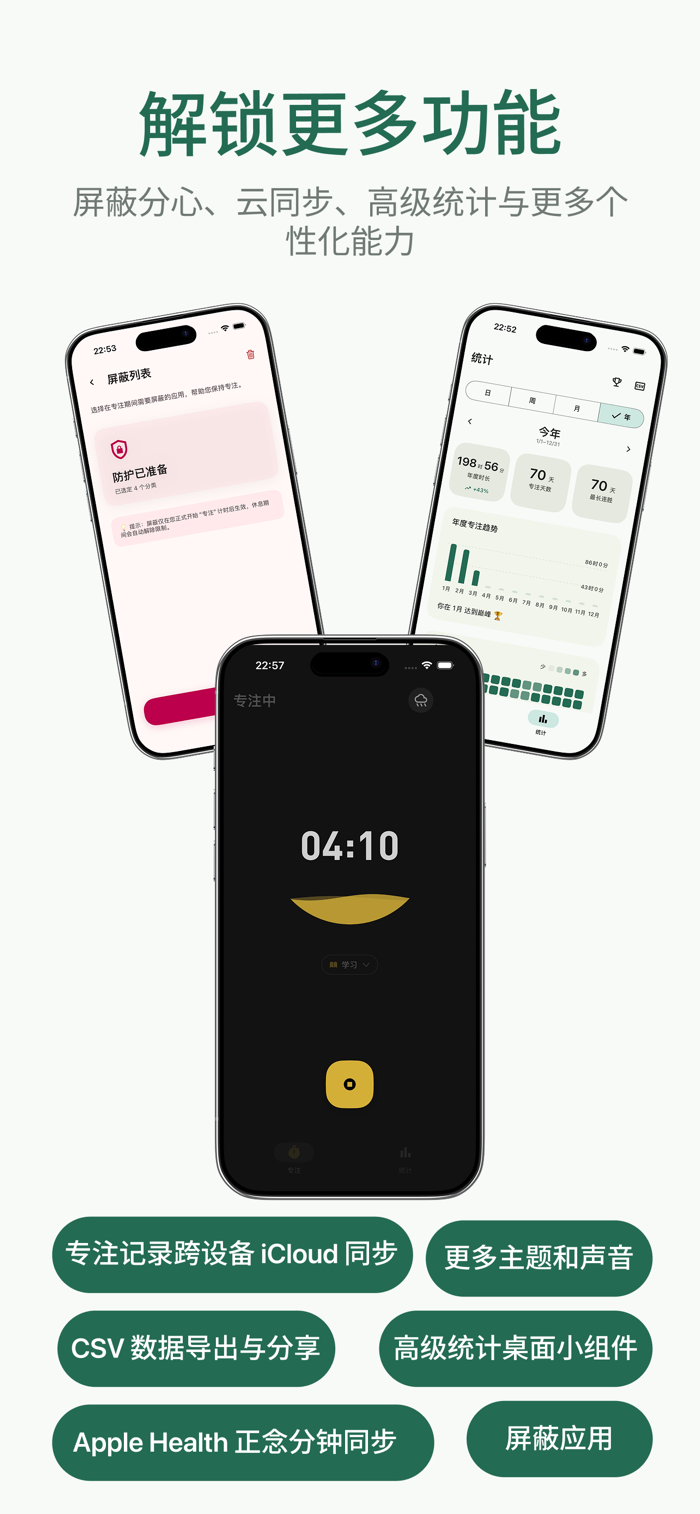
Strictly lock apps to help you stay focused while working
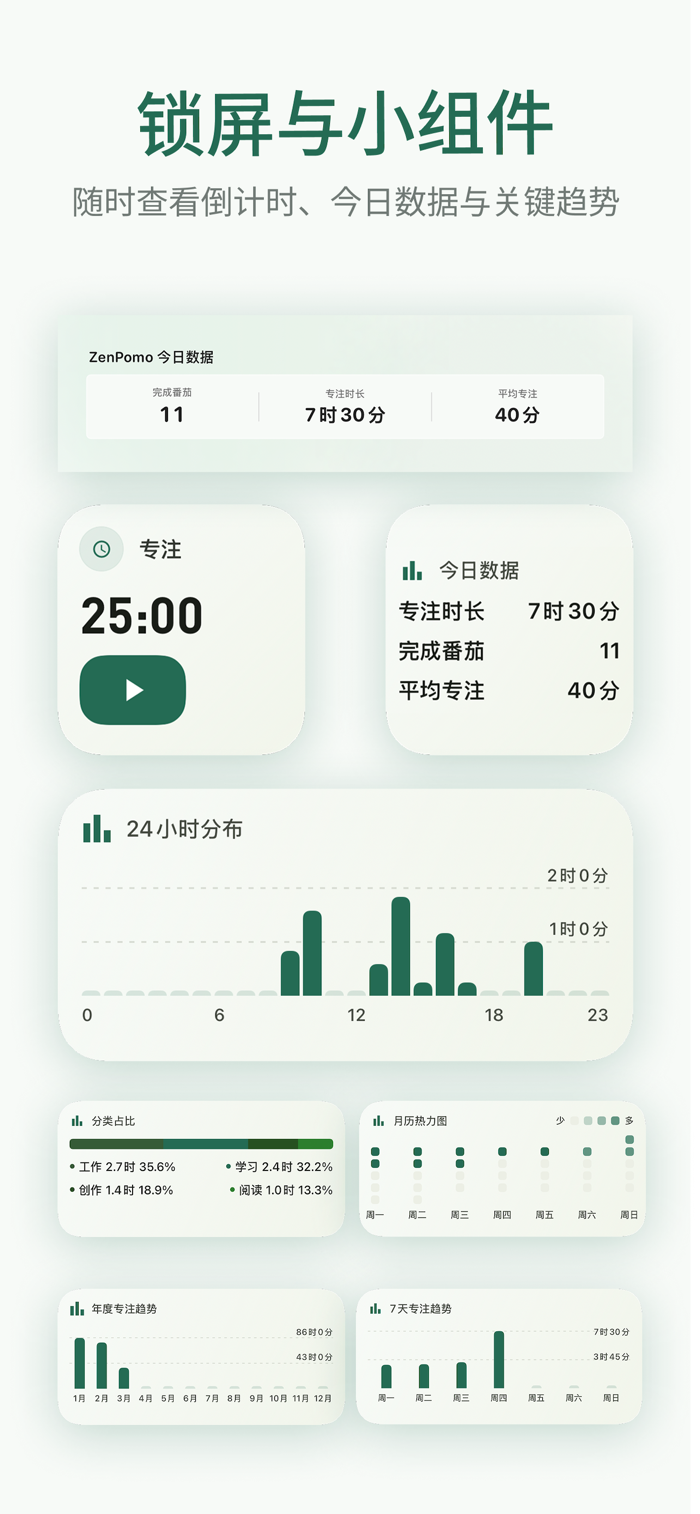
Check the current countdown at a glance on the lock screen and home screen
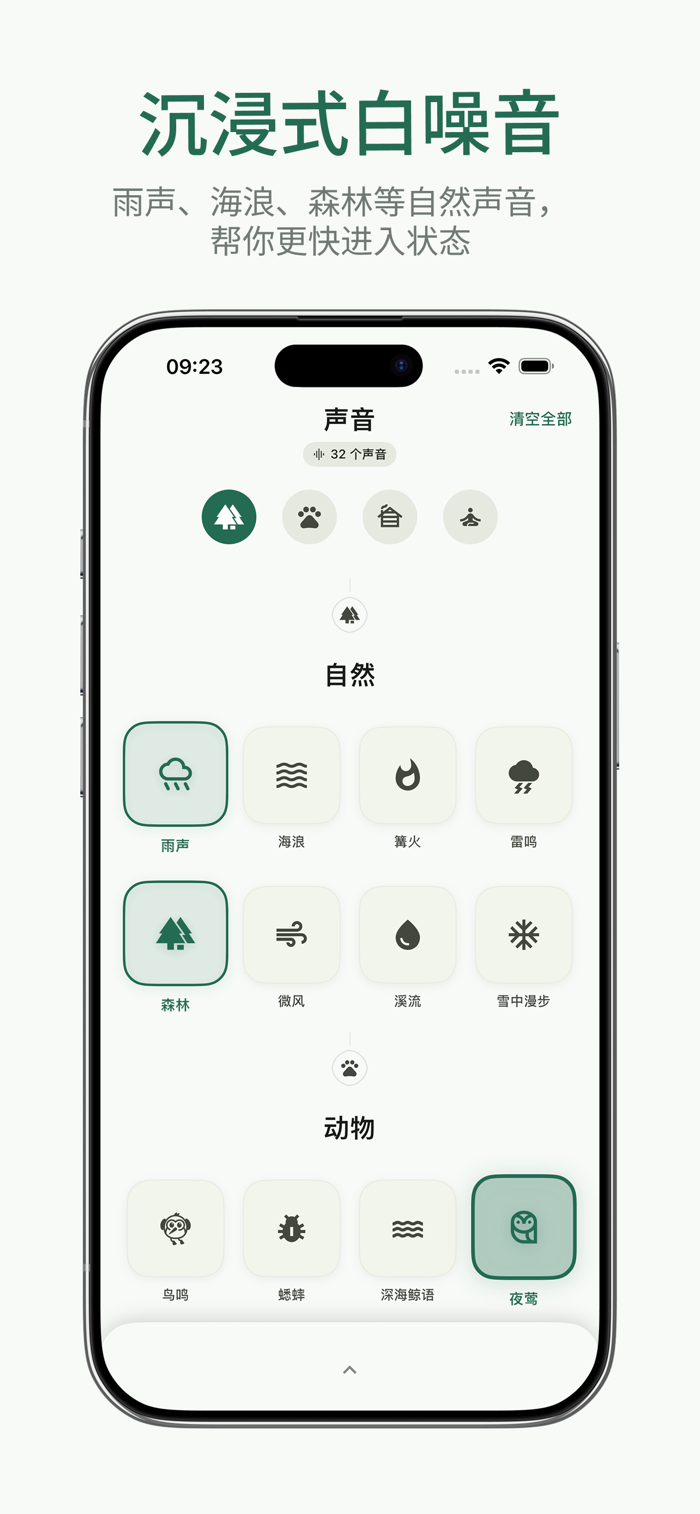
ZenPomo is a focus timer designed for learning, writing, reading, and deep work. Start focus or break sessions with one click, customize durations, support automatic timing, record...
One-click timer start reduces friction to enter focus mode
Strictly lock apps to help you stay focused while working
Check the current countdown at a glance on the lock screen and home screen
🏷️ Quiet and Restrained / Orderly Desktop Aesthetics / Annual Heatmap
✅ iPhone - iOS 16.0 or later
🇨🇳 Chinese Developers
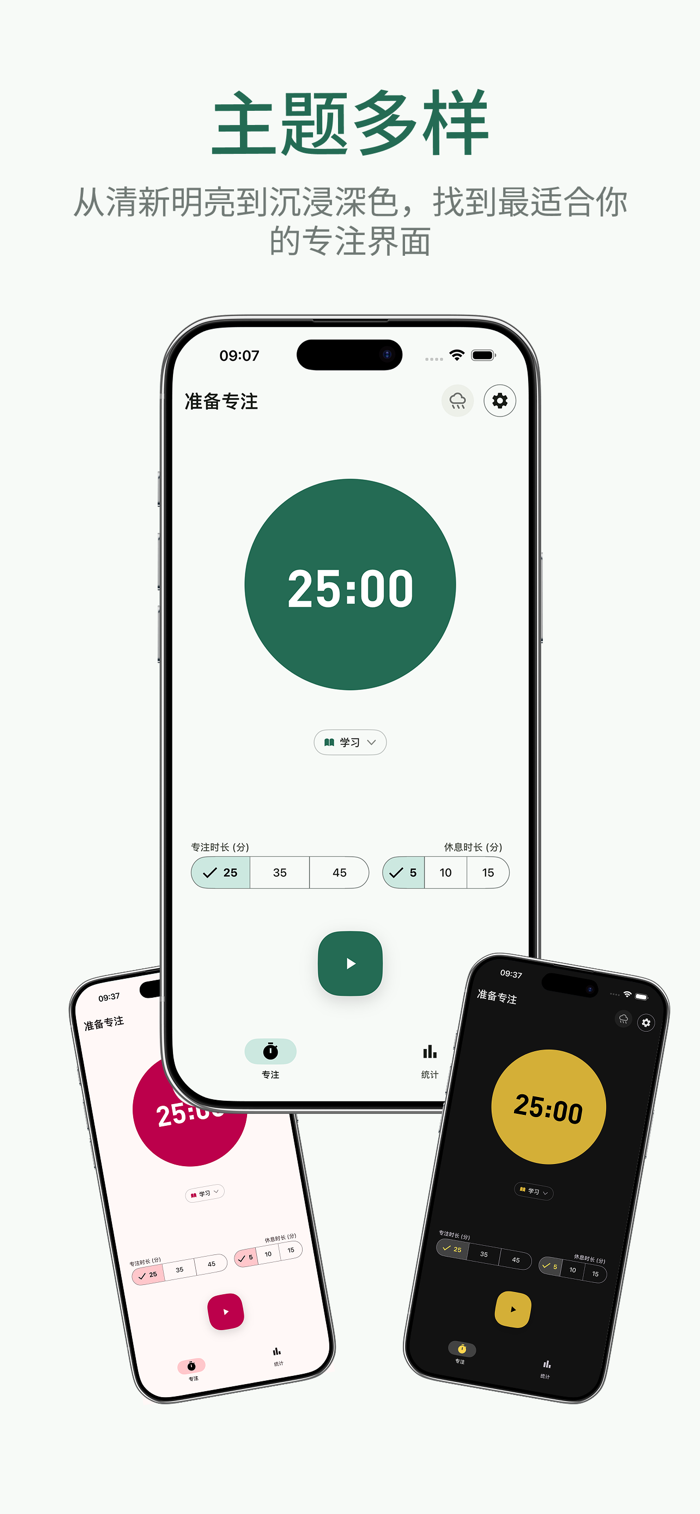
📱"ZenPomo" Developer: “ZenPomo is an iOS focus application designed specifically for deep learning and work. It does not try to push you forward with motivational quotes and pop-ups, but instead hopes to allow users to slowly extend the small act of focusing within a quiet interface through restrained, clear, and highly visually orderly design. Focusing should never be more exhausting than focusing itself.”
🎯The most匠心 (artisanal) feature of "ZenPomo" is its data visualization module and fully customizable theme system:
📋Other Feature Highlights:
📜More Product Background: ZenPomo is a pure independent developer project. From color schemes to the corner radius of every button, it has been carefully polished by the developer alone. To allow users around the world to quietly enjoy this tool, the product has invested significant effort into multi-language adaptation. It currently meticulously supports 14 languages and has completely solved the adaptation challenges for right-to-left (RTL) texts like Arabic under custom typography.
Future Plans: In the short term, priority will be given to refining iCloud data synchronization (based on the most concentrated user feedback), adding more ambient sounds, and introducing new theme color schemes; The mid-term plan includes launching an independent Apple Watch version, allowing users to truly put down their phones when focusing; In the long term, there are plans to introduce lightweight AI capabilities for "focus review," quietly helping users summarize their golden hours of highest efficiency without disturbing them at all.
43 enthusiasts have claimed
9.0 Rating 界面简约干净,是很治愈的禅意风格,上手很轻松。自带雨声、森林这类自然白噪音,沉浸感很强。统计页面做得很用心,可以看每日专注时长、时间分布,帮我找到自己高效的黄金时段。 还有严格模式、防止锁屏、屏蔽应用这些实用设置,适配学习、工作各种场景。 小遗憾是目前缺少正计时模式,期待后续可以加上!


 3 screenshots
10.0 Rating 特别好用,这个学习软件解决了我的学习烦恼,可以在学习的过程中解决,一个神仙App他的桌面操作也特别简单

10.0 Rating 挺好用,刚下载感觉很简洁,基本符合我要求,各种热力图和趋势都有,很适合用来备考

 2 screenshots
6.0 Rating 打开App界面非常简洁,没有很多复杂的东西。看起来特别舒适,如果后期可以增加计划表就更好了。

10.0 Rating ui很简洁,用起来也很舒服,特别的方便,非常不错的软件

Exclusive Giveaways in progress today 102 items. Keep browsing to see if the next one is what you're looking for.
 Tools

Cherish the space and life memories
 Tools

Camera photos with GPS correction, relive your travel footprints, supports GPX
 Tools

Habits, To-Do Lists, Memos, and Countdowns
 效率

100% offline, no full access required
 Tools

Cats accompany you to stay focused, using calendars and plans to manage time
 Tools

Relaxing Woodfish and Piano | Watch Faces | Stress Alerts | Breathing Relaxation | Heart Rate & Blood Oxygen | Stress Relief
 效率

Strictly reviewing every time you open a mobile application
 Tools

Study, work, and read in your favorite settings


🏷️ Quiet and Restrained / Orderly Desktop Aesthetics / Annual Heatmap
✅ iPhone - iOS 16.0 or later
🇨🇳 Chinese Developers
📱"ZenPomo" Developer: “ZenPomo is an iOS focus application designed specifically for deep learning and work. It does not try to push you forward with motivational quotes and pop-ups, but instead hopes to allow users to slowly extend the small act of focusing within a quiet interface through restrained, clear, and highly visually orderly design. Focusing should never be more exhausting than focusing itself.”
🎯The most匠心 (artisanal) feature of "ZenPomo" is its data visualization module and fully customizable theme system:
📋Other Feature Highlights:
📜More Product Background: ZenPomo is a pure independent developer project. From color schemes to the corner radius of every button, it has been carefully polished by the developer alone. To allow users around the world to quietly enjoy this tool, the product has invested significant effort into multi-language adaptation. It currently meticulously supports 14 languages and has completely solved the adaptation challenges for right-to-left (RTL) texts like Arabic under custom typography.
Future Plans: In the short term, priority will be given to refining iCloud data synchronization (based on the most concentrated user feedback), adding more ambient sounds, and introducing new theme color schemes; The mid-term plan includes launching an independent Apple Watch version, allowing users to truly put down their phones when focusing; In the long term, there are plans to introduce lightweight AI capabilities for "focus review," quietly helping users summarize their golden hours of highest efficiency without disturbing them at all.

9.0 Rating 界面简约干净,是很治愈的禅意风格,上手很轻松。自带雨声、森林这类自然白噪音,沉浸感很强。统计页面做得很用心,可以看每日专注时长、时间分布,帮我找到自己高效的黄金时段。 还有严格模式、防止锁屏、屏蔽应用这些实用设置,适配学习、工作各种场景。 小遗憾是目前缺少正计时模式,期待后续可以加上!
3 screenshots

10.0 Rating 特别好用,这个学习软件解决了我的学习烦恼,可以在学习的过程中解决,一个神仙App他的桌面操作也特别简单

10.0 Rating 挺好用,刚下载感觉很简洁,基本符合我要求,各种热力图和趋势都有,很适合用来备考
2 screenshots
Exclusive Giveaways in progress today 102 items. Keep browsing to see if the next one is what you're looking for.
Copy the code below and send it in the Mergeek WeChat Official Account chat box
to check the activity status,Claim Redemption Code。

Your activity participation record has been saved. You can return to the Official Account to continue checking the redemption status.
ZenPomo
0 Gems
--
--
The redemption code will be sent via the Mergeek WeChat official account.
We recommend pinning the 「Mergeek」 WeChat official account and ensuring message notifications are not muted, so you can receive redemption code alerts promptly.
You can also check the current status in the 'Personal Center'.
--
Please scan the QR code within 24 hours to visit the Mergeek WeChat official account and send the code to check the activity status.
Some app store links cannot be opened directly within the mini program. Please long-press and scan the QR code below, go to the Mergeek WeChat official account, and automatically obtain the download link for this product.
More convenient on mobile