



 Trickster: Recent Files


App Introduction
App 介绍
Trickster keeps your recent files and links one click away in the menu bar. The document you saved a minute ago, the PDF you downloaded, the page you meant to come back to: they're at the top of the list, so you don't have to dig through folders. "Can't work without this app. Trickster has become my most used and favorite app!" (App Store review) Already own Trickster? Version 4 is a free update, redesigned for macOS Tahoe and now tracking web links alongside your files. RIGHT WHERE YOU LEFT IT • Downloaded an invoice? Drag it from Trickster into an email without opening Finder. • Closed a document by mistake? Reopen it from the list. • Exported design assets? Drag them into Slack, Figma or a client upload form. • Files synced from your other Mac through iCloud Drive or Dropbox show up too. YOU CHOOSE WHAT TO TRACK Trickster watches the folders you pick and lets you filter what you see. • See new, downloaded and changed files, not only the ones you opened. • Choose your watched folders on first launch and change them any time. • Use the built-in filters, or create your own by location, file type, Finder tags or name. • Switch between files, links or everything with one click. WEB LINKS NEXT TO YOUR FILES • Save a page from Safari, Chrome or Firefox, and it appears in your list with the site's icon. • Each link remembers the browser it came from and opens there again. • Search, filter, flag and drag links like any other item. • The Safari extension is built in. Chrome and Firefox extensions are available. WORK WITH YOUR ITEMS • Drag items out of Trickster into any app, the same way you would from Finder. • Open, rename, preview with Quick Look, or reveal in Finder. • Keep the files, folders, apps and links you use most in the Favorites sidebar. • Drop files on a favorite folder to move them there, or on a favorite app to open them with it. • Flag the items you want to keep. KEYBOARD FRIENDLY Open Trickster from anywhere with a global shortcut, then search, open and preview items without touching the mouse. WORKS WITH YOUR TOOLS • DEVONthink: open DEVONthink items from Trickster, with their database location shown in the list. • Hookmark: see which items have hooks. • Alfred: browse your recent items with the Trickster workflow. • AppleScript support for your own automations. YOUR DATA STAYS ON YOUR MAC Your files and links never leave your Mac, and there's no account to create. The browser extensions send links straight to Trickster on your Mac, not through a server. PRICING Trickster is free to download, and everything is unlocked for the first 14 days. After that, the free version keeps working with your 10 most recent items. A one-time purchase unlocks the full version: unlimited items, dragging items out of Trickster, and creating your own filters. No subscription. WHAT PEOPLE SAY "It is one of my 3 essential mac apps. I use it multiple times every single day." (App Store review) "Where Trickster does the trick for me is with its keyboard navigation." (MacStories) Questions or ideas? Write to support@apparentsoft.com.
Trickster keeps your recent files and links one click away in the menu bar. The document you saved a minute ago, the PDF you downloaded, the page you meant to come back to: they're at the top of the list, so you don't have to dig through folders. "Can't work without this app. Trickster has become my most used and favorite app!" (App Store review) Already own Trickster? Version 4 is a free update, redesigned for macOS Tahoe and now tracking web links alongside your files. RIGHT WHERE YOU LEFT IT • Downloaded an invoice? Drag it from Trickster into an email without opening Finder. • Closed a document by mistake? Reopen it from the list. • Exported design assets? Drag them into Slack, Figma or a client upload form. • Files synced from your other Mac through iCloud Drive or Dropbox show up too. YOU CHOOSE WHAT TO TRACK Trickster watches the folders you pick and lets you filter what you see. • See new, downloaded and changed files, not only the ones you opened. • Choose your watched folders on first launch and change them any time. • Use the built-in filters, or create your own by location, file type, Finder tags or name. • Switch between files, links or everything with one click. WEB LINKS NEXT TO YOUR FILES • Save a page from Safari, Chrome or Firefox, and it appears in your list with the site's icon. • Each link remembers the browser it came from and opens there again. • Search, filter, flag and drag links like any other item. • The Safari extension is built in. Chrome and Firefox extensions are available. WORK WITH YOUR ITEMS • Drag items out of Trickster into any app, the same way you would from Finder. • Open, rename, preview with Quick Look, or reveal in Finder. • Keep the files, folders, apps and links you use most in the Favorites sidebar. • Drop files on a favorite folder to move them there, or on a favorite app to open them with it. • Flag the items you want to keep. KEYBOARD FRIENDLY Open Trickster from anywhere with a global shortcut, then search, open and preview items without touching the mouse. WORKS WITH YOUR TOOLS • DEVONthink: open DEVONthink items from Trickster, with their database location shown in the list. • Hookmark: see which items have hooks. • Alfred: browse your recent items with the Trickster workflow. • AppleScript support for your own automations. YOUR DATA STAYS ON YOUR MAC Your files and links never leave your Mac, and there's no account to create. The browser extensions send links straight to Trickster on your Mac, not through a server. PRICING Trickster is free to download, and everything is unlocked for the first 14 days. After that, the free version keeps working with your 10 most recent items. A one-time purchase unlocks the full version: unlimited items, dragging items out of Trickster, and creating your own filters. No subscription. WHAT PEOPLE SAY "It is one of my 3 essential mac apps. I use it multiple times every single day." (App Store review) "Where Trickster does the trick for me is with its keyboard navigation." (MacStories) Questions or ideas? Write to support@apparentsoft.com.

第一时间掌握精选限免应用/游戏信息
自定义喜欢的应用/游戏的价格变动
了解内购应用/游戏的限免或降价活动
查看应用/游戏价格历史等待合适时机再出手
第一时间收到价格通知不错过省钱机会


扫码下载 Follow
更多极客玩法


 One Player
OnePlayer是一款本地离线音乐播放器,目前已经支持iPhone、iPad、Apple Watc...

 试试双拼
试试双拼
试试双拼是 App Store 上第一款双拼输入法练习软件,通过这个软件你能方便的学习双拼规则,练习...
 Mini记账
现在有各种各样的记账工具,有人喜欢简洁的,有人喜欢功能强大的,也有人喜欢设计精美的,这款 APP 是...
Geek Stories
极客玩法
更多极客玩法
Selected Solutions
精选产品
 68
68
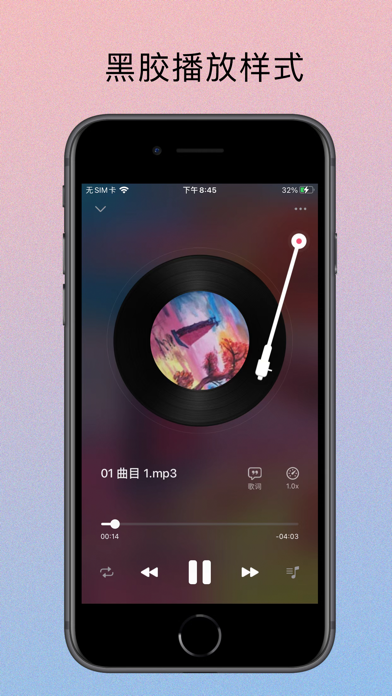

OnePlayer是一款本地离线音乐播放器,目前已经支持iPhone、iPad、Apple Watc...
9

试试双拼是 App Store 上第一款双拼输入法练习软件,通过这个软件你能方便的学习双拼规则,练习...
41


现在有各种各样的记账工具,有人喜欢简洁的,有人喜欢功能强大的,也有人喜欢设计精美的,这款 APP 是...
天天发现优质应用
 到主屏幕
到主屏幕






你成为这个产品的发现者啦,说说你的推荐语吧!