


 +100宝石




产品功能
Make beats, record ideas and shape your sound on iPad.
Sampledex brings audio recording, MIDI sequencing, sampling, sound design and mixing into one touch workspace. Start with a blank project or an editable beat template, build your arrangement and export your music—all with included sounds and instruments.
CREATE YOUR BEAT
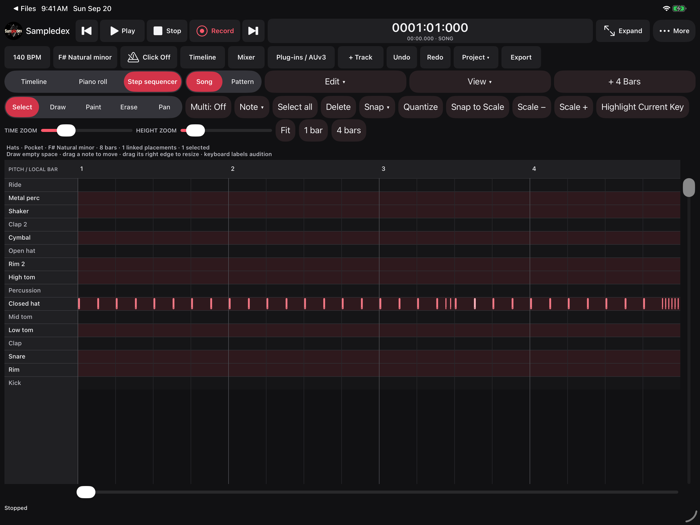
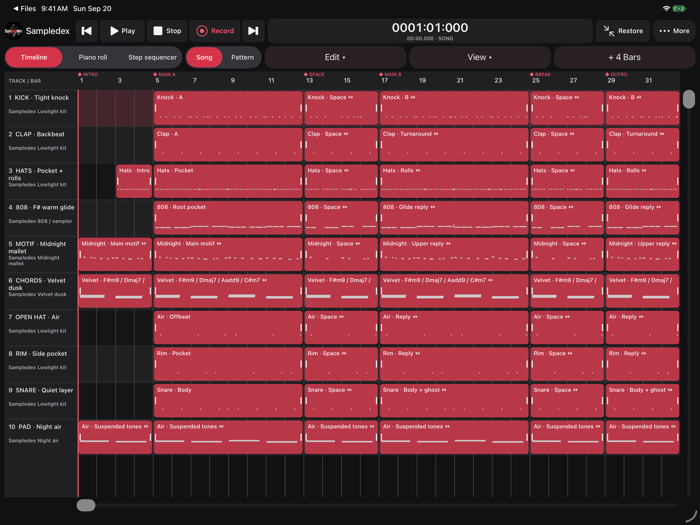
Draw notes in the piano roll or paint rhythms in the drum sequencer. Adjust note length, tempo, key and scale. Quantize a performance, snap notes to scale or add scale-degree triads. Arrange your ideas across tracks with clip move, trim, duplicate, Undo and Redo.
RECORD AND SAMPLE
Record audio through the iPad microphone or a compatible audio interface. Capture MIDI performances from compatible MIDI devices. Import audio and MIDI files, play pitched samples or chop sounds into pads. Recorded audio becomes an editable clip in your timeline.
SHAPE YOUR ARRANGEMENT
Adjust clip gain and add fade-ins and fade-outs. Join clips within a track or combine selected parts across tracks into an audio stem. Keep the original clips editable and choose whether to mute them or leave them playing.
FIND YOUR SOUND
Start with included drums, sampled 808s, Poly Synth, FM Keys and AI Synth. Shape oscillators, filters, envelopes, tuning and modulation. Design individual drum pads and use the pitch readout to guide tonal sounds.
DESIGN SOUNDS OFFLINE
Create instant sound variations or describe a sound to the bundled local AI. Audition a proposal, keep what works and discard the rest. Parameter locks protect settings you want to retain.
No account, API key, model download or online AI service is required. AI Synth designs instrument sounds; it does not generate beats, notes, loops or songs.
BUILD YOUR MIX
Control channel levels, pan, buses, sends and automation. Add included EQ, compression, limiting, reverb, delay, filter, saturation, chorus, bitcrusher and rhythmic gate. Process individual tracks and the master channel to shape your mix.
Use compatible installed AUv3 instruments and effects, with native plug-in editors when available and generic parameter controls.
EXPORT YOUR MUSIC
Export full mixes and individual stems as WAV, MP3 or M4A. Choose WAV for sample-aligned stems and lossless delivery. Export MIDI arrangements or individual MIDI tracks, or share a portable Sampledex project with its audio and editable session data.
KEEP YOUR IDEAS
Find your projects and templates on the start screen. Autosave keeps drafts in your project library, including unnamed ideas. Use Save to name your work and Save As to create an independent copy. Turn your own projects into reusable templates.
Open compatible Sampledex projects from Mac. Desktop plug-ins retain their saved state, and rendered audio from frozen Mac tracks can play without the original instruments.
COMPATIBILITY
Requires iPadOS 17 or later. Desktop VST3 and AU v2 plug-ins do not run on iPad. AUv3 features and editor availability depend on the installed plug-in. External audio and MIDI devices must be compatible with iPadOS.
Recording runs in the foreground and supports one mono or stereo audio input, or one MIDI instrument take, at a time. Extend the arrangement before longer recordings.
Local AI refinement requires sufficient available memory. Manual sound controls and instant variations remain available if refinement cannot run.
Your music remains yours. Sampledex’s original factory sounds can be used in commercial music, subject to the bundled license notice. Imported material and third-party plug-ins retain their owners’ terms.
分享「」体验,参与「」抽奖!
分享 1~3 张你对这个产品最满意的截图或效果图
分享「」体验,参与「」抽奖!
用你的故事点亮社区✨!你的真实体验,将会永久展示在 官方主页 📌,为其他朋友提供宝贵参考 💡。立即分享吧!🚀
请为产品评分
请选择问题回答,为大家提供宝贵参考
选择要回答的问题
温馨提示
你尚未上传产品截图。
上传截图可立即获得宝石积分奖励!
如果你赶时间,也可稍后修改评论,补上截图领取宝石。
温馨提醒
你尚未添加产品截图
⚠️ 不添加截图将降低抽奖权重

感谢参加,你已成功参加!
为了确保你能及时收到审核结果和领奖码通知

扫描二维码关注 Mergeek 公众号
在后台回复 「获奖通知」
完成上述操作,即可保障奖励发放成功





用户评价
立即分享产品体验
你的真实体验,为其他用户提供宝贵参考
💎 分享获得宝石
【分享体验 · 获得宝石 · 增加抽奖机会】
将你的产品体验分享给更多人,获得更多宝石奖励!
💎 宝石奖励
每当有用户点击你分享的体验链接并点赞"对我有用",你将获得:
🔗 如何分享
复制下方专属链接,分享到社交媒体、群聊或好友:
💡 小贴士
分享时可以添加你的个人推荐语,让更多人了解这款产品的优点!
示例分享文案:
"推荐一款我最近体验过的应用,界面设计很精美,功能也很实用。有兴趣的朋友可以看看我的详细体验评价~"
关注 Mergeek 公众号
领奖遇到问题?联系小门助手