Timers - 重复间隔计时器

Timers - 重复间隔计时器

Efficient Timed Notification Assistant, Focusing on Every Moment of Life

Creator
Koji Ito
平台
iOS
效率

Timers is a powerful multi-functional timing app. It supports continuously setting multiple timers, group repeat settings, sound selection, early notification, and countdown, and is suitable for various scenarios such as fitness, study, and meditation. It is simple and easy to use, and can be edited and launched in just a few steps. It supports background notifications and can be used when the device is locked or music is playing. It stores multiple groups, with a maximum of 64 that can be set. Data is synchronized and backed up, and it can be easily restored when changing devices. Please ensure to allow notifications in the iOS settings.
COMMUNITY PERKSMergeek 社区专属福利
独家限免 NEW每天发现一份惊喜
PRODUCT SCREENS / 4

点击查看界面细节

Timers - 重复间隔计时器 产品截图 1Timers - 重复间隔计时器 产品截图 2Timers - 重复间隔计时器 产品截图 3Timers - 重复间隔计时器 产品截图 4

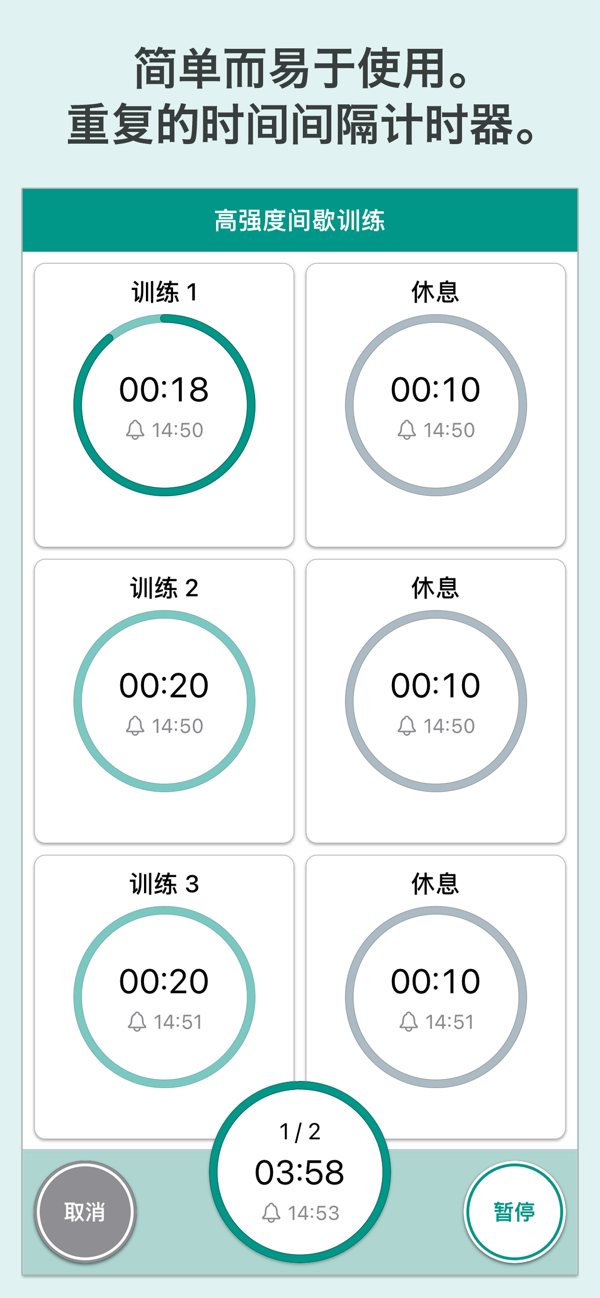
Timers is an application that allows you to set multiple timers continuously.
Notifications will inform you at the specified time. There are various functions to choose from, such as grouped repeat settings, sound selection, advance notification, reading, and countdown.
This application can be used in various situations, such as fitness, muscle training, when you want to concentrate, etc.
■ Simple and easy to use
Timers is very easy to use. Edit the name, time, sound, and repeat settings. All of these can be done in just a few simple steps. Once you set a timer, click the "Start" button. When the time is up, you will be notified with a sound. Background notification is also supported, so you can use it when the device is locked. You can also use it while playing music.
■ Support for your plans
Timers can store multiple groups. Learning, exercise, strength training, meditation, reading, Pomodoro technique, cooking. Create timers that suit your needs and focus on your goals.
■ More features
Timers offers a wide range of functions, such as timer reading, advance notification, countdown, copying from templates, etc. You can customize them according to your usage.
■ Notes
・Please allow notifications in iOS settings.
・The maximum number of settings per group is 64.
・When you back up your iPhone to a PC or iCloud, the data in the application will also be backed up simultaneously. When you change the model, etc., the data in the application will also be restored by restoring this iPhone data.

版本

3.3

• 高级版新增月度方案,可在年度、月度和买断中选择。
• 所有方案均提供相同的高级版权益,包括去除广告。
• 修复问题并提升稳定性。

查看完整更新记录 ↗

你的真实体验,为其他用户提供宝贵参考,获得宝石奖励

REWARD MARKET100 宝石可兑换什么?

还没有公开评论,欢迎分享你的体验。

提交反馈

每一个想法,都让 Mergeek 更好一点。