


 +100宝石




产品功能
Motibang is a platform for creating, publishing, and sharing test papers. With the powerful Excel spreadsheet, you can create a test paper in just a few simple steps, covering common question types such as multiple-choice, fill-in-the-blank, and matching. By publishing the test paper and obtaining feedback, you can continuously improve your test paper with the help of Motibang.
Since it is very convenient to import question banks into Motibang, after reading the help on the official website, you can import the electronic version of the existing question bank in your hand into Motibang within just a few minutes. Motibang has been used by many enterprises for internal training and assessment, and 90% of the questions are from industries such as railways, electricity, finance, accounting, healthcare, and government.
Main features:
1. Simple test paper creation
Excel is very suitable for creating test papers. Spend a few minutes reading the tutorials we provide and understanding the file format of Motibang's test papers, and you can use Excel on your computer to create your own test papers.
If your test paper is in Word format, you can use the tool we provide to convert it into an Excel file. For details, see the official website.
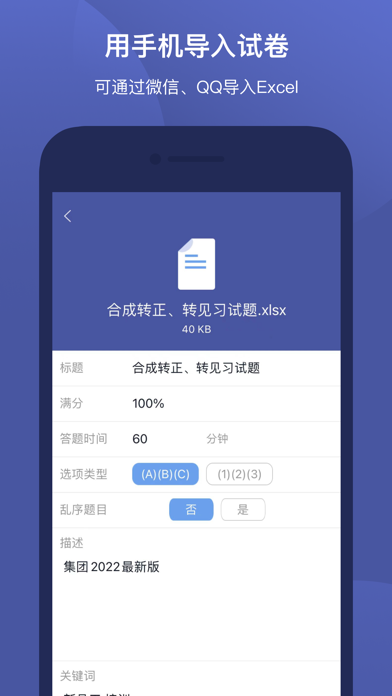
2. Directly import questions with your mobile phone
Without the need to rely on a computer or the web, you can directly read Excel files with the App. Whether it is an Excel file in 2007 format or 97-2003 format, it can be directly imported.
3. Create test papers with your mobile phone
It has a built-in function for creating test papers, allowing you to compile questions without a computer. The test papers created on the mobile phone can also be exported as Excel files at any time so that you can continue to modify them on the computer.
4. Rich supported question types
Supports 10 question types such as single-choice questions, multiple-choice questions, multiple-choice questions with indefinite answers, fill-in-the-blank questions, unordered fill-in-the-blank questions, matching questions, true-or-false questions, questions for correcting misspelled words, material questions, short-answer/essay questions, etc.
5. Supports passing-level questions
The passing-level question bank is a question bank containing several levels. There is a certain amount of various questions in each level. When answering questions in passing levels, several questions will be randomly selected from these questions. Whether you pass depends on whether the wrongly answered questions are within the allowed range.
6. Create groups for joint learning
After creating a group, you can publish announcements; you can publish test papers in the group for group members to download; you can publish assignments to assess group members. The group administrator can view the homework scores and answering situations of each person and can see the proportion of correct and wrong answers for each question.
7. Supports offline answering
After downloading the test paper to your mobile phone, you can answer questions at any time without connecting to the Internet during the answering process.
Motibang will save the records of each of your exams and practices. You can view these answering records at any time and check each question you answered wrongly. You can also repeat practicing the questions you answered wrongly or the questions you collected.
8. Manage my question bank
You can classify and manage the questions in my question bank, add questions by yourself, or add the questions of existing test papers to my question bank, and can modify and improve the questions.
You can select questions for practice or exams in my question bank and mark the questions as mastered.
The questions in my question bank are stored in the cloud.
QQ Group 1: 485210051 (full)
QQ Group 2: 577025465
WeChat official account: motibangapp
分享「」体验,参与「」抽奖!
分享 1~3 张你对这个产品最满意的截图或效果图
分享「」体验,参与「」抽奖!
用你的故事点亮社区✨!你的真实体验,将会永久展示在 官方主页 📌,为其他朋友提供宝贵参考 💡。立即分享吧!🚀
请为产品评分
请选择问题回答,为大家提供宝贵参考
选择要回答的问题
温馨提示
你尚未上传产品截图。
上传截图可立即获得宝石积分奖励!
如果你赶时间,也可稍后修改评论,补上截图领取宝石。
温馨提醒
你尚未添加产品截图
⚠️ 不添加截图将降低抽奖权重

感谢参加,你已成功参加!
为了确保你能及时收到审核结果和领奖码通知

扫描二维码关注 Mergeek 公众号
在后台回复 「获奖通知」
完成上述操作,即可保障奖励发放成功










用户评价
立即分享产品体验
你的真实体验,为其他用户提供宝贵参考
💎 分享获得宝石
【分享体验 · 获得宝石 · 增加抽奖机会】
将你的产品体验分享给更多人,获得更多宝石奖励!
💎 宝石奖励
每当有用户点击你分享的体验链接并点赞"对我有用",你将获得:
🔗 如何分享
复制下方专属链接,分享到社交媒体、群聊或好友:
💡 小贴士
分享时可以添加你的个人推荐语,让更多人了解这款产品的优点!
示例分享文案:
"推荐一款我最近体验过的应用,界面设计很精美,功能也很实用。有兴趣的朋友可以看看我的详细体验评价~"
关注 Mergeek 公众号
领奖遇到问题?联系小门助手