Transform your iPad into a professional digital signage creation studio. Design beautiful billboards with Apple Pencil on your iPad, display them on Apple TV. No servers, no subscriptions to third-party platforms—just your devices and iCloud.
Create Like a Pro
Draw custom graphics with Apple Pencil, add photos from your library, drop a video from your iPhone or design text-based billboards. Every billboard is a canvas for your creativity. Sketch promotional artwork, handwrite announcements, or combine drawings with photos for unique displays.
Playlist Groups with Scheduling
Organize billboards into playlist groups that rotate automatically on your Apple TV. Schedule seasonal campaigns with start and end dates—holiday promotions, back-to-school sales, or event announcements that activate and deactivate automatically. Perfect for businesses with rotating content needs.
Powerful Features
• Apple Pencil Drawing Tools: Sketch, handwrite, and draw directly on billboards. Choose from 12 vibrant colors and 5 brush sizes. The only digital signage app with native drawing support.
• Photo Integration: Add images from your photo library. Crop, position, and layer photos with drawings or text.
• Add a movie too.
• Text Customization: Multiple fonts, sizes, colors, and alignment options (left, center, right). Create headlines, body text, or full-screen messages.
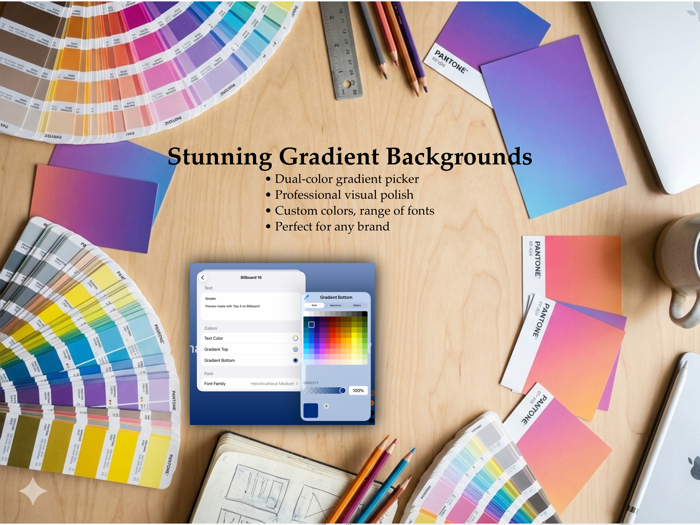
• Gradient Backgrounds: Dual-color gradients (vertical/horizontal) or solid colors. Professional polish for text and drawing billboards.
• Playlist Scheduling: Calendar-based start/end dates for seasonal content. Set it and forget it.
• Duplicate & Templates: Copy existing billboards as starting points. Build a library of reusable designs.
• Group Management: Backup and restore groups. Safe area boundaries toggle for screen edge protection.
• iCloud Sync: Seamless synchronization between iPad and Apple TV. Changes appear instantly across devices.
Why Choose Billboard
Unique Drawing Capability: Only app with Apple Pencil support for digital signage. Create truly custom content no competitor can match.
Native Apple Ecosystem: Built for iPad + Apple TV using SwiftUI and CloudKit. No web portals or third-party servers.
No Complicated Servers Required: Your data stays in your iCloud account. No monthly platform fees beyond optional device upgrades.
Simple Setup: Install on iPad (creation), install on Apple TV (display). Sign into same iCloud account. Done.
Automated Scheduling: Set date ranges for seasonal campaigns. Perfect for retail, restaurants, and offices with recurring promotions.
Multilingual: English, French, German, Spanish, Italian, Portuguese (Brazil).
Perfect For
Restaurants (daily specials, menu boards), retail stores (promotions, announcements), offices (employee communications, lobby displays), schools (event calendars, announcements), small businesses (promotional displays), anywhere you need dynamic visual communication on Apple TV.
How It Works
1. Create on iPad: Design billboards using Apple Pencil drawings, photos, or text. Organize into playlist groups with optional date ranges.
2. Display on Apple TV: Install companion app, sign into iCloud. Apple TV automatically displays your rotating playlists.
3. Update Anytime: Changes sync via iCloud. Update content from anywhere your iPad goes.
Subscription Tiers
• FREE: 1 iPad, 5 billboards
• STARTER: 1 iPad + 2 Apple TVs, 15 billboards
• PRO: 1 iPad + 9 Apple TVs, 50 billboards
• BUSINESS: 1 iPad + 49 Apple TVs, 200 billboards
All tiers include unlimited drawings, photos, playlist groups, and iCloud sync. Choose the tier that matches your display needs.
Requires iPad running iPadOS 17.0 or later (Apple Pencil recommended for drawing features). Apple TV HD or 4K running tvOS 17.0 or later for display. Both devices must use same iCloud account.
Privacy & Support
Your content stays in your iCloud account. We don't collect, store, or access your billboards. In-app support.

 +100宝石


 分享
分享























用户评价
立即分享产品体验
你的真实体验,为其他用户提供宝贵参考
💎 分享获得宝石
【分享体验 · 获得宝石 · 增加抽奖机会】
将你的产品体验分享给更多人,获得更多宝石奖励!
💎 宝石奖励
每当有用户点击你分享的体验链接并点赞"对我有用",你将获得:
🔗 如何分享
复制下方专属链接,分享到社交媒体、群聊或好友:
💡 小贴士
分享时可以添加你的个人推荐语,让更多人了解这款产品的优点!
示例分享文案:
"推荐一款我最近体验过的应用,界面设计很精美,功能也很实用。有兴趣的朋友可以看看我的详细体验评价~"
领取结果