Easy to use:
Select a video from the "Photos" library or "Files" app, adjust the settings, and then convert. The simple and intuitive interface allows you to easily extract audio with just three taps. It can also be used to make video ringtones for mobile phones.
Multiple format support
• Supports multiple audio formats such as MP3, M4A, WAV, AIFF, CAF, AAC, AC3, ADX, DTS, FLAC, M4R, MKA, MP2, OGG, TTA, WMA, WV, etc.
• Compatible with all common video formats
• Lossless audio formats are available
Advanced settings
• Codec presets: Auto, Fast, Standard, High Quality
• Sampling rate, bit rate, audio filter settings
• Fade in and out of sound, play speed adjustment
• Sound: Keep as it is, Mono, Stereo
• Equalizer & Noise reduction: Customizable (69 Hz, 230 Hz, 910 Hz, 3600 Hz, 14000 Hz), High and low frequency enhancement, Vocal enhancement, Pop, Jazz, Rock
Audio effects
• Crop: Precise cropping of audio segments
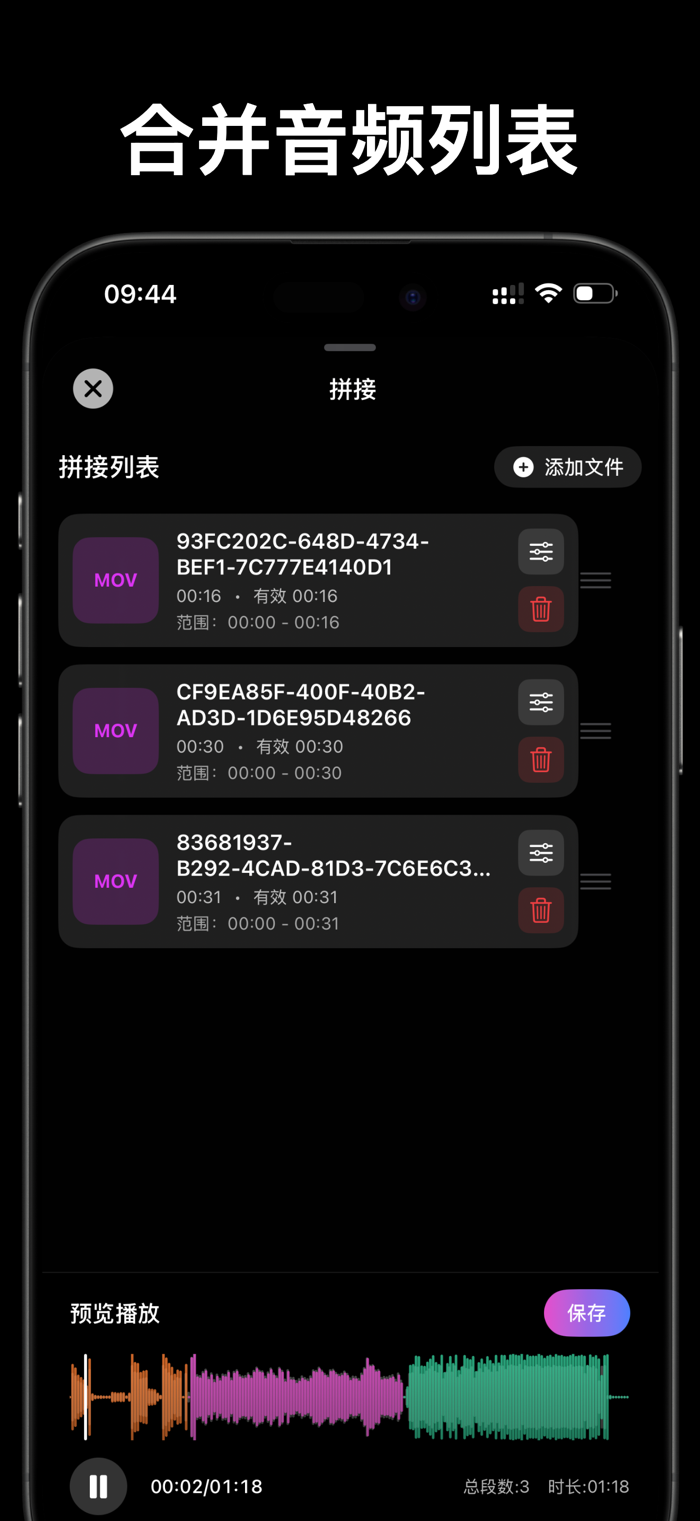
• Concatenate: Combine multiple audios into one
• Vocal separation: Separate vocals from accompaniment
• Denoise: Intelligent noise reduction
• Fade in and out: Smooth transition
Professional audio effects
• Volume: Adjustable from 0 - 300%
• Speed: Variable speed from 0.25x - 4.0x
• Reverb: 16 presets (KTV, Bathroom, Hall, Room, Church, etc.)
• 10-band equalizer: 10 bands adjustable, supports presets
Precise video cropping
• Audio visual timeline editing
• Real-time video preview
• Cropping control accurate to seconds
- Automatically generate video thumbnails
Professional sound quality control:
- Adaptive sound quality and high-bitrate high-quality settings, no cumbersome setting operations required
- Meet all needs from audio to professional music
Intelligent file management
- Built-in audio library for easy management
- Quick search function
- Supports renaming, sharing, deleting
- Displays file details and duration
Built-in audio player
- Playback control and fast forward/rewind
- Drag and drop for timeline positioning
- Real-time progress display
Privacy and security
- 100% offline conversion
- Data stored completely locally
- Does not collect any personal information
- Does not upload files to the server
Usage scenarios:
- Students: Convert online course videos to audio for review
- Music lovers: Extract MV, concert audio
- Language learners: Convert teaching videos to audio
- Podcast creators: Extract audio materials from videos
- Content creators: Secondary video creation
- Office workers: Convert meeting recordings
Why choose Audio Converter:
- Ultra-fast conversion, specially optimized audio and video engine, fast conversion speed and high quality
- Complete privacy, all processing is done on the local device
- Professional-level audio output, extremely simple operation, one-click conversion
- Does not collect any data, including audio and video files and personal information
- Real-time progress, conversion status is clear at a glance
- Simple and distraction-free, clean interface, focuses on functions, completely ad-free
- Modern interface, developed with native SwiftUI, optimized for iPhone and iPad. Supports portrait and landscape screens.
Audio Converter Pro Unlimited subscription:
Subscribing to Audio Converter Pro Unlimited allows you to use all premium features for free, including more format support, unlimited duration, more import and export methods, and automatically removes ads.
MP3 Converter Pro Unlimited is billed annually, and the fee is charged according to the selected plan. In addition, a one-time purchase option (non-subscription plan) will also be provided.
When the purchase is confirmed, the fee will be deducted from the iTunes account.
- The subscription will automatically renew unless you turn off auto-renew at least 24 hours before the end of the current period.
- Within 24 hours before the end of the current period, the account will be charged the renewal fee and the renewal cost will be shown.
- Users can manage subscriptions in the account settings after purchase, or turn off auto-renew.
- If a free trial period is provided, any unused part of the trial period will be cancelled after the user purchases the subscription.
- Annual subscription and lifetime purchase options are provided.
Feel free to contact us: amosiper@gmail.com


 +100宝石


 分享
分享










用户评价
立即分享产品体验
你的真实体验,为其他用户提供宝贵参考
💎 分享获得宝石
【分享体验 · 获得宝石 · 增加抽奖机会】
将你的产品体验分享给更多人,获得更多宝石奖励!
💎 宝石奖励
每当有用户点击你分享的体验链接并点赞"对我有用",你将获得:
🔗 如何分享
复制下方专属链接,分享到社交媒体、群聊或好友:
💡 小贴士
分享时可以添加你的个人推荐语,让更多人了解这款产品的优点!
示例分享文案:
"推荐一款我最近体验过的应用,界面设计很精美,功能也很实用。有兴趣的朋友可以看看我的详细体验评价~"
关注 Mergeek 公众号
领奖遇到问题?联系小门助手