



 +100宝石



产品功能
The little beauties in life often come quickly: a sunset glow, a meal, a meeting, or a sudden light by the roadside. Luminary allows you to take pictures and record the moment right away, and it can also collect the photos and a sentence in your album that you don't want to lose into a default private, low - burden, and long - term - carryable moment box.
It is not a tool that requires you to write long diaries every day, nor is it a photo organizer that replaces the system album. Luminary only serves a lighter scenario: taking pictures of the truly memorable moments when they occur, or quietly saving them for yourself when you see them again in the album.
You can use Luminary like this:
- When you see a little beauty, directly take a photo to record it.
- When you see a photo in the system album that you want to keep, directly share it to Luminary.
- Preview the photo, write a sentence, select tags and dates in the sharing panel, and then save.
- Use 1 - 9 photos to record a sunset glow, a meal, a trip, or a meeting.
- When there are no photos, save a thought with just a piece of text.
- Use tags, months, locations, and timelines to retrieve a certain period of life.
- Let the past little lights reappear through random memories and Today in the Past Years.
Core functions:
- Take - a - photo - at - will recording: When you see a moment worth keeping, directly take a photo and save it.
- Private photo - text moments: Each moment supports up to 9 photos at most.
- System sharing and supplementing: Share photos or text from the album or other apps and directly save them as official moments.
- Pure - text moments: You can seriously record a sentence you want to keep without taking a photo.
- Private timeline: You can see the moments you have selected as soon as you open it.
- Random memories and Today in the Past Years: Let the past records come back to your eyes actively.
- Tag and month filtering: Find moments like trips, friends, daily life, little pleasures, etc. faster.
- App lock: Use system authentication to protect private content.
- Local priority: Data is default saved on this iPhone.
- iCloud private synchronization: Optionally synchronize between devices through your iCloud.
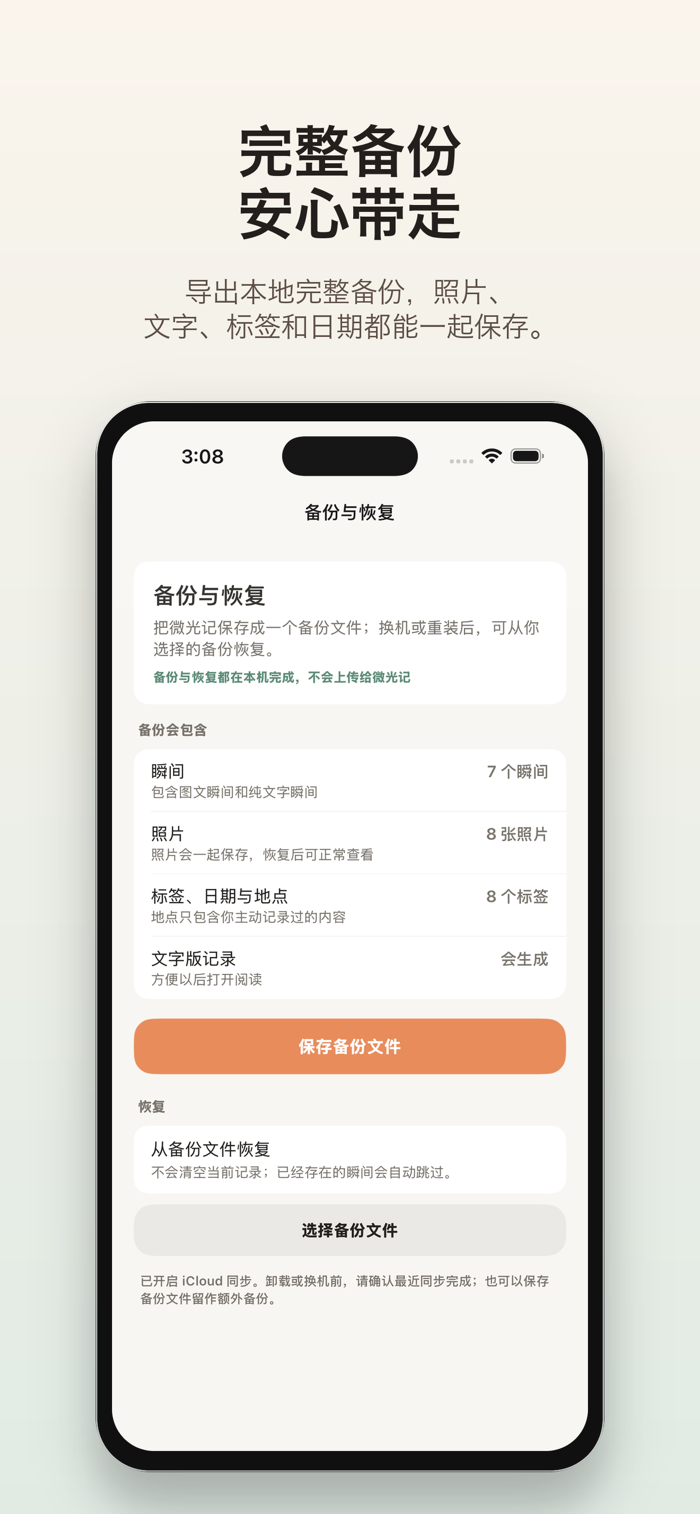
- Complete backup and restoration: Export a complete backup including photos, text, tags, and metadata.
Luminary has no public homepage, likes, comments, or follow - up relationships, and it doesn't require account login. It doesn't pursue complex templates,打卡压力 or social exposure, but gives a stable place to those very small, very private, but life moments that you don't want to lose.
If you often see little moments you want to keep but don't want to write long diaries; if your album is full but it's hard to find the photos you really like; if you hope your memories belong to yourself rather than becoming public posts, Luminary will be more suitable for you.
Carefully collect those tiny but memorable lights in life.
分享「」体验,参与「」抽奖!
分享 1~3 张你对这个产品最满意的截图或效果图
分享「」体验,参与「」抽奖!
用你的故事点亮社区✨!你的真实体验,将会永久展示在 官方主页 📌,为其他朋友提供宝贵参考 💡。立即分享吧!🚀
请为产品评分
请选择问题回答,为大家提供宝贵参考
选择要回答的问题
温馨提示
你尚未上传产品截图。
上传截图可立即获得宝石积分奖励!
如果你赶时间,也可稍后修改评论,补上截图领取宝石。
温馨提醒
你尚未添加产品截图
⚠️ 不添加截图将降低抽奖权重

感谢参加,你已成功参加!
为了确保你能及时收到审核结果和领奖码通知

扫描二维码关注 Mergeek 公众号
在后台回复 「获奖通知」
完成上述操作,即可保障奖励发放成功










用户评价
立即分享产品体验
你的真实体验,为其他用户提供宝贵参考
💎 分享获得宝石
【分享体验 · 获得宝石 · 增加抽奖机会】
将你的产品体验分享给更多人,获得更多宝石奖励!
💎 宝石奖励
每当有用户点击你分享的体验链接并点赞"对我有用",你将获得:
🔗 如何分享
复制下方专属链接,分享到社交媒体、群聊或好友:
💡 小贴士
分享时可以添加你的个人推荐语,让更多人了解这款产品的优点!
示例分享文案:
"推荐一款我最近体验过的应用,界面设计很精美,功能也很实用。有兴趣的朋友可以看看我的详细体验评价~"
关注 Mergeek 公众号
领奖遇到问题?联系小门助手