NaviBeat

NaviBeat

Universal music playback across multiple devices, no subscription ads or tracking

Creator
Nenad Jokic

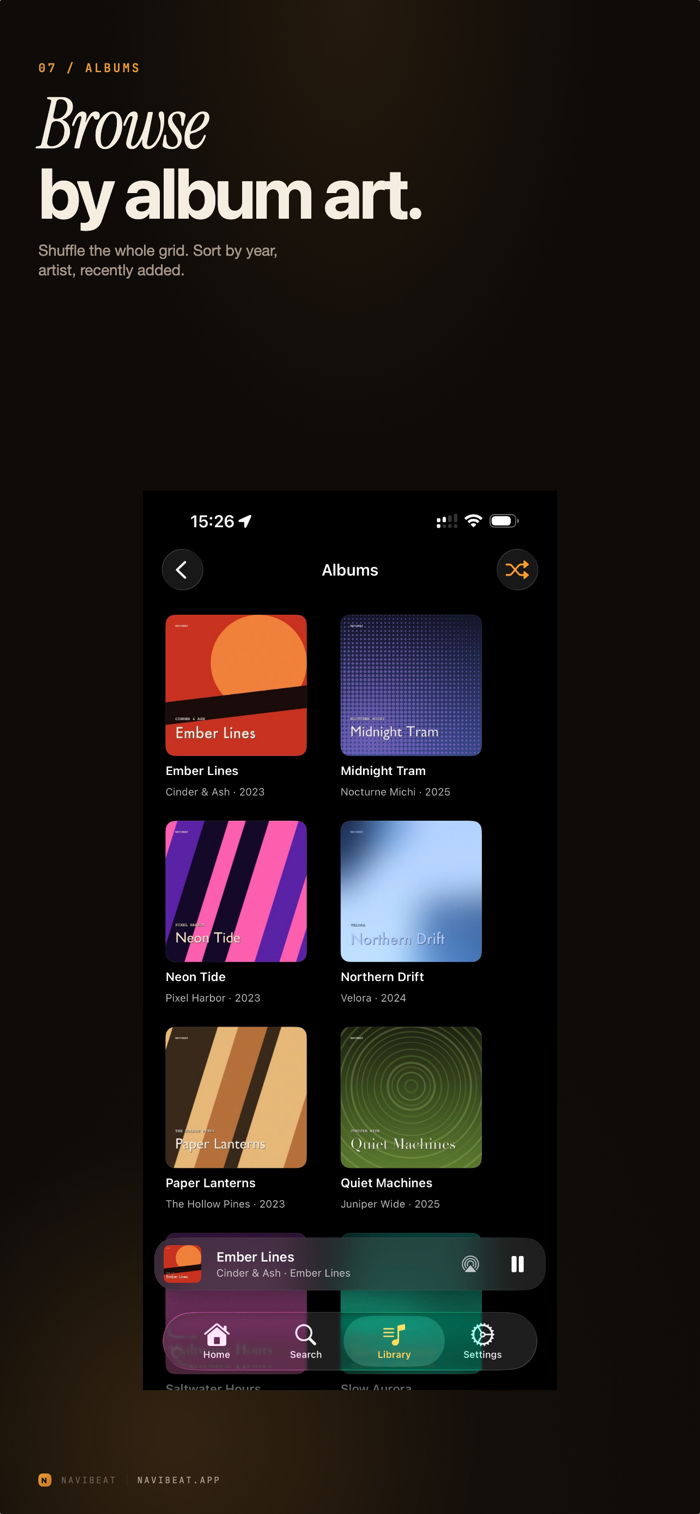
NaviBeat lets you bring your personal music library as a single, universal purchase to all Apple devices, including iPhone, iPad, Mac, Apple TV, and Apple Watch. One-time payment grants full ownership with no subscriptions, ads, or tracking, and without requiring NaviBeat cloud; your music is stored on your own server. It serves as a premium client for Navidrome, a free, open-source, self-hosted music streaming server that can run on devices such as NAS. Once connected, NaviBeat delivers smooth playback across Apple devices, offering full-library browsing, voice and text search on iPhone and iPad, and a native app with MiniPlayer mode on Mac.

COMMUNITY PERKSMergeek 社区专属福利
独家限免 NEW每天发现一份惊喜
PRODUCT SCREENS / 10

点击查看界面细节

NaviBeat 产品截图 1NaviBeat 产品截图 2NaviBeat 产品截图 3NaviBeat 产品截图 4NaviBeat 产品截图 5NaviBeat 产品截图 6NaviBeat 产品截图 7NaviBeat 产品截图 8NaviBeat 产品截图 9NaviBeat 产品截图 10

NaviBeat brings your own music library to every Apple device you own — iPhone, iPad, Mac, Apple TV, and Apple Watch — as a single Universal Purchase. Pay once. Own it.

No subscriptions. No ads. No tracking. No NaviBeat cloud. Your music stays on your own server, exactly where you put it. NaviBeat just plays it — beautifully.

ABOUT NAVIDROME

NaviBeat is a premium client for Navidrome, the free and open-source self-hosted music streaming server. You run Navidrome on a NAS, Raspberry Pi, VPS, or any machine you control. NaviBeat connects to it and streams your collection across every Apple device you own with a polished, native-feel experience.

ON iPHONE & iPAD
- Full library browsing: artists, albums, playlists, genres
- Voice search and text search with live results
- Now Playing with synced and plain lyrics
- Background audio, Control Center integration, AirPlay
- Offline listening for downloaded albums and playlists

ON MAC
- Native macOS app with MiniPlayer mode
- Keyboard shortcuts, multi-window browsing
- Full library browsing with large artwork

ON APPLE TV
- Cinema-scale artwork UI with smart discovery shelves
- Recently Played, Most Played, Rediscover, On This Day, Because You Listened To…
- Voice search via the Siri Remote
- Full-screen Now Playing with synced lyrics

ON APPLE WATCH
- Now Playing complications on every watch face
- Standalone queue control from the wrist
- Download albums and playlists straight to Watch storage

CORE FEATURES

- Gapless playback
- Scrobbles back to your Navidrome server
- Lossless streaming when your server and network allow
- Beautiful dark UI throughout
- Optional iCloud Keychain sync for credentials across your Apple devices

REQUIREMENTS

NaviBeat requires a running Navidrome server (v0.50 or later, free and open source) accessible from your Apple device. Self-host it on a home NAS, a Raspberry Pi, a VPS, or any machine you control. See navibeat.app for setup tips.

NaviBeat is a third-party client and is not affili…

版本

1.5.5

NEW IN THIS VERSION

Popular songs. A flame in front of the track number marks up to three popular songs on each album. Settings, Popular songs picks the source: your server (the default), Last.fm, ListenBrainz or Off.

The Now Playing widget works away from home and in Offline Mode, using your downloads. A radio station shows the song it announces, with that song's cover. On the small widget the play button sits in the bottom right corner.

Home: Now Playing on This Server shows what others on your server are playing. It is off; turn it on in Customise Home.

Listening Stats work without a Last.fm account and show Most played on your server. They open at once from a saved copy.

Shuffle Mix, Songs Shuffle, genre shuffle, CarPlay, Siri and the Shuffle Library shortcut never start on the song that is already playing. Siri's "play music" keeps out what you excluded from shuffle.

CarPlay: New picks is the first tile of Random Picks.

Crossfade: songs played in order from one album are not crossfaded. Shuffled playlists still crossfade.

Album names dim their version part, like "[2019 Super Deluxe Edition]", with the Dim version text switch.

Manage Playlists: with Recent Playlists shown, the full list has its own Playlists header.

Refresh Lyrics in the song menu asks your server again for the lyrics.

Airsonic Advanced servers connect.

FIXED

iPad on iPadOS 17: signing in no longer freezes on the Connecting screen. Downloads, Search and Home in Offline Mode stay quick with thousands of downloaded songs. A downloaded song whose clock ran on past its end moves to the next song. Mono MP3 albums play the next song from its first note. Get Info no longer shows Bit Depth 0 for MP3. And many smaller fixes.

查看完整更新记录 ↗

你的真实体验,为其他用户提供宝贵参考,获得宝石奖励

REWARD MARKET100 宝石可兑换什么?

还没有公开评论,欢迎分享你的体验。

提交反馈

每一个想法,都让 Mergeek 更好一点。