Live interaction with your iOS Simulator — from your iPhone. No Xcode on your laptop. No remote desktop squinting.
YOUR MAC STAYS HOME. YOU STAY MOBILE.
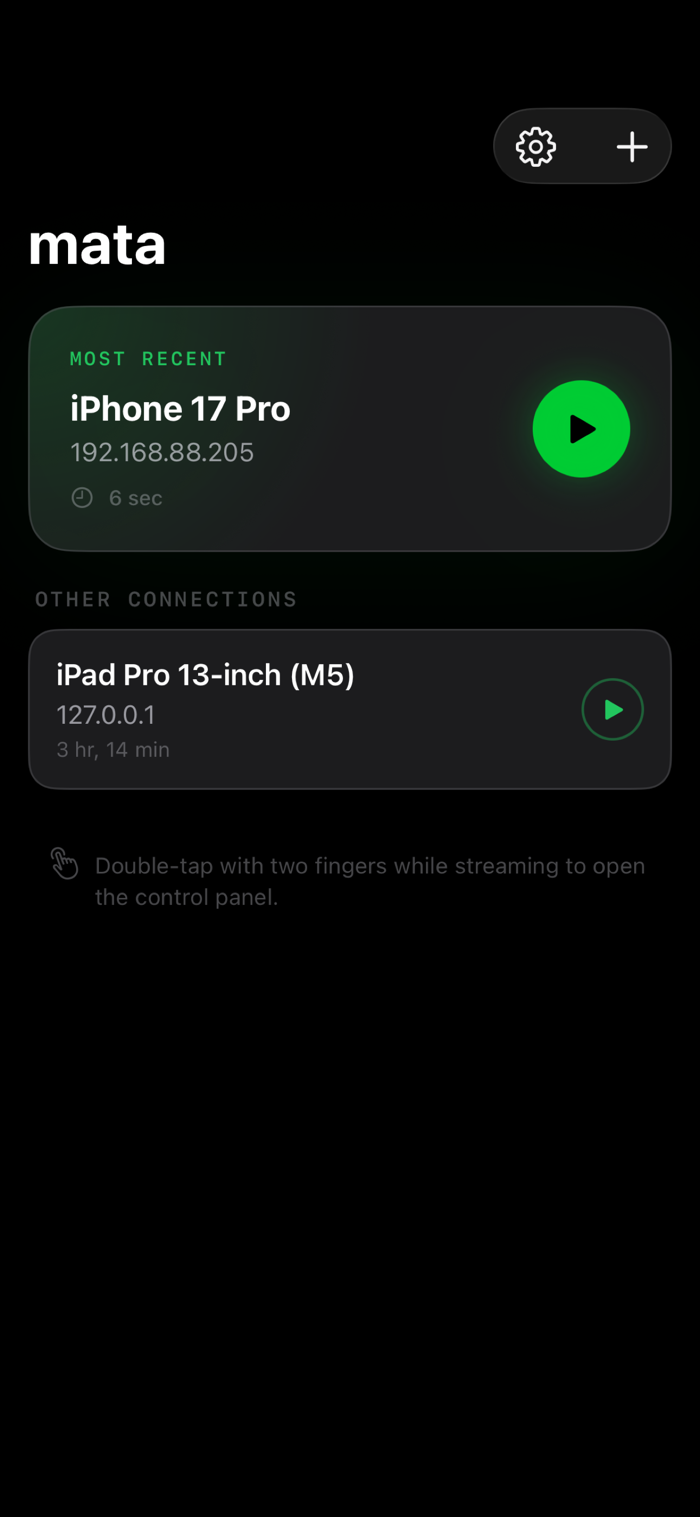
A Mac Mini on your desk runs Xcode, your coding agent, and the simulator. In your bag: just your phone. Mata is the window between them — a live, resolution-matched stream of your iOS Simulator with full touch control.
FULL INTERACTIVE CONTROL
Tap, scroll, swipe, and pinch — everything maps 1:1 to the simulator. You're not watching a recording. You're in it.
SIMULATOR SHORTCUTS WITHOUT XCODE
Trigger Face ID, simulate locations, rotate the device, send memory warnings, and test push notifications — all from the control panel. No Xcode menus required.
SWITCH BETWEEN SIMULATORS
Running iPhone and iPad builds on the same Mac? Switch between them instantly from your phone. Compare layouts across device sizes without walking back to your desk.
QUALITY YOU CONTROL
Adjust capture scale, frame rate, and bandwidth to match your network. Crisp over Wi-Fi, smooth over cellular.
WORKS WITH YOUR CODING AGENT
Pair Mata with Moshi or any terminal app. Your agent builds and runs on the Mac — you see the result live on your phone. Spot what's broken, tell your agent what to fix. Ship faster without ever opening Xcode on a second machine.
REQUIREMENTS
- A Mac running the Mata host app with an active iOS Simulator
- iPhone on the same network (or reach...


 +100宝石


 分享
分享
















用户评价
立即分享产品体验
你的真实体验,为其他用户提供宝贵参考
💎 分享获得宝石
【分享体验 · 获得宝石 · 增加抽奖机会】
将你的产品体验分享给更多人,获得更多宝石奖励!
💎 宝石奖励
每当有用户点击你分享的体验链接并点赞"对我有用",你将获得:
🔗 如何分享
复制下方专属链接,分享到社交媒体、群聊或好友:
💡 小贴士
分享时可以添加你的个人推荐语,让更多人了解这款产品的优点!
示例分享文案:
"推荐一款我最近体验过的应用,界面设计很精美,功能也很实用。有兴趣的朋友可以看看我的详细体验评价~"
关注 Mergeek 公众号
领奖遇到问题?联系小门助手