Inventory, locations, and stock under control—all data is stored entirely on your device when using an iPhone or iPad.
Manage store or warehouse inventory on iPhone and iPad. This is the iOS version of our Mac program; purchase once and use it on both platforms.
Products
Assign a product code, name, description, and barcode to each item, and categorize them into main categories and subcategories. Selling price, minimum stock level, units, and VAT rate are associated with the product, as are photos and custom attributes. The product list can be searched and exported as CSV.
Stock and Locations
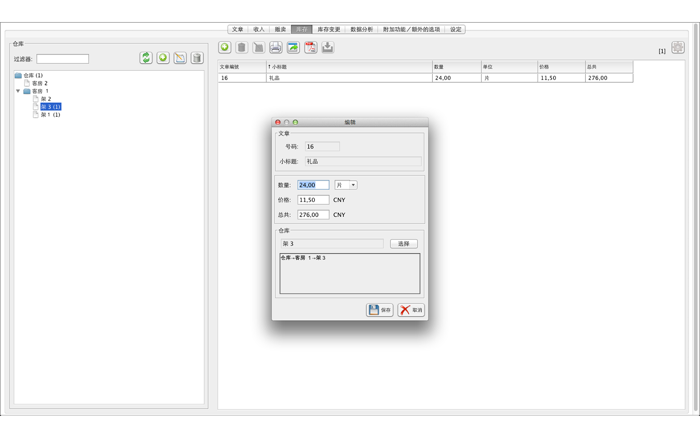
Locations form a tree structure of any depth: buildings, rooms, shelves. Each inventory record corresponds to one product at a specific location, with its own quantity and purchase price. Product quantities and inventory value update immediately with every change. Inventory records can be split, merged, or transferred to other locations.
Inbound and Outbound
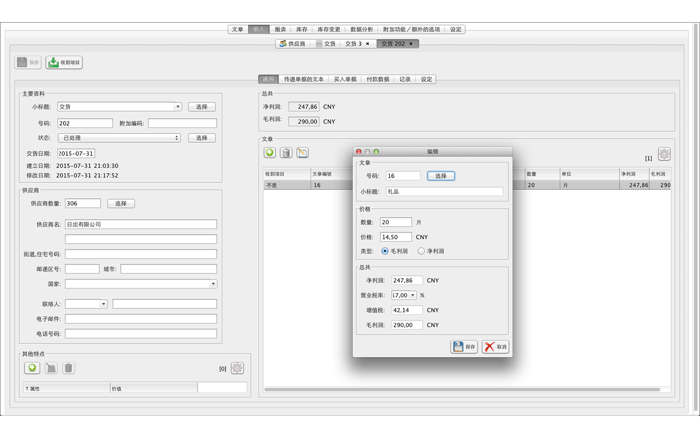
Enter supplier deliveries and customer orders in the same familiar interface. “Receive Goods” stocks a delivery batch into your chosen location. “Ship Goods” shows which locations will supply items before posting, automatically distributing across multiple inventory records if necessary. Every posting creates a new line in the stock ledger, so you can always see what happened and when.
Delivery Notes and Invoices
Every document can be output as a PDF, complete with your address, logo, and footer, and printed or shared via AirPrint. Columns, names, and margins are fully customizable. Quotations, order confirmations, and dunning letters can be included as attachments.
Suppliers and Customers
Every business partner can have their address, contact details, photo, and attributes recorded, and be organized by group and status. New documents automatically populate address and contact information.
Statistics and Analysis
Inventory value, products below minimum stock levels, distribution by category, unit, or status, and mon…