



 +100宝石




产品功能
ReplayCap is a menu bar instant-replay clipper that saves moments after they happen.
It continuously buffers the last 15 seconds to 5 minutes of your screen and audio. When something worth keeping happens, press a hotkey and ReplayCap saves it as an MP4. If you have used instant replay on a gaming PC, you will feel right at home.
FEATURES
• Instant replay and sessions: Save the last 15 to 300 seconds on demand, or record full sessions until you stop.
• Extended replay: Roll 5, 10, or 30-minute replay windows to disk for longer capture history.
• Automatic game capture: Start recording automatically when a game launches and stop when you quit.
• Dual-display and priority handling: Capture two monitors side by side or as separate files, or rank preferred screens for automatic fallback across wake and docking changes.
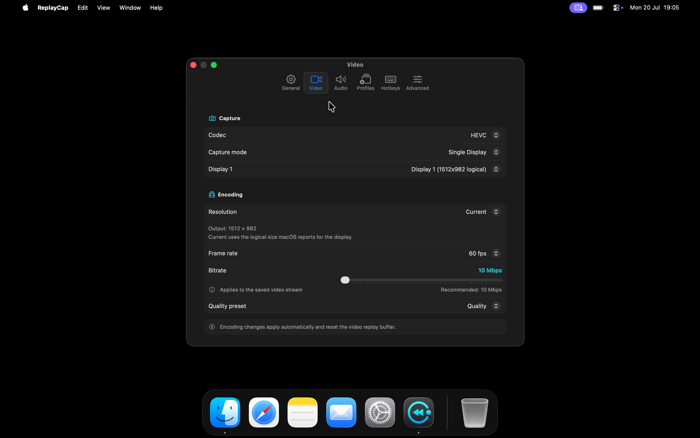
• Hardware-accelerated encoding and HDR: Record smooth HEVC or H.264 video up to 60 fps, with optional 10-bit HDR capture on Apple silicon and full Retina pixel resolution.
• Flexible audio: Record system audio, microphone input, or a single selected app, merged into one track or saved as separate tracks inside the MP4.
• Built-in clip library and editor: Preview, trim, crop (with 16:9, 1:1, 4:3, and 9:16 presets), resize to 1080p or 720p with a live file-size estimate, or export as GIF.
• Custom workflow: Configure global hotkeys, capture profiles, quality presets, and file-name templates.
STAYS OUT OF YOUR WAY
• ReplayCap lives in your menu bar and writes standard MP4 files straight to disk. A live badge shows recording state and buffered duration so you always know when it is ready.
• Set ReplayCap to launch at login and start buffering automatically, and it stays quietly in the background until you hit save.
PRIVATE BY DESIGN
• ReplayCap runs entirely offline on your Mac. Every recording saves directly to a local folder you choose as a standard MP4 file that belongs to you.
GREAT FOR
• Gamers: Save the boss fight, goal, or clutch win right after it happens.
• Bug hunting: Capture intermittent bugs the first time they happen.
• Streamers and creators: Pull highlights straight into short clips ready to share.
• Anyone who has ever said, "I wish I had been recording that."
Screen Recording permission is required.
分享「」体验,参与「」抽奖!
分享 1~3 张你对这个产品最满意的截图或效果图
分享「」体验,参与「」抽奖!
用你的故事点亮社区✨!你的真实体验,将会永久展示在 官方主页 📌,为其他朋友提供宝贵参考 💡。立即分享吧!🚀
请为产品评分
请选择问题回答,为大家提供宝贵参考
选择要回答的问题
温馨提示
你尚未上传产品截图。
上传截图可立即获得宝石积分奖励!
如果你赶时间,也可稍后修改评论,补上截图领取宝石。
温馨提醒
你尚未添加产品截图
⚠️ 不添加截图将降低抽奖权重

感谢参加,你已成功参加!
为了确保你能及时收到审核结果和领奖码通知

扫描二维码关注 Mergeek 公众号
在后台回复 「获奖通知」
完成上述操作,即可保障奖励发放成功






用户评价
立即分享产品体验
你的真实体验,为其他用户提供宝贵参考
💎 分享获得宝石
【分享体验 · 获得宝石 · 增加抽奖机会】
将你的产品体验分享给更多人,获得更多宝石奖励!
💎 宝石奖励
每当有用户点击你分享的体验链接并点赞"对我有用",你将获得:
🔗 如何分享
复制下方专属链接,分享到社交媒体、群聊或好友:
💡 小贴士
分享时可以添加你的个人推荐语,让更多人了解这款产品的优点!
示例分享文案:
"推荐一款我最近体验过的应用,界面设计很精美,功能也很实用。有兴趣的朋友可以看看我的详细体验评价~"
关注 Mergeek 公众号
领奖遇到问题?联系小门助手