[Apple's Official Top 10 Apps of 2016]
[Recommended on the App Store's Official Homepage 7 Times]
The Choice for [Autumn Photography], [Unleashing Creativity], [Becoming a Retouching Pro]
MaxCurve is a professional photo editing tool with the most comprehensive curve adjustment functions in history and other advanced retouching tools. It has now been added to the professional manual camera.
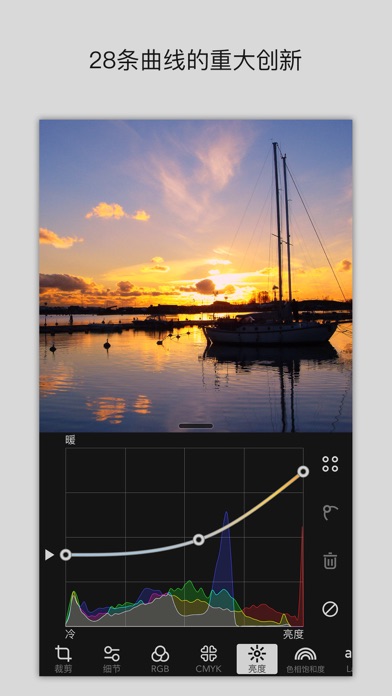
MaxCurve has created 28 curves, which is a major innovation. Most of these curves are not seen in other software, and even Photoshop does not have such precise adjustment capabilities. Moreover, tools such as professional cameras, RAW format processing, layers, channels, masks, presets, rendering modes, color overlay, cropping, vignetting, noise, and textures work to their full potential for you. MaxCurve can precisely adjust every detail of an image, process pictures without loss, and perfectly restore your photographic works. It can also be connected to Photoshop on the desktop via Wi-Fi and process pictures like a PS plugin. It is a daily essential tool for photographers, the ultimate weapon for color enthusiasts, and the perfect choice for detail freaks.
The Most Beautiful App,
"Probably the most powerful curve tool in history."
Minority,
"When it comes to the 'best' curve tools, no app can rival MaxCurve."
Feniao.com,
"The comprehensive curve adjustment functions and the ability to work with Photoshop can not only meet the need for quick photo adjustment but also provide more extensive and detailed adjustments for professionals with strict color requirements."
The professional imaging review website DPReview,
"The functions provided by MaxCurve can satisfy image editors who pursue perfection."
iPhone Photography School,
"MaxCurve has introduced a new way to edit photos, and even powerful desktop applications like Photoshop do not have comparable curve control capabilities."
RGB Tools
- RGB, Red, Green, and Blue curves.
CMYK Tools
- CMYK, Cyan, Magenta, Yellow, and Black curves.
Brightness Tools
- Contrast/Brightness curve;
- Exposure/Brightness curve, similar to Photoshop's Shadows/Highlights but with more flexible control;
- Gamma/Brightness curve;
- Color Temperature/Brightness curve, so that the sky and the ground are not of the same color temperature;
- Brightness/Hue curve, similar to Photoshop's Hue/Saturation;
- Black & White/Hue curve, the best black and white tool in history.
Hue Saturation Tools
- Hue curve, similar to Photoshop's Hue/Saturation;
- Hue/Saturation curve, a favorite among colorists;
- Hue/Brightness curve, similar to Photoshop's Color Balance;
- Saturation curve;
- Saturation/Hue curve, a favorite among colorists;
- Saturation/Brightness curve.
Lab Tools
- a curve in Lab mode;
- a/Lightness curve;
- Copy a to b curve;
- b curve in Lab mode;
- b/Lightness curve;
- Copy b to a curve, similar to阿宝色;
- Lightness curve in Lab mode, a favorite among masters.
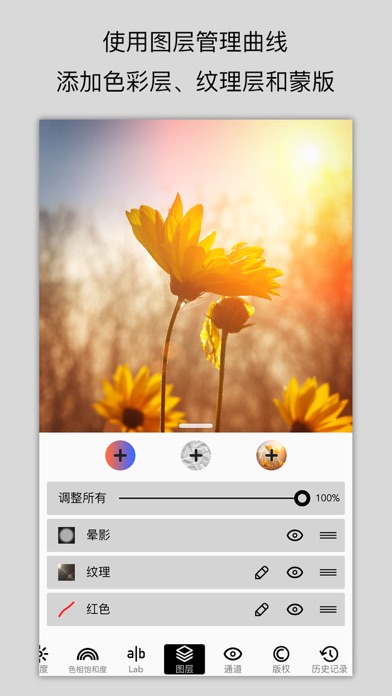
Layer Tools
- Use layers to manage curve effects, supporting up to 40 layers;
- Add color layers, texture layers, or self-rendering layers, and then set blending modes like in Photoshop;
- Use curves to adjust the intensity of blending;
- A mask can be added to each layer.
Channel Tools
- RGB, CMYK, HSL, and LAB channels.
- Precisely adjust colors by viewing and hiding channels.
Other Tools
- Create a gorgeous HDR effect with just one photo;
- Cropping, rotating, mirroring, and scaling tools;
- Sharpening, blurring, noise, structure, and vignetting tools;
- A full-featured history record with professional snapshots;
- Mosaic and border tools.
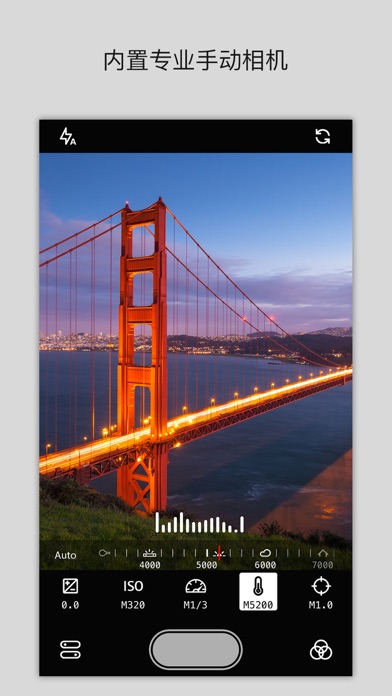
Professional Manual Camera
- Manually adjust exposure, ISO, shutter speed, color temperature, and focus;
- Use presets as filters;
- Use this as an independent camera app.
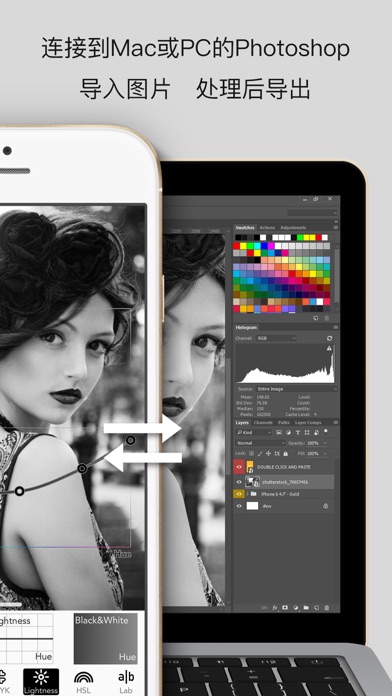
Work with Photoshop
- Connect MaxCurve to Photoshop on a Mac or PC via Wi-Fi, import pictures from Photoshop, and export processed pictures, something never seen before;
- Export presets in 3D LUT format and use them

 +100宝石


 分享
分享











用户评价
立即分享产品体验
你的真实体验,为其他用户提供宝贵参考
💎 分享获得宝石
【分享体验 · 获得宝石 · 增加抽奖机会】
将你的产品体验分享给更多人,获得更多宝石奖励!
💎 宝石奖励
每当有用户点击你分享的体验链接并点赞"对我有用",你将获得:
🔗 如何分享
复制下方专属链接,分享到社交媒体、群聊或好友:
💡 小贴士
分享时可以添加你的个人推荐语,让更多人了解这款产品的优点!
示例分享文案:
"推荐一款我最近体验过的应用,界面设计很精美,功能也很实用。有兴趣的朋友可以看看我的详细体验评价~"
领取结果