产品功能

应用市场介绍

This application analyzes the popularity of Chinese characters.


Japanese people learn 1000 Chinese characters in elementary school. In the lower grades, we learn Chinese characters with simple structures and frequent usage. As school grades improve, their stroke counts increase and their usage frequencies decrease. Understanding this stage is also helpful for those learning Japanese.


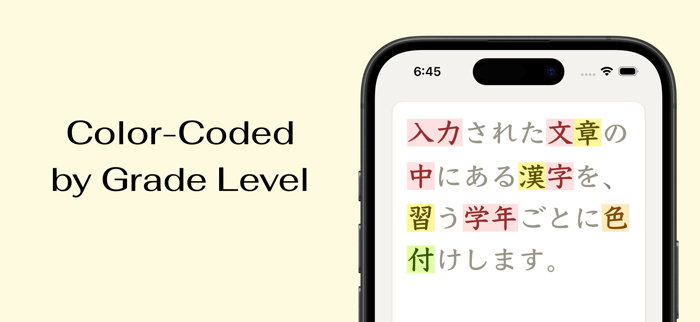
This application classifies Chinese characters according to the school grades we learn and uses each color. It is mainly targeted at Japanese education officials and parents, but I think it is also useful for those learning Japanese. When you read a Japanese sentence and find some Chinese characters you don't know, you can check the popular Chinese characters that you should learn first.


Specifications


Input a sentence and press the judgment button, then each Chinese character will be colored. Each color is determined according to the grade we learn. It shows the relationship between the color and the grade below the input area. It also shows the number of Chinese characters for each grade.


Further Specifications


After purchasing in-app purchase items, certain functions will be enabled.


Change the lowest grade of the color range


If the target of the sentence is learners at a certain level of advancement, there is no need to color simple Chinese characters. In this case, you can change the lowest grade of the color range.


Change the color scheme


There are a total of five modes: light, heavy, etc.


Emphasize Chinese characters at the lowest grade of the range


I think this is a bit confusing, but, for example, when coloring above the fourth grade, you can emphasize the Chinese characters of the fourth grade. The assumed usage is to determine one by one whether the Chinese characters of that grade will be used as Chinese characters or changed to hiragana. It is suitable for those who know the proficiency level of children, such as homeroom teachers.


Change the text size


You can change the size of this letter. Smaller letters are useful for checking a large number of almost completed sentences. If the characters are very small, you can check whether the color is attached. In addition to the basic size, compared with hiragana, you can enlarge the colored characters, so even if the hiragana is very small, you can easily view the colored letters.


Use the clipboard


You can transfer text using other applications. You can create a sentence using other applications, check it using this application, and then return it to the original application. Since the clipboard itself is a function of the operating system, you can use it without purchasing in-app purchase items. After purchasing, you can operate it easily using the button.

收起

用户评价

立即分享产品体验

你的真实体验,为其他用户提供宝贵参考

宝石
评论可得 100 宝石
宝石随心兑换应用高级会员,每周更新 前往查看 >>
活动动态 0 人参加
查看更多评论