产品功能

应用市场介绍

DiskPress brings the power of two storage techniques together on your Mac. Native file compression and APFS file deduplication help you make better use of the disk you already have.

Lossless file compression stores supported files using fewer bytes while preserving their full original contents. macOS reads the compressed data automatically, so your files open in the apps you already use.

File deduplication lets identical files share physical storage. Eligible duplicates can share compressed data too, adding further savings after compression. Each copy keeps its own name and location, and editing one does not change the others.

Your files stay optimized after you quit DiskPress, because macOS handles their storage directly.

- Start with a drop. Drag files or folders into DiskPress or onto its Dock icon for one-time optimization. Review the selected path, file count and existing savings before starting. Open separate progress windows for different destinations and cancel a job when needed. Completed optimizations are kept.

- Make regular optimization part of your routine. Save specific locations and use Optimize Now whenever you choose, or enable automatic monitoring at your preferred interval. Recent File Protection leaves newly changed files for a later cycle. With monitoring enabled, keep working from the menu bar while the main window is closed.

- Understand your results. Overview shows disk capacity, current savings and the split between compression and estimated deduplication savings. Compare your saved locations and track results over the last 24 hours, 7 days and 30 days. Activity explains individual outcomes, including why a file was skipped. Use Rescan to refresh your measurements.

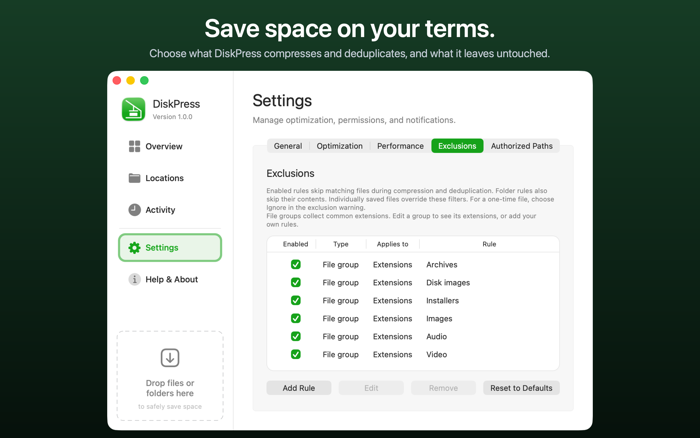
- Choose what gets optimized. Set compression file-size limits, minimum savings and whether to include hidden files. Fine-tune exclusions by file type, wildcard or regular expression. Common compressed media and archive formats are excluded by default.

- Set a pace that fits your Mac. Choose Low CPU, Balanced, Fast or Fastest. Configure separate battery and power adapter profiles, or pause automatic monitoring on battery power.

- Put it to work from Terminal. The built-in CLI gives scripts and AI agents access to the same optimization engine. Scan targets, optimize files and read locations, settings, Activity and savings reports. Built-in help, structured JSON output and clear exit codes support automation. Run without a window or display live progress.

- Keep access in your hands. Authorize the files and folders DiskPress may read and write. Review, add or remove remembered permissions in Authorized Paths. Terminal commands require an existing authorization before they can process a target.

DiskPress verifies file contents and includes recovery checks for interrupted work. Protected system locations and other unsupported files are skipped.

DiskPress does not compress apps or executable files and leaves them unchanged. To compress, archive or restore apps, use App Archiver, also available on the Mac App Store.

All optimization happens locally and works offline. The app has no account, file uploads, analytics, telemetry or Internet access.

Start with mostly stable local folders, such as text documents, completed data exports and files from finished projects. Savings vary with file contents, existing compression and filesystem support.

Requires macOS 10.15 or later and compatible local storage, including supported external drives. Deduplication requires matching files on the same compatible APFS volume.

收起

用户评价

立即分享产品体验

你的真实体验,为其他用户提供宝贵参考

宝石
评论可得 100 宝石
宝石随心兑换应用高级会员,每周更新 前往查看 >>
活动动态 0 人参加
查看更多评论