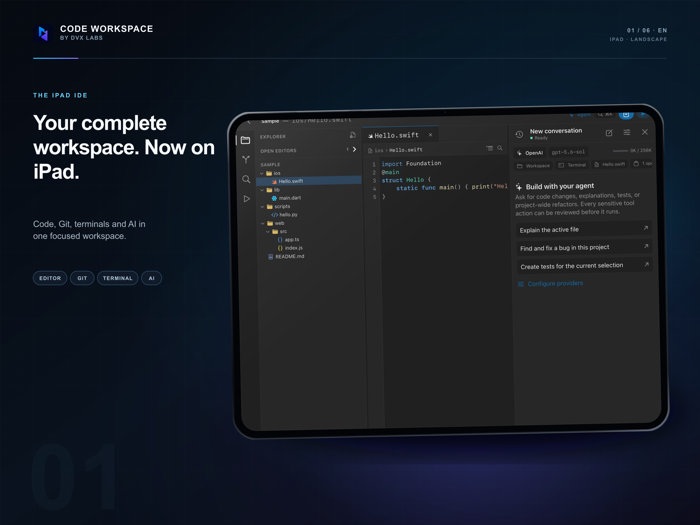
Code Workspace puts an AI coding agent at the center of your development workflow. Explore projects, create and edit code, manage Git, and connect to remote development tools from one focused workspace.
AN AI AGENT INSIDE YOUR PROJECT
Work with an agent that can understand your project structure and use relevant file context to help you move from an idea to concrete code changes.
Ask the agent to inspect, explain, create, and edit project files. Follow its progress and tool activity from a dedicated workspace without repeatedly copying code between separate apps.
You remain in control. Review sensitive actions before they run, keep a complete conversation history for each project, and choose the compatible AI provider you want to use.
Provider credentials are stored securely in Keychain.
BUILT FOR REAL PROJECTS
Create a new project, open an existing folder, or clone a repository directly in the app. Browse files, edit with syntax highlighting, search across your workspace, and keep multiple files open in tabs.
Your working directory remains on device. Git remotes and optional iCloud recovery snapshots give you control over how and where your work is backed up.
GIT, WITHOUT LEAVING YOUR CODE
• Review changed files and diffs.
• Stage individual files or add every change at once.
• Commit, create and switch branches, and manage remotes.
• Connect GitHub, GitLab, or your own Git server.
• Merge, rebase, cherry-pick, and resolve conflicts visually.
SSH, SFTP, AND A PERSISTENT TERMINAL
Use interactive terminal sessions for shells, REPLs, Vim, and long-running processes. Create multiple SSH profiles, authenticate with passwords or Ed25519/RSA keys, and access remote files through SFTP.
PROFESSIONAL LANGUAGE TOOLING
Connect language servers for project completion, diagnostics, definitions, references, and rename operations. Use DAP-compatible debugging through your configured development host.
Work with common Swift, JavaScript, TypeScript, Python, Dart, Go, Rust, HTML, and Markdown project structures.
ADAPTIVE WORKSPACE
Code Workspace supports touch, trackpad, and hardware keyboard workflows. Its adaptive multi-panel interface keeps your coding agent, explorer, editor, terminal, and source control within reach.
LOCAL FIRST, CONNECTED WHEN YOU CHOOSE
Code Workspace does not require a proprietary VPS for your projects. Files remain on device unless you choose to use a Git remote, SSH server, AI provider, or iCloud backup.
Build with your agent, your tools, your infrastructure, and your code.
By DVX Labs


 +100宝石

 分享
分享









用户评价
立即分享产品体验
你的真实体验,为其他用户提供宝贵参考
💎 分享获得宝石
【分享体验 · 获得宝石 · 增加抽奖机会】
将你的产品体验分享给更多人,获得更多宝石奖励!
💎 宝石奖励
每当有用户点击你分享的体验链接并点赞"对我有用",你将获得:
🔗 如何分享
复制下方专属链接,分享到社交媒体、群聊或好友:
💡 小贴士
分享时可以添加你的个人推荐语,让更多人了解这款产品的优点!
示例分享文案:
"推荐一款我最近体验过的应用,界面设计很精美,功能也很实用。有兴趣的朋友可以看看我的详细体验评价~"
关注 Mergeek 公众号
领奖遇到问题?联系小门助手