



Vizref
图形与设计
- 创作者
- Studio Pixanoh Inc
- 平台
- iOS
VizRef for iPad是首款由艺术家为艺术家打造的心情板创建应用,专为动画师和视觉艺术家设计。它利用iPad的iOS多任务处理功能,成为Procreate、Adobe Fresco、Clip Studio Paint等绘图/动画应用的完美伴侣。支持从网页、云存储、照片和屏幕截图等多种来源批量导入图像和GIF,并轻松拖拽至画板。该应用能帮助用户清理难以找到的隐藏图层,随时随地组织灵感,打造视觉参考板。

图形与设计
VizRef for iPad是首款由艺术家为艺术家打造的心情板创建应用,专为动画师和视觉艺术家设计。它利用iPad的iOS多任务处理功能,成为Procreate、Adobe Fresco、Clip Studio Paint等绘图/动画应用的完美伴侣。支持从网页、云存储、照片和屏幕截图等多种来源批量导入图像和GIF,并轻松拖拽至画板。该应用能帮助用户清理难以找到的隐藏图层,随时随地组织灵感,打造视觉参考板。
点击查看界面细节
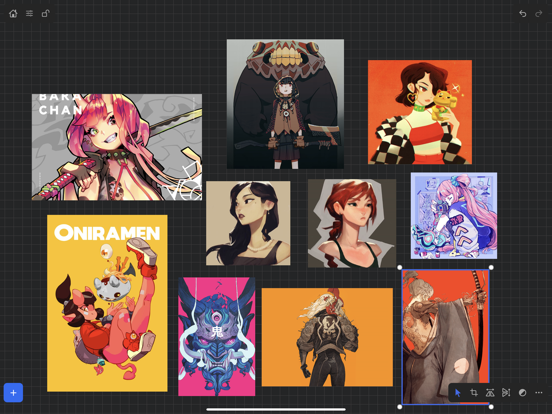
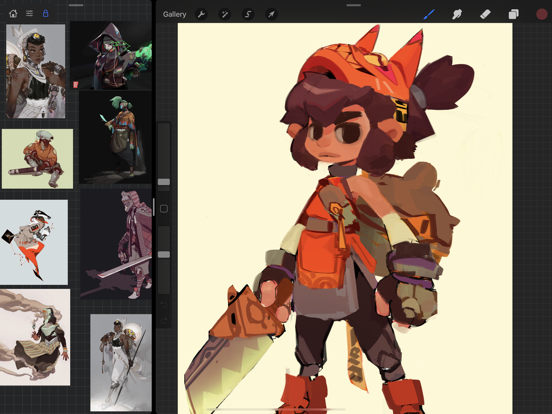
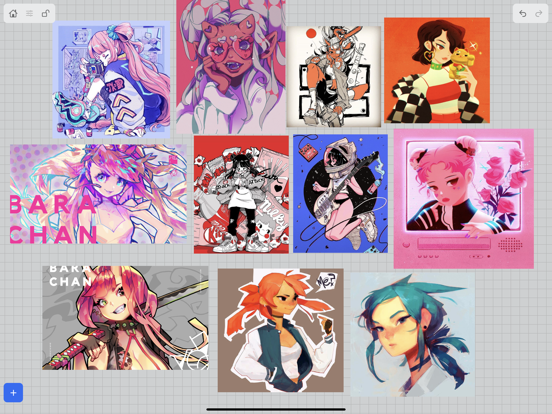
VizRef enables creatives to finally take their inspiration anywhere. It becomes the perfect companion app for Procreate® or paired with your favorite drawing/animation application with Split View on iPad. Clear up your hard to find hidden layers in your drawing app and easily organize your inspiration on the go. Make visual reference boards with any images or gifs from web browsers, cloud storage, photos, screen captures and more. The first mood board creation app made by artists for artists, that brings comprehensive referencing tools to animators and visual artists/en. We are dedicated to bringing creatives what they need most in being inspired everywhere they go.
HIGHLIGHTS
-Perfect companion app paired with Procreate® Adobe Fresco ® Clip Studio Paint® Infinite Painter® etc. with Split View on iPad
-Supports many image types including GIF
-Drag and drop from web
-Batch Import from Photos app
-Batch Export images from boards to cloud storage using Files app
- *Multi-Select and auto pack images for a quicker workflow *
-Import High-Resolution images with HD toggle
_*Focus on whats importing with Focus mode. ( rotate imageboard )
-Batch Import from iCloud, Dropbox, Google Drive with split-screen
-Quick and responsive visual reference board experience
-Easy to use/ minimal UI
-Light mode and Dark mode
-Set thumbnails for reference boards to visually organize your inspiration
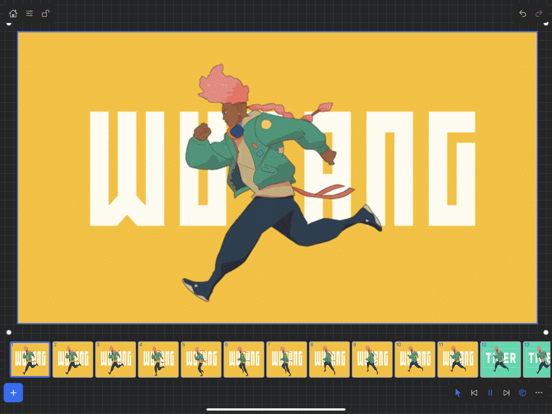
ANIMATED GIF SUPPORT
-Reference your favorite animated gifs
-Pause animation and play frame by frame to better understand referenced animations
-Advanced animation timeline gives you an interactive visual breakdown of all frames
EASY TO USE REFERENCE TOOLS
-Crop images to optimize screen space and view more references
-Greyscale toggle for images for value reference
-Flip horizontally and vertically
-Rotate Images
-Copy-paste images into other apps
Artwork and animation credits
@_Artazi
@_baomii
@_Deadslug_
@amnesiapancake
@barachan
@belgeist
@criisalys
@ergo.josh
@evan_monteiro
@gloo…
还没有公开评论,欢迎分享你的体验。
Vizref
让使用你作品的人,认识背后的你。编辑确认身份后,将为你授予入驻开发者标识。
编辑将人工核实你的资料,如需补充信息会通过所填邮箱联系你。身份确认后,由编辑为你授予入驻标识。
评论赢 100 宝石
用过 Vizref?说说你喜欢哪里。
评论审核通过后即可领取宝石。
正在加载兑换好物…
抢先领 3,000 宝石
和同好一起发现好产品。
首次注册,收下这份见面礼。
正在加载兑换好物…
