



Timery for Toggl
效率
- 创作者
- Joseph Hribar
- 平台
- iOS
Timery可提升Toggl时间跟踪体验,支持Mac、iPhone、iPad和Apple Watch。能一键启动常用定时器,轻松编辑时间记录,查看时间报告。具备保存定时器、时间记录建议、报告、管理项目等功能,还有键盘快捷键、菜单栏项目、快捷指令支持及可定制小组件。有限基础免费使用,通过订阅解锁全部功能,其配置可通过iCloud同步到多设备,曾被多家媒体推荐。

效率
Timery可提升Toggl时间跟踪体验,支持Mac、iPhone、iPad和Apple Watch。能一键启动常用定时器,轻松编辑时间记录,查看时间报告。具备保存定时器、时间记录建议、报告、管理项目等功能,还有键盘快捷键、菜单栏项目、快捷指令支持及可定制小组件。有限基础免费使用,通过订阅解锁全部功能,其配置可通过iCloud同步到多设备,曾被多家媒体推荐。
点击查看界面细节
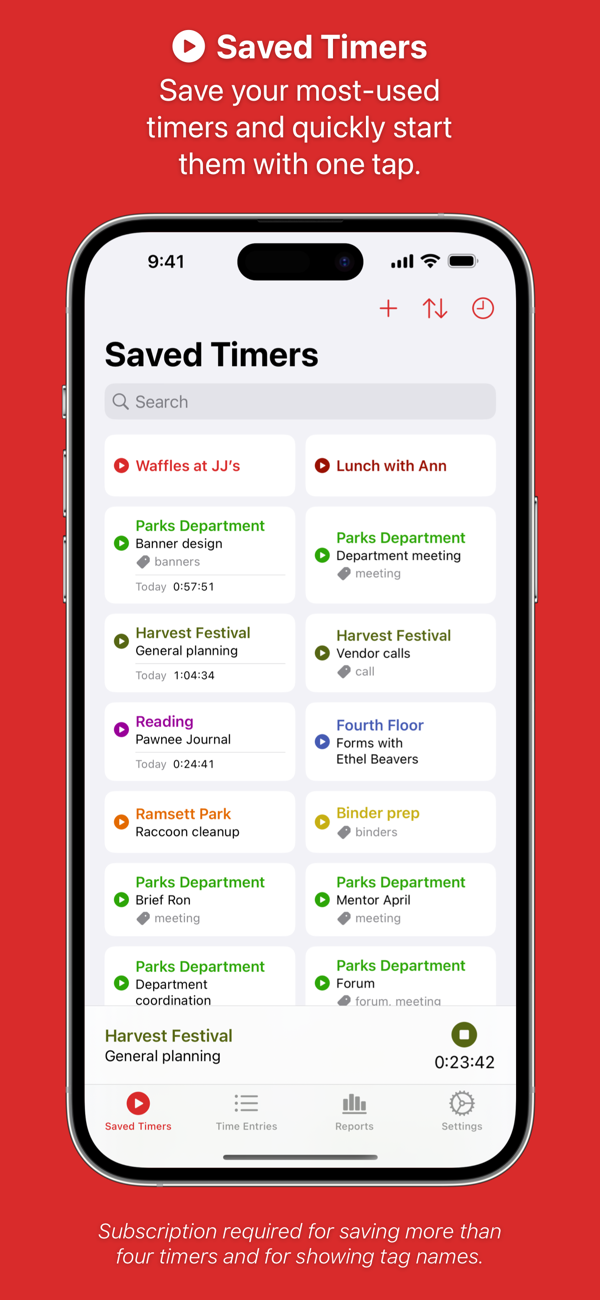
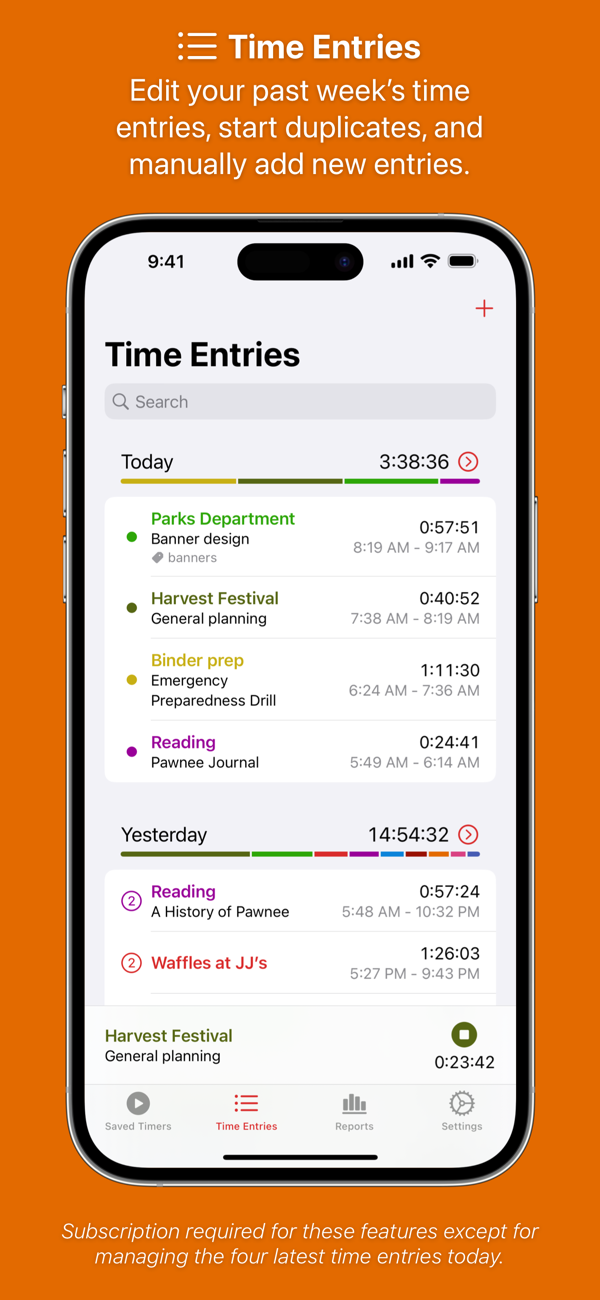


Enhance your Toggl time-tracking experience with Timery! Start your most-used timers with one tap. Edit your time entries easily. See reports of your time tracked. With its apps, widgets, and Shortcuts actions, Timery brings you easy time tracking with Toggl.
Timery works on iPhone, iPad, Mac, and Apple Watch with your free or paid Toggl Track account. It is made independently of Toggl.
Timery’s features:
Saved Timers
Save your frequently used timers and quickly start them.
Time Entries
Edit recent time entries, start duplicates, and add new ones.
Time Entry Suggestions
Select from suggested saved timers & recent timers when starting or editing time entries.
Split Time Entries
Split one entry into two or three at specified times or durations.
Reports
See your time tracked today, this week, and beyond with filtering & grouping options. Export it too.
Manage Projects & More
Edit your Toggl projects & tags and add new ones.
Interactive Widgets
Start & stop time entries, check time tracked, show report details, and more.
Live Activities
Show your current time entry on the Lock Screen and in the Dynamic Island.
Shortcuts Support
Start & stop time entries, check your current time entry, update time entries, check time tracked, and more.
Keyboard Shortcuts
Start & stop time entries, edit the current time entry, navigate the app, and more.
And more is planned.
A few more notes:
• Timery is a Toggl client and requires a Toggl Track account
• Timery requires an internet connection to perform tasks
• Saved timers & saved reports sync with iCloud to all your devices signed in with the same Apple ID
Timery is free to use on a limited basis: save up to four timers, manage the four latest time entries today (the rest are read-only), and edit the current time entry. With a monthly or yearly subscription (which includes a two-week free trial), join the Timery Club and unlock all the app’s functionality. You’ll also be helping support the app & future development, and…
New in Timery: An updated design for iOS & macOS 26, many small improvements & fixes, and more Toggl API optimizations.
— Updated Design —
Timery’s design is updated for iOS & macOS 26. Everything is updated yet familiar.
The main app icon and all alternate icons are updated too. To simplify things a bit, some alternate icons are gone (sorry if yours is), but there are still 122 icons to choose from on iOS and 83 on macOS.
For previous versions of iOS & macOS, there are new alternate icons of the classic app icon and a few others.
— General —
There are many improvements and fixes to loading & caching time entries amongst the apps, widgets, Shortcuts actions, and iCloud.
Summary Report widgets should better load & cache time entries to share with the main app and other widgets to reduce profile API requests.
When the Settings > Tag Names option to show names in the app and widgets is on, tag names use a slightly larger font size. There’s also a new option to make tag names use a more prominent text color for increased legibility.
When starting a current time entry in the edit view, there’s a new “Stop & Add” button to set the stop time and log the time entry in a single action.
When editing the current time entry, there’s a new option to clear the stop time in case it was accidentally set during editing.
New clients can be added when adding or editing a project.
Settings > Report Exports has new options to specify if CSV exports include total seconds and project colors. And the “Export Saved Report” action in Shortcuts has new options to use the app settings or override them.
— Apple Watch —
The current time entry should better sync between the iPhone and watch apps when the watch is connected.
Complications should more reliably update when returning to the watch face from the app.
The time-entry edit view by default hides the rows to edit the project, description, and tags to allow quicker access to copying timer details and adjusting times. There’s a button to show the rows, and there’s an option in Settings > Edit View to always show them.
Settings > Edit View also has a new option to automatically show timers lists when opening the edit view to start or add a time entry to more quickly copy time-entry details.
Settings > Current Time Entry Complications has new options to open the app to the edit view and open to the edit view when a current time entry isn’t running. And the option to open to timers lists when a current time entry isn’t running should be more reliable.
— Mac —
There’s a new menu in Settings > Menu Bar App to select which projects have their recent timers appear in the recent timers menu.
Start Saved Timer Control widget symbols can be updated on macOS 26 when editing a saved timer and in settings.
— Widgets —
New widgets without buttons & sections (like Current Time Entry and single-graph Time Tracked widgets) have an option to show a border to look more like widgets with buttons & sections.
— Shortcuts —
Fixed the “Find Time Entries” action sometimes not including the current time entry when it should.
Fixed the “Find Time Entries” action not correctly passing the current time entry to an “Update Time Entry” action configured to use found time entries.
—————
Thank you for using Timery and being part of the Timery Club. I couldn’t keep working on Timery without you and your support. Thank you.
Happy time tracking!
– Joe
还没有公开评论,欢迎分享你的体验。
Timery for Toggl
让使用你作品的人,认识背后的你。编辑确认身份后,将为你授予入驻开发者标识。
编辑将人工核实你的资料,如需补充信息会通过所填邮箱联系你。身份确认后,由编辑为你授予入驻标识。
