



 +100宝石





产品功能
PLEASE READ BEFORE BUYING
PLUR is not a synthesizer and it is not a sound source. It produces no audio of its own. It is a MIDI controller, built exclusively for the Elektron Digitakt II.
It does NOT work with the original Digitakt (the first model), with any other hardware, or with software instruments. Without a Digitakt II connected to your iPad over MIDI, there is nothing to hear.
If you own a Digitakt II, read on.
WHERE THE IDEAS COME FROM
Press BASS and a bassline lands, in your key, through your own samples, on your own kit. Press it again and you get another one. Twenty ideas take twenty seconds, and the ones that miss cost you nothing.
Four buttons, four kinds of part: a bassline that locks to the beat, a rhythm part with real groove in the placement, a melody line over the top, and a wide-net roll for when you just want to be surprised. Hold the rhythm button instead of tapping it and the hits come out tuned, a few semitones apart around your key. Everything stays inside your key and scale, so nothing lands out of tune.
Keep the one that grabbed you and carry on.
IT KEEPS MOVING WHILE YOU PLAY
MUTATE nudges a step or two and leaves the rest — the groove survives, the pattern moves. Turn on EVOLVE and it does that for you, in time, as gently or as hard as you set it: let it run while you play and the pattern drifts somewhere new without falling apart. Every generate and mutation is one tap of undo away.
THE MORPH PAD
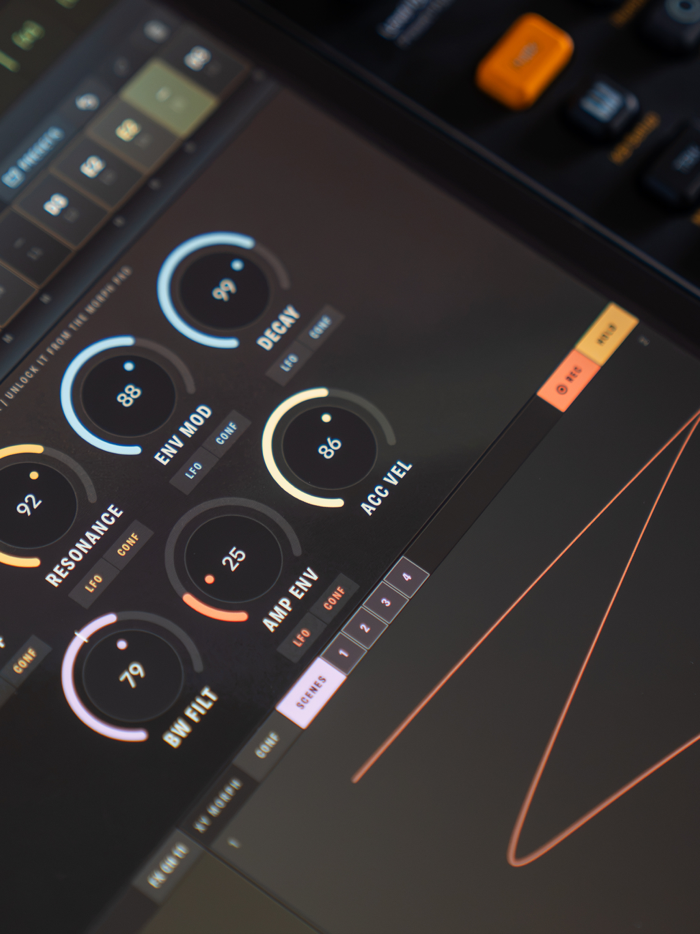
One finger, two axes, the whole filter voice moving at once — cutoff, resonance, env mod, decay and note length, live, with nothing to set up first. Switch the pad to SCENES and its four corners become four complete snapshots of the sound: drag between them and all four blend under your thumb. Lock any encoder out of the pad and it holds still while everything else morphs around it.
LOOP turns the pad into a motion recorder. Draw, jab at positions, lift and hold — it captures the actual movement of your hand and plays it back tempo-locked to the Digitakt, at the exact speed you performed it. Switch QUANT on and your moves land on the beat.
WHAT THE REST OF THE APP IS FOR
Yes, PLUR puts cutoff, resonance, env mod and decay on screen, and yes, those already have encoders on the box. They are not there as a remote control. They are the surface the pad moves, the values a scene stores and the targets each LFO drives — none of that layer exists without them.
Your samples, your machines, your kit, your mix stay exactly where they are — PLUR plays them. And when you want the box to play on its own, SEQ OFF switches PLUR's sequencer off completely. The Digitakt plays its pattern; the encoders, the morph pad and the FX throws stay live in your hands.
FX THROW
Two big pads for dub delay and reverb throws — momentary or latched, with tails in time.
UNDER IT ALL
PLUR drives two Digitakt tracks at once. Seven large encoders — cutoff, resonance, env mod, decay, filter width, amp envelope and accent velocity — five of them with their own LFO. A full 16-step sequencer with per-step CC offsets, slide, accent, gate length and probability, and forward / reverse / ping-pong / random playback direction. Four pattern banks chained in any order, with DRIFT letting banks of different lengths shuffle against each other instead of restarting together.
WHAT YOU NEED
• An Elektron Digitakt II. Not the original Digitakt — the CCs and the sound engine are different, and PLUR will not control it
• A USB-C cable from the iPad to the Digitakt
• An iPad. PLUR is iPad-only
A short one-time setup on the Digitakt is required before anything responds. The app opens that guide on first launch and keeps it one tap away.
Elektron and Digitakt are trademarks of Elektron Music Machines MAV AB. PLUR is an independent app and is not affiliated with, endorsed or sponsored by Elektron.
分享「」体验,参与「」抽奖!
分享 1~3 张你对这个产品最满意的截图或效果图
分享「」体验,参与「」抽奖!
用你的故事点亮社区✨!你的真实体验,将会永久展示在 官方主页 📌,为其他朋友提供宝贵参考 💡。立即分享吧!🚀
请为产品评分
请选择问题回答,为大家提供宝贵参考
选择要回答的问题
温馨提示
你尚未上传产品截图。
上传截图可立即获得宝石积分奖励!
如果你赶时间,也可稍后修改评论,补上截图领取宝石。
温馨提醒
你尚未添加产品截图
⚠️ 不添加截图将降低抽奖权重

感谢参加,你已成功参加!
为了确保你能及时收到审核结果和领奖码通知

扫描二维码关注 Mergeek 公众号
在后台回复 「获奖通知」
完成上述操作,即可保障奖励发放成功





用户评价
立即分享产品体验
你的真实体验,为其他用户提供宝贵参考
💎 分享获得宝石
【分享体验 · 获得宝石 · 增加抽奖机会】
将你的产品体验分享给更多人,获得更多宝石奖励!
💎 宝石奖励
每当有用户点击你分享的体验链接并点赞"对我有用",你将获得:
🔗 如何分享
复制下方专属链接,分享到社交媒体、群聊或好友:
💡 小贴士
分享时可以添加你的个人推荐语,让更多人了解这款产品的优点!
示例分享文案:
"推荐一款我最近体验过的应用,界面设计很精美,功能也很实用。有兴趣的朋友可以看看我的详细体验评价~"
关注 Mergeek 公众号
领奖遇到问题?联系小门助手