RecallNote is a study review app that helps you record, review, and retain what you have learned.
Designed for both quick exam preparation and long-term memory retention.
1. Add a Review Item
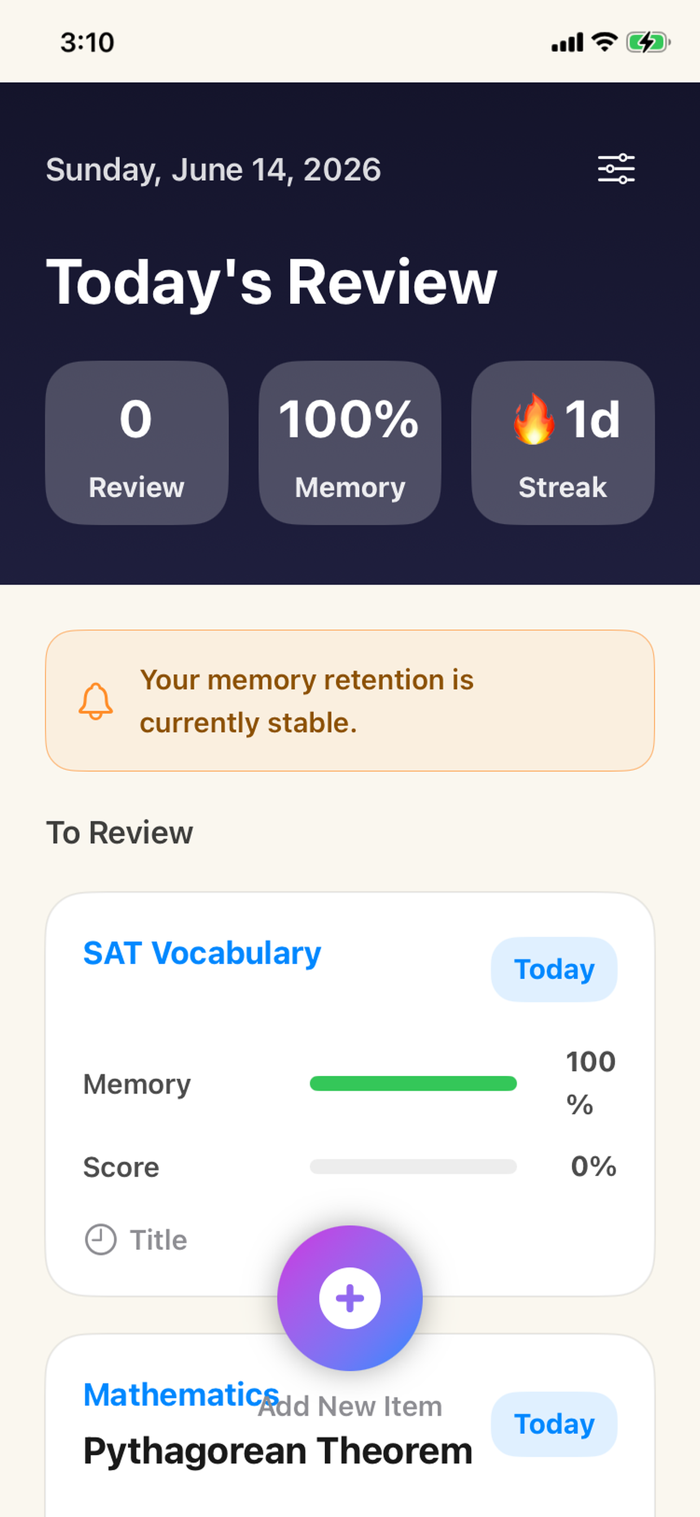
Tap the Add button at the bottom of the screen to create a new review item.
You can enter a subject, title, and notes. You can also save study images if needed.
The title is optional and can be left blank.
2. Subject Management
You can register frequently used subjects in advance.
When adding or editing review items, you can select an existing subject or enter a new one manually.
3. Memory Rate
Memory Rate is a reference value calculated based on review history and elapsed time.
After reviewing, the memory rate increases and gradually decreases over time.
It indicates how likely you are to remember the studied content.
4. Achievement Score
Achievement Score is calculated based on the number of completed reviews.
The more you review, the higher your achievement score becomes, up to 100%.
5. Complete Review
After reviewing the content, tap the Review Complete button to increase your review count and achievement score.
The last review date is also saved and used to calculate the next review date.
6. Next Review Date
The next review date is automatically calculated based on the number of completed reviews.


 +100宝石


 分享
分享














用户评价
立即分享产品体验
你的真实体验,为其他用户提供宝贵参考
💎 分享获得宝石
【分享体验 · 获得宝石 · 增加抽奖机会】
将你的产品体验分享给更多人,获得更多宝石奖励!
💎 宝石奖励
每当有用户点击你分享的体验链接并点赞"对我有用",你将获得:
🔗 如何分享
复制下方专属链接,分享到社交媒体、群聊或好友:
💡 小贴士
分享时可以添加你的个人推荐语,让更多人了解这款产品的优点!
示例分享文案:
"推荐一款我最近体验过的应用,界面设计很精美,功能也很实用。有兴趣的朋友可以看看我的详细体验评价~"
关注 Mergeek 公众号
领奖遇到问题?联系小门助手