



 +100宝石




产品功能
Photo Statistic turns the photos and videos already on your iPhone, iPad, or Mac into a picture of your own life: how many you took, when you took them, and where. Nothing is imported, nothing is uploaded, and nothing in your library is changed - the app simply reads what is already there and counts it.
There is no account to create, no setup to work through, and no file to import. Open the app, allow access to your library, and start exploring.
KEY FEATURES
From Years Down to Hours
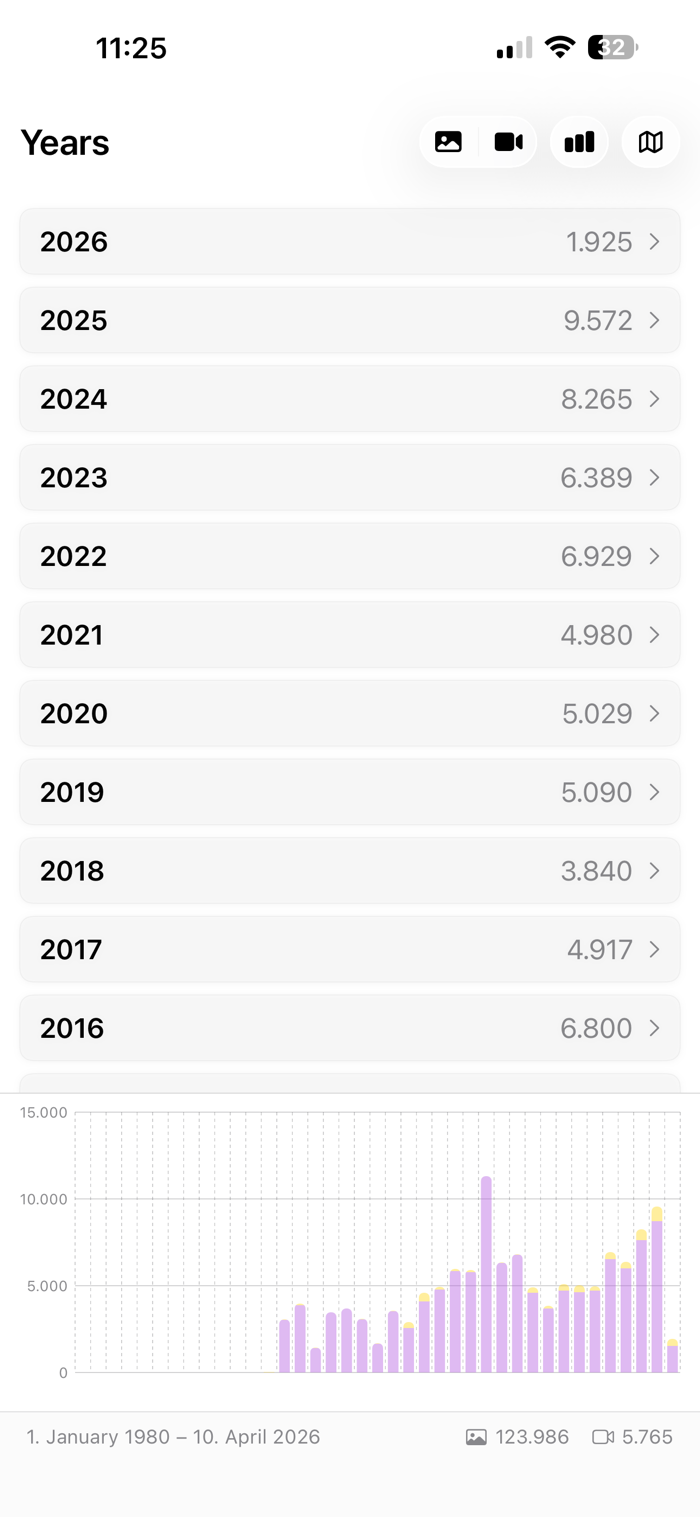
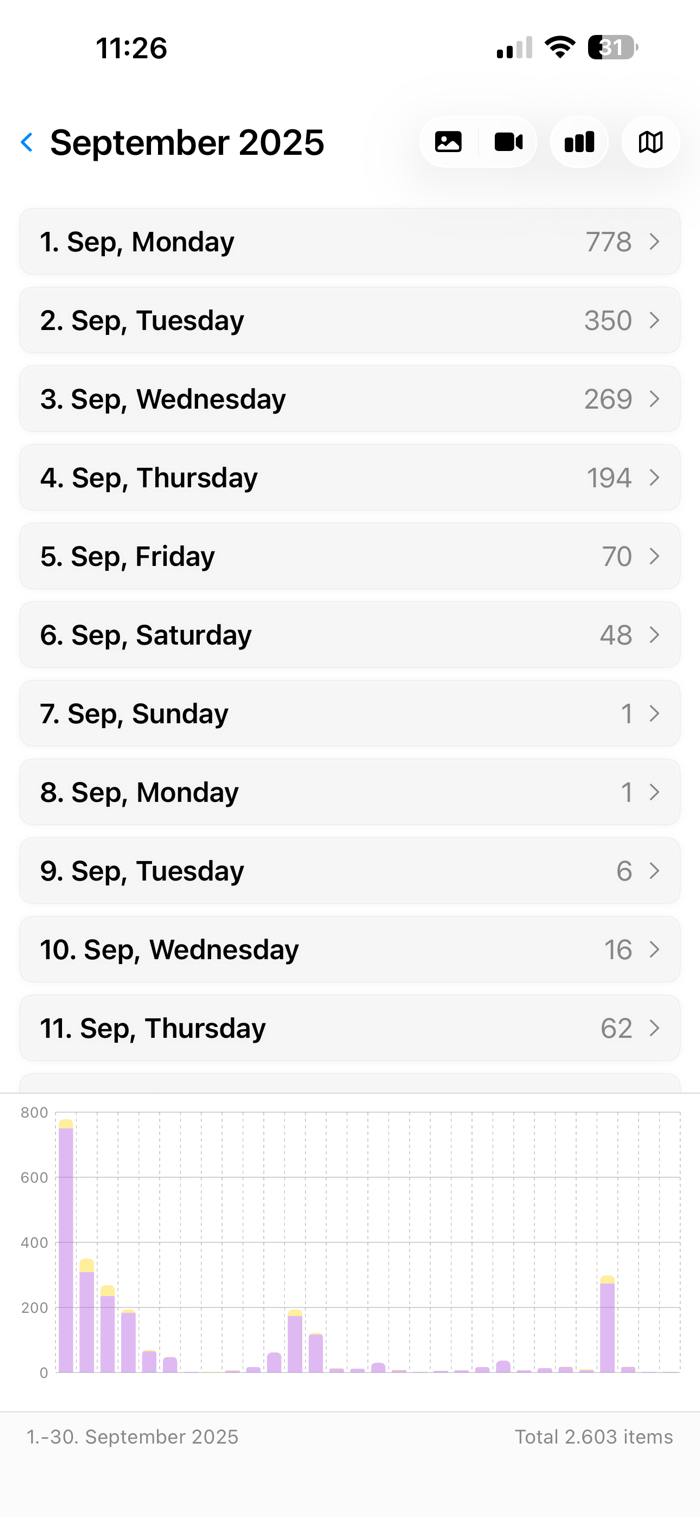
- Your library becomes a timeline you can open like nested drawers: years, then months, then days, then hours, and finally the pictures themselves
- Stacked bars show photos and videos side by side, so you see at a glance when you shot the most
- Tap any bar for the exact numbers, or jump straight into that period
- Switch between photos, videos, or both at any level
- Watch your library grow over time on a chart
Every Year at Once
- One button folds all years onto a single calendar: January holds all your Januaries, 24 December every Christmas Eve
- The way down stays the same - months, days, hours, then the pictures - only with the year left out
- See which day of the year you take the most pictures, or what one date looks like across your whole library
- One tap switches back to the single year you came from
A Map Made of Hexagons
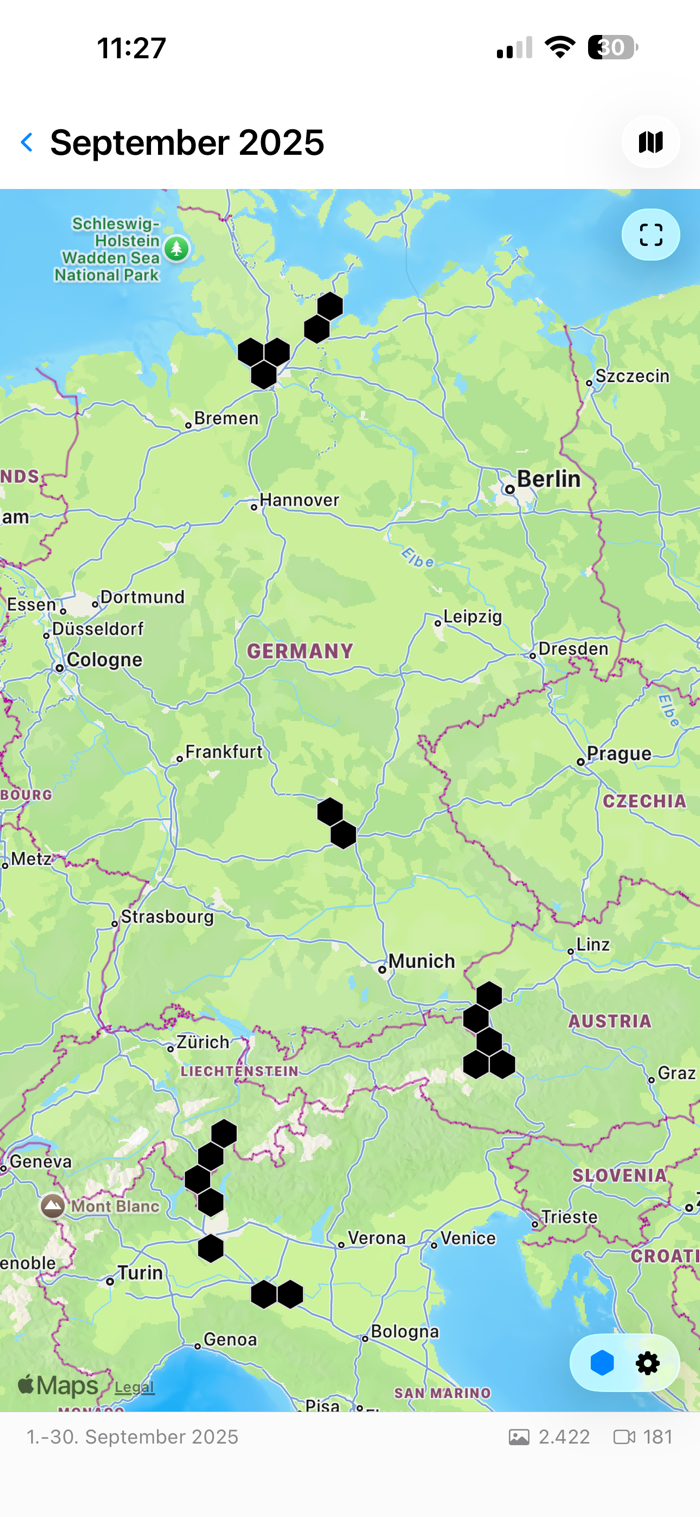
- Photos that carry a location cluster into honeycomb cells, each labeled with how many pictures were taken there
- Adjust the cell size from 1 to 100 kilometers, from a single neighborhood out to a whole continent
- Tap any cell to see the pictures behind it
- Drawn only from coordinates already saved in your photos - the app never asks for your device location
Mark the Ones You Love
- Browse thumbnails grouped by period, and pinch to resize the grid
- Select several pictures at once, or a whole group by tapping its title
- Collect everything you marked into a real album in the Photos app, and clear it again whenever you like
Fix a Stuck iCloud Photos Sync
- When iCloud Photos insists that items are still to sync, the app finds out exactly which ones
- Two devices on the same iCloud account find each other over the local network and compare their libraries year by year, month by month, day by day
- Each device gathers the items the other one is missing into its album, so iCloud picks them up and carries them across
- Every step asks first, and it works between iPhone, iPad, and Mac
Ask Instead of Tapping
- Apple Intelligence: describe what you want in plain language and the app opens at the matching year, month, or day
- Siri answers out loud without opening the app - ask for a photo report for last month, or how many videos you took this year
- Four Shortcuts actions turn your library into a report, a spreadsheet, or a plain number
- Export as CSV or JSON, or build a PDF report inside a shortcut
- Choose today, last month, a specific year, a date range, or any number of days back
Private By Design
- Every calculation happens on your device, using Apple's own PhotoKit
- Nothing is uploaded and nothing is shared; no photo ever leaves your device
- On the Mac the app runs in Apple's App Sandbox, with access to nothing but your photo library and the local network
- The device comparison talks straight to your other device - only counts and anonymous identifiers, never a photo
- No account, no ads, no usage tracking, no analytics
Also Included
- Handoff: start on your iPhone and pick up on your Mac where you left off
- Dark Mode
- One app for iPhone, iPad, and Mac
- Available in English, German, Spanish, and French
- Completely free, with no in-app purchases and no subscription
Photo Statistic only ever reads and counts - it never moves, edits, or deletes a picture, so you can explore your whole library without risk.
Terms of Use (EULA): https://apps.schwarz-interactive.de/terms-of-use.html
分享「」体验,参与「」抽奖!
分享 1~3 张你对这个产品最满意的截图或效果图
分享「」体验,参与「」抽奖!
用你的故事点亮社区✨!你的真实体验,将会永久展示在 官方主页 📌,为其他朋友提供宝贵参考 💡。立即分享吧!🚀
请为产品评分
请选择问题回答,为大家提供宝贵参考
选择要回答的问题
温馨提示
你尚未上传产品截图。
上传截图可立即获得宝石积分奖励!
如果你赶时间,也可稍后修改评论,补上截图领取宝石。
温馨提醒
你尚未添加产品截图
⚠️ 不添加截图将降低抽奖权重

感谢参加,你已成功参加!
为了确保你能及时收到审核结果和领奖码通知

扫描二维码关注 Mergeek 公众号
在后台回复 「获奖通知」
完成上述操作,即可保障奖励发放成功











用户评价
立即分享产品体验
你的真实体验,为其他用户提供宝贵参考
💎 分享获得宝石
【分享体验 · 获得宝石 · 增加抽奖机会】
将你的产品体验分享给更多人,获得更多宝石奖励!
💎 宝石奖励
每当有用户点击你分享的体验链接并点赞"对我有用",你将获得:
🔗 如何分享
复制下方专属链接,分享到社交媒体、群聊或好友:
💡 小贴士
分享时可以添加你的个人推荐语,让更多人了解这款产品的优点!
示例分享文案:
"推荐一款我最近体验过的应用,界面设计很精美,功能也很实用。有兴趣的朋友可以看看我的详细体验评价~"
关注 Mergeek 公众号
领奖遇到问题?联系小门助手