


 +100宝石



产品功能
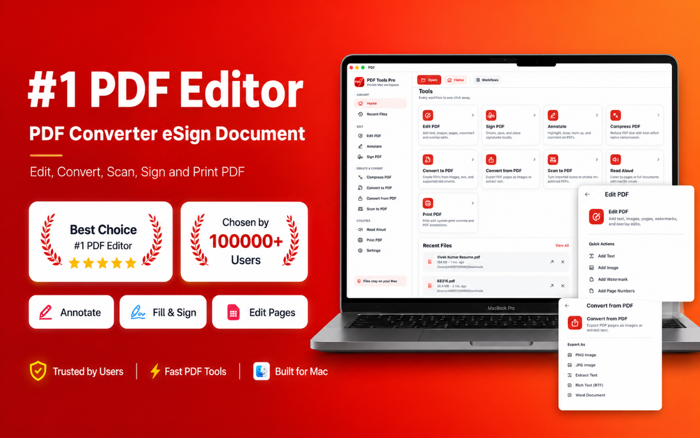
e Signature Creator PDF Maker PDF Editor is an all-in-one eSign and document signing app for Mac designed to help you Sign pdf documents, complete Pdf fill sign workflows, create an E sign, Signnow, manage Signing documents, use a Signature scanner, make a signature with Sign maker and Signature creator tools, Scan document files, create PDFs with Pdf maker, handle scans with Scanner pro and Document scanner features, and work with every Pdf reader, Pdf editor and Pdf scanner tool you need in one place.
CREATE & ADD YOUR SIGNATURE
Create a professional electronic signature in seconds. Draw your handwritten signature, type your name or initials, or import an existing signature and place it exactly where needed. Save signatures for faster repeat use across contracts, forms, invoices, agreements, applications and business documents.
FILL & SIGN PDF DOCUMENTS
Open a PDF, add your signature, insert text, fill forms, add dates, initials, notes and other details, then save, export, share or print the completed document. The streamlined PDF fill and sign workflow helps you handle approvals and paperwork without printing and rescanning.
SIGNATURE SCANNER & DOCUMENT SCANNER
Turn paper signatures and documents into digital files. Import photos or scanned pages, create clean PDFs, arrange pages and build documents ready for signing, editing or sharing. Use the app as a document scanner, PDF scanner and scan-to-PDF tool for receipts, forms, notes, bills and paperwork.
PDF EDITOR & ANNOTATION TOOLS
Edit PDF files with useful tools for adding text and images, highlighting content, underlining text, drawing, adding shapes, writing notes and annotating pages. Review contracts, reports, assignments, forms and office documents from one Mac workspace.
PDF MAKER & PDF CONVERTER
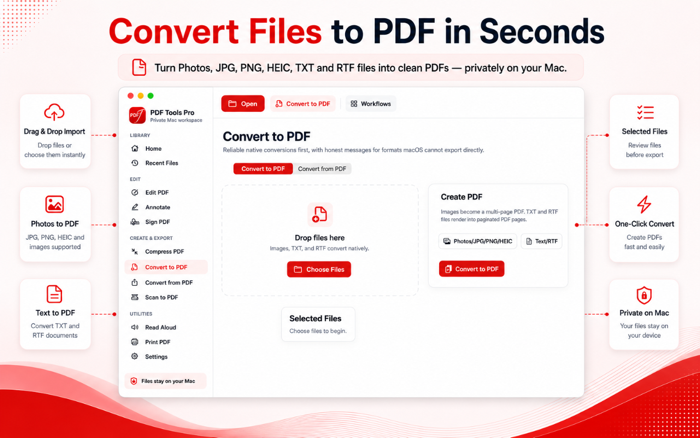
Create PDFs from images and popular file formats, or convert PDFs into other formats when needed. Supported workflows include JPG to PDF, PNG to PDF, image to PDF, Word to PDF, Excel to PDF, PowerPoint to PDF, PDF to JPG, PDF to PNG, PDF to Text, PDF to Word and PDF to Excel.
MERGE, SPLIT, COMPRESS & ORGANIZE
Combine multiple PDF files, split documents, rotate pages, reorder pages and organize your files. Compress PDFs to reduce file size for faster sharing, email and uploads.
PDF READER, READ ALOUD & PRINT
Open and review documents with a clean PDF reader. Use read-aloud support for reports, articles, study material and hands-free reading. When your document is ready, print directly from your Mac.
BUILT FOR EVERYDAY SIGNING
Whether you are signing a contract, filling a form, approving an invoice, creating a PDF, scanning paperwork or editing a document, e Signature Creator PDF Maker PDF Editor brings signature creation, document signing and PDF tools into one simple workflow.
Your documents remain under your control while you choose when to open, edit, sign, save, convert, export, share or print them.
-------------------------------------------------------------------------------------------------------------------------------------------------------------------------------------
Subscription
Weekly with Free Trial - $7.99
Yearly - $29.99
Privacy Policy: https://pdfeditortoolpro.blogspot.com/2026/06/privacy-policy.html
Terms of USE (EULA) - https://pdfeditortoolpro.blogspot.com/2026/08/terms-of-use.html
-------------------------------------------------------------------------------------------------------------------------------------------------------------------------------------
分享「」体验,参与「」抽奖!
分享 1~3 张你对这个产品最满意的截图或效果图
分享「」体验,参与「」抽奖!
用你的故事点亮社区✨!你的真实体验,将会永久展示在 官方主页 📌,为其他朋友提供宝贵参考 💡。立即分享吧!🚀
请为产品评分
请选择问题回答,为大家提供宝贵参考
选择要回答的问题
温馨提示
你尚未上传产品截图。
上传截图可立即获得宝石积分奖励!
如果你赶时间,也可稍后修改评论,补上截图领取宝石。
温馨提醒
你尚未添加产品截图
⚠️ 不添加截图将降低抽奖权重

感谢参加,你已成功参加!
为了确保你能及时收到审核结果和领奖码通知

扫描二维码关注 Mergeek 公众号
在后台回复 「获奖通知」
完成上述操作,即可保障奖励发放成功









用户评价
立即分享产品体验
你的真实体验,为其他用户提供宝贵参考
💎 分享获得宝石
【分享体验 · 获得宝石 · 增加抽奖机会】
将你的产品体验分享给更多人,获得更多宝石奖励!
💎 宝石奖励
每当有用户点击你分享的体验链接并点赞"对我有用",你将获得:
🔗 如何分享
复制下方专属链接,分享到社交媒体、群聊或好友:
💡 小贴士
分享时可以添加你的个人推荐语,让更多人了解这款产品的优点!
示例分享文案:
"推荐一款我最近体验过的应用,界面设计很精美,功能也很实用。有兴趣的朋友可以看看我的详细体验评价~"
关注 Mergeek 公众号
领奖遇到问题?联系小门助手