产品功能

应用市场介绍

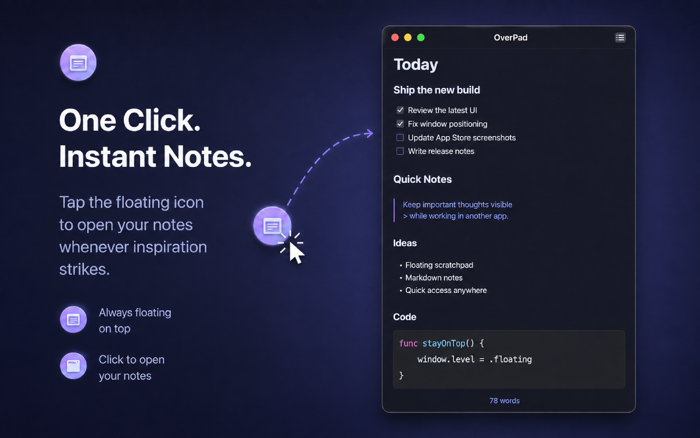
OverPad is a lightweight floating Markdown scratchpad for macOS, designed to stay within reach while you work—even across desktop Spaces and native full-screen workflows.

Stop switching between apps just to copy a prompt, save a code snippet, collect reference text, or prepare context for AI.

OverPad gives you a small floating orb that stays ready on your screen. Click it to instantly open your scratchpad, capture or paste what you need, then close it back into the floating orb and continue working.

BUILT FOR FULL-SCREEN WORKFLOWS

Many note apps work well in normal windows but become inconvenient when your main app is running full screen.

OverPad is designed for workflows where your editor, browser, documentation, or other macOS app occupies the entire screen. Its floating interface works across desktop Spaces and is designed to appear alongside native full-screen apps, keeping your temporary notes close without constantly switching windows.

PERFECT FOR AI PROMPTS AND CONTEXT

OverPad is especially useful when working with AI coding and writing tools.

Collect requirements from one app.
Copy code or error messages from another.
Save instructions, examples, logs, links, and reference text.
Organize everything into clean Markdown.
Then copy the complete context into your AI tool when you're ready.

Instead of repeatedly jumping between windows, OverPad becomes a lightweight staging area for your prompts and working context.

A FLOATING SCRATCHPAD, NOT A HEAVY NOTE SYSTEM

OverPad is made for temporary working text: prompts, code snippets, Markdown, todos, drafts, logs, references, and anything you need to keep visible while working.

There is no traditional main window taking over your workspace. Launch OverPad and its floating orb is ready when you need it.

Click to write.
Close to collapse.
Drag it wherever it is most convenient.

MARKDOWN AND CODE FRIENDLY

Write and paste Markdown while keeping the original Markdown text portable.

OverPad supports live Markdown styling for common Markdown and GFM content, including:

• Headings
• Bold and italic text
• Ordered and unordered lists
• Quotes
• Links
• Task lists
• Tables
• Inline code
• Fenced code blocks

Code blocks include syntax highlighting for common languages, making OverPad useful as a temporary code scratchpad while programming.

MULTIPLE NOTES, ONE LIGHTWEIGHT WORKSPACE

Create multiple notes for different tasks without building a complicated note library.

Keep one note for an AI prompt, another for code snippets, another for requirements, and another for temporary reference material.

Notes are automatically saved locally and restored when you return.

CUSTOMIZE IT FOR YOUR WORKSPACE

Choose from 19 built-in color themes, including light and dark options.

Customize the editor font and base font size, or quickly zoom your text from 60% to 240% with Command + Plus and Command + Minus.

OverPad also supports eight interface languages:

English, Simplified Chinese, Traditional Chinese, Japanese, Korean, Spanish, French, and German.

DESIGNED FOR FOCUSED MAC WORK

OverPad is useful for:

• AI prompt writing
• AI coding workflows
• Prompt engineering
• Code snippets
• Error logs
• Markdown notes
• Temporary text storage
• Copy-and-paste workflows
• Research and reference collection
• Writing drafts
• Browser research
• Xcode and coding workflows
• Full-screen productivity
• Multi-Space macOS workflows

YOUR TEXT STAYS LOCAL

Your notes are automatically saved on your Mac. No account is required.

OverPad is deliberately focused: a fast, native macOS floating scratchpad that keeps the text you need close to your work.

收起

用户评价

立即分享产品体验

你的真实体验,为其他用户提供宝贵参考

宝石
评论可得 100 宝石
宝石随心兑换应用高级会员,每周更新 前往查看 >>
活动动态 0 人参加
查看更多评论