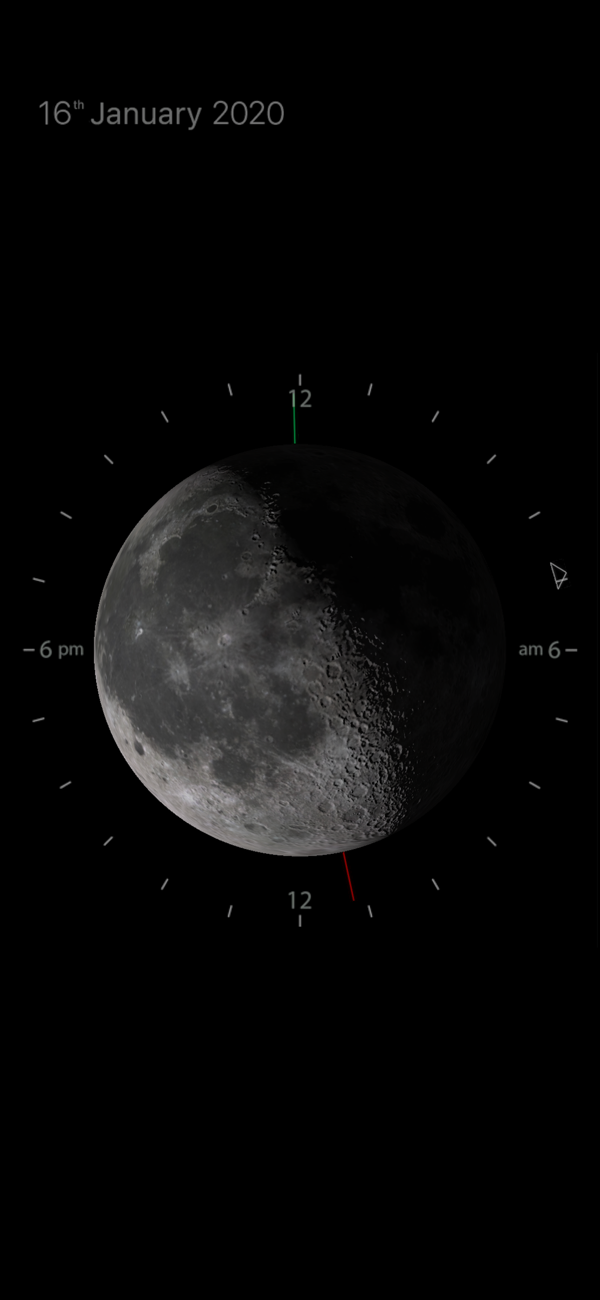
View all the moon's properties in one simple graphic, using your location MoonClock calculates the moon's appearance and is constantly updated in real-time.
What it tells you:
• current moon phase
• time the moon crosses meridian
• time the moon rises
• time the moon sets
• moon's current libration
• moon's apparent size
• brightness of sky at time of meridian crossing
How to read the MoonClock
The clock at top left displays the current time and date. You can switch between 12 and 24 hour display by tapping on the clock.
The image of the moon always displays the moons current phase at the time shown on the clock. It also illustrates the moons libration and apparent size due to distance – the moon phase is constantly changing and the moon image represents the moons properties right now – not at the time of meridian crossing (when the moon appears at its highest point in the sky).
The dial around the moon represents a twenty four hour clock.
The small triangle shows the time at which the moon will cross meridian on the current day – if the moon does not cross meridian on that day it will show the time of meridian crossing on the following day and the triangle marker will turn blue instead of white.
The green bar shows the time of moonrise – this is relative to the meridian crossing so it may indicate the time on the previous day.
The red bar shows the time of moonset – this is relative to th...

 +100宝石


 分享
分享





















用户评价
立即分享产品体验
你的真实体验,为其他用户提供宝贵参考
💎 分享获得宝石
【分享体验 · 获得宝石 · 增加抽奖机会】
将你的产品体验分享给更多人,获得更多宝石奖励!
💎 宝石奖励
每当有用户点击你分享的体验链接并点赞"对我有用",你将获得:
🔗 如何分享
复制下方专属链接,分享到社交媒体、群聊或好友:
💡 小贴士
分享时可以添加你的个人推荐语,让更多人了解这款产品的优点!
示例分享文案:
"推荐一款我最近体验过的应用,界面设计很精美,功能也很实用。有兴趣的朋友可以看看我的详细体验评价~"
领取结果