Some shortcuts stay simple. Others end up with branches inside loops inside menus — and a month later you open one and have no idea what it actually does.
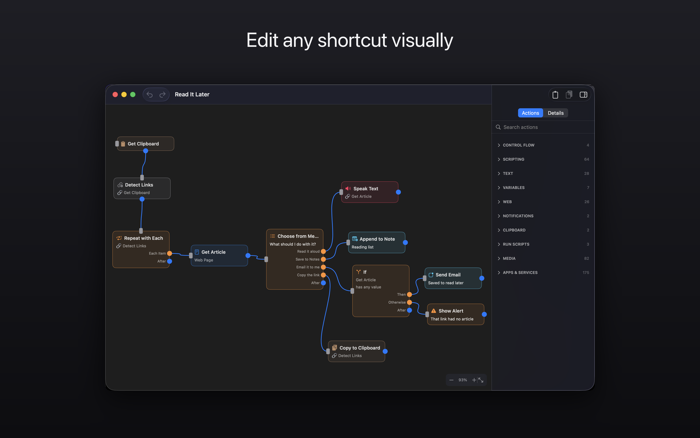
Shortcuts Editor lays them out as a diagram. Each action becomes a box, each connection a line you can follow with your finger. Branches fork apart on screen instead of hiding behind indentation.
WHEN IT HELPS
• Untangling a shortcut that grew too complicated to read
• Checking what a shortcut you downloaded does before you run it
• Sketching out a branching automation before you commit to building it
• Working out how your own automation worked, months later
SEE THE STRUCTURE
• If / Otherwise conditions fork into two visible paths
• Repeat and Repeat with Each show exactly what sits inside the loop
• Choose from Menu gives every option its own branch
• Tell at a glance which actions belong to which branch
EDIT ON THE CANVAS
• Drag actions to rearrange them and draw connections between them
• Change a value on the action itself, or in the side panel
• Select several actions at once; undo and redo anything
• Point a field at a variable set earlier in the flow
MOVE IT INTO SHORTCUTS
• Copy your whole workflow to the clipboard
• Paste it into a shortcut in Apple's Shortcuts app
• Branches, loops, and menus all arrive intact
KEEP YOUR WORK
• Save a layout as a project file and reopen it later
• Autosave reme...


 +100宝石


 分享
分享











用户评价
立即分享产品体验
你的真实体验,为其他用户提供宝贵参考
💎 分享获得宝石
【分享体验 · 获得宝石 · 增加抽奖机会】
将你的产品体验分享给更多人,获得更多宝石奖励!
💎 宝石奖励
每当有用户点击你分享的体验链接并点赞"对我有用",你将获得:
🔗 如何分享
复制下方专属链接,分享到社交媒体、群聊或好友:
💡 小贴士
分享时可以添加你的个人推荐语,让更多人了解这款产品的优点!
示例分享文案:
"推荐一款我最近体验过的应用,界面设计很精美,功能也很实用。有兴趣的朋友可以看看我的详细体验评价~"
关注 Mergeek 公众号
领奖遇到问题?联系小门助手