Turn a local HTML project into a Mac app for your own use.
HTML to App converts a website folder or a self-contained HTML file into a standalone .app bundle for personal use and testing. Export directly when you just need the finished app, or use the workspace to edit, run and improve your project.
Quick conversion
Choose Convert HTML to App, select your source, customize the app, and export. There is no need to add a workspace project first. Embed your HTML, CSS, JavaScript, images and other assets inside the app, or keep using the original folder so future launches use its latest files.
A workspace for your projects
Keep local projects in one library and return to them whenever you want.
- Browse and edit HTML, CSS, JavaScript and other text files.
- Find text with Command-F and save changes to the original files.
- Run a project in Preview to check its layout, navigation and behavior.
- Check saved HTML and CSS references for missing local resources.
- Inspect JavaScript errors and console output in Checks & Output.
- Duplicate projects, reveal files in Finder, and remember export settings for each project.
Start with a working example
Explore 10 editable examples, including a drawing pad, text editor, image viewer, audio and video players, folder browser, camera viewer, and native integration demos. Create your own copy, run it, and change the source. A simple notes starter is also included.
Make it feel at home on Mac
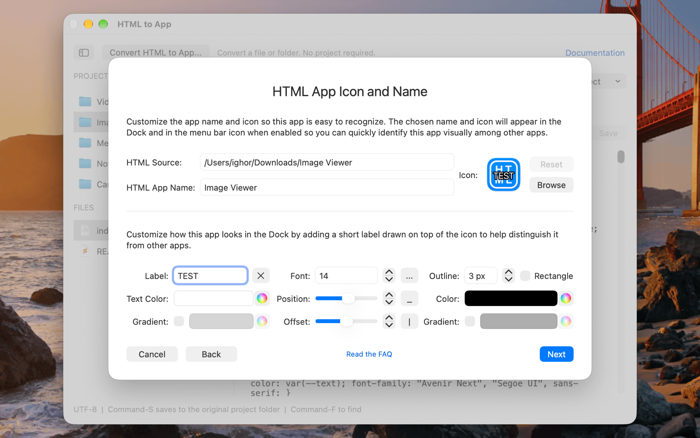
Choose an app name, window title, icon and optional Dock icon effects. Configure Finder's Open With support for files and folders. Use the JavaScript bridge to work with local files, create native menu bar items, control the app window, send notifications and update Dock badges.
Keep your work local
Project files are edited and packaged locally on your computer. Embedded exports contain the project files. Apps that use the original folder need that folder to remain available. Projects that load online resources or APIs may need an int…