Use this revised version. I would avoid saying it "hides" contact information in an absolute security sense. Better wording is "keeps it below the first visible area" because anyone can still scroll if they know to do it.
LockLines helps you create custom macOS lock screen messages that fit the small message area cleanly.
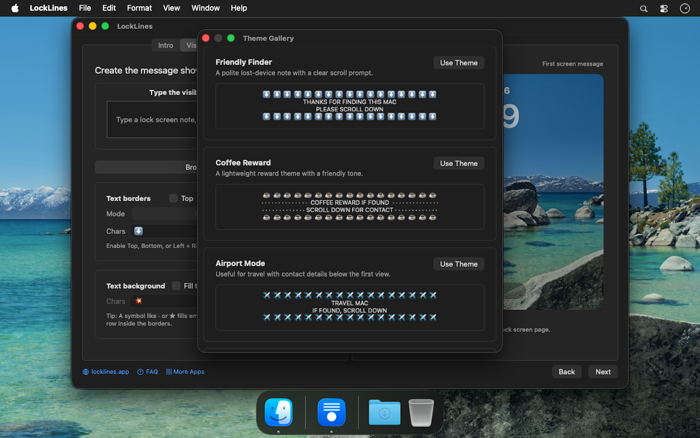
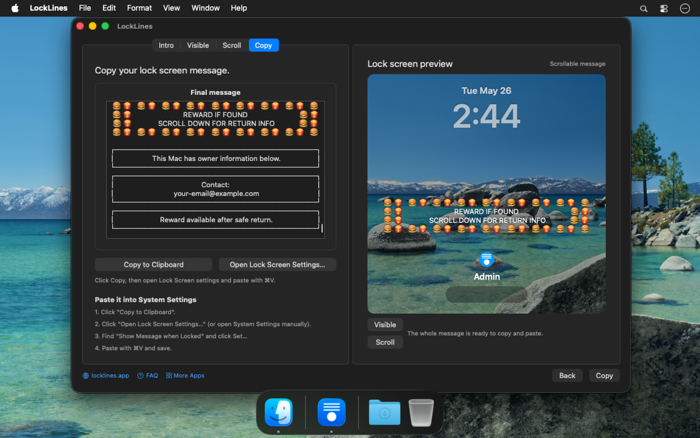
Instead of guessing how your text will appear on the lock screen, you can design it visually, preview what shows first, place private details below the first visible area, and copy a finished plain-text message into System Settings.
Use LockLines for owner notes, contact information, device labels, test machines, asset tags, recovery instructions, or any short message you want visible before someone signs in.
A practical use case is lost-device contact info. You can show a simple visible message such as "If found, scroll down", while keeping your email, phone number, or return instructions below the initially visible part of the lock screen message. This helps avoid exposing contact details at a glance when your MacBook is in a public place, while still making the information available to someone who finds it and scrolls down.
Once the message is set in macOS, it remains part of the standard lock screen message and is preserved across reboots.
Features:
* Create visible lock screen text
Write the message that appears first on the lock screen before scrolling.
* Place details below the...


 +100宝石

 分享
分享













用户评价
立即分享产品体验
你的真实体验,为其他用户提供宝贵参考
💎 分享获得宝石
【分享体验 · 获得宝石 · 增加抽奖机会】
将你的产品体验分享给更多人,获得更多宝石奖励!
💎 宝石奖励
每当有用户点击你分享的体验链接并点赞"对我有用",你将获得:
🔗 如何分享
复制下方专属链接,分享到社交媒体、群聊或好友:
💡 小贴士
分享时可以添加你的个人推荐语,让更多人了解这款产品的优点!
示例分享文案:
"推荐一款我最近体验过的应用,界面设计很精美,功能也很实用。有兴趣的朋友可以看看我的详细体验评价~"
关注 Mergeek 公众号
领奖遇到问题?联系小门助手