Create highly customizable countdown timer overlays with ease using Countdown Timer Pro, a completely free macOS app. It's the perfect tool for work sessions, focus sprints, event timing, or simply keeping track of time visually.
EFFORTLESS CREATION
Just click and drag the Countdown menu bar icon—the farther you drag, the longer the timer (Inspired by Gestimer). Release to instantly place a sleek timer overlay anywhere on your screen.
FULL CONTROL & CUSTOMIZATION
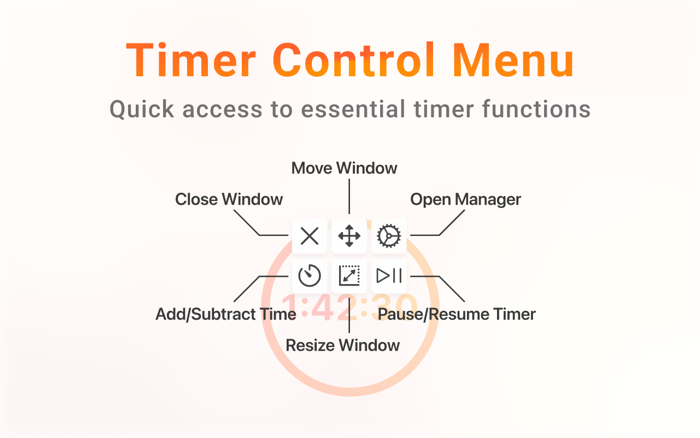
• Timer Control Menu: Hover over a timer to access quick actions—move, resize, adjust time (by dragging), pause/resume, open the Countdown Manager, or close the timer—all directly from the overlay.
• Click-Through Overlays: On hover, timers become translucent and activate pass-through mode so you can interact with apps behind them without getting interrupted.
• Countdown Manager: Manage all your timers from one central hub. Set exact start and end dates, create recurring timers (daily, weekly, monthly, or custom intervals), and fine-tune every detail.
CUSTOMIZE THE LOOK
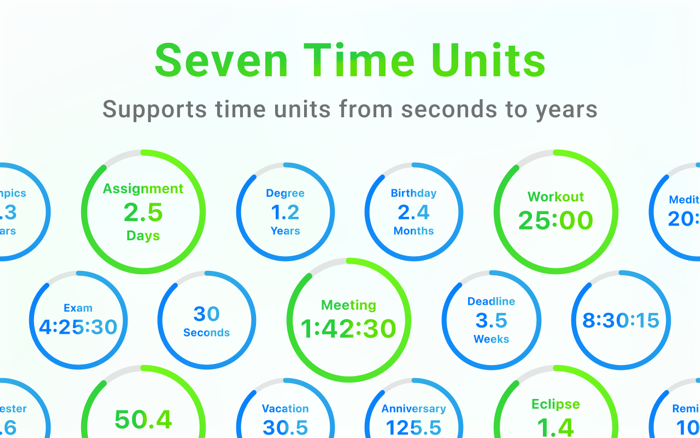
• Flexible Time Display: Choose from 7 time units (seconds to years) or display time as a percentage. The app automatically selects the most readable unit based on the remaining time. You can optionally hide the seconds portion in hours and minutes formats for a cleaner display.
• Visual Options: Personalize each timer with custom fonts, background styles, opacity, and progress ring set...


 +100宝石


 分享
分享










用户评价
立即分享产品体验
你的真实体验,为其他用户提供宝贵参考
💎 分享获得宝石
【分享体验 · 获得宝石 · 增加抽奖机会】
将你的产品体验分享给更多人,获得更多宝石奖励!
💎 宝石奖励
每当有用户点击你分享的体验链接并点赞"对我有用",你将获得:
🔗 如何分享
复制下方专属链接,分享到社交媒体、群聊或好友:
💡 小贴士
分享时可以添加你的个人推荐语,让更多人了解这款产品的优点!
示例分享文案:
"推荐一款我最近体验过的应用,界面设计很精美,功能也很实用。有兴趣的朋友可以看看我的详细体验评价~"
关注 Mergeek 公众号
领奖遇到问题?联系小门助手