CombineCodes Universal turns one or more source folders into a single, reviewable file — Plain Text, Markdown, XML, or Claude XML — running fully on your Mac with no network, no account, and no cloud dependency.
Whether you're preparing a codebase for an LLM review, sharing a snapshot of a project, or just want one scrollable artifact out of a multi-folder workspace, CombineCodes handles the scan, the formatting, and the local history in a single guided workflow.
A FIVE-STEP WORKFLOW
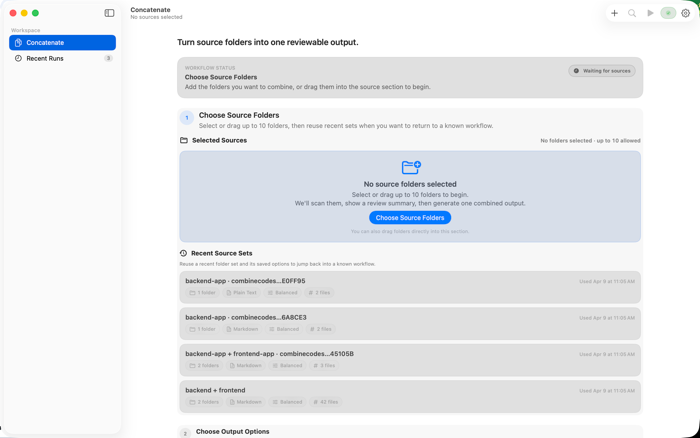
1. Choose sources — pick or drag up to 10 folders. Recent source sets save their full option set so you can jump back into a known workflow in one click.
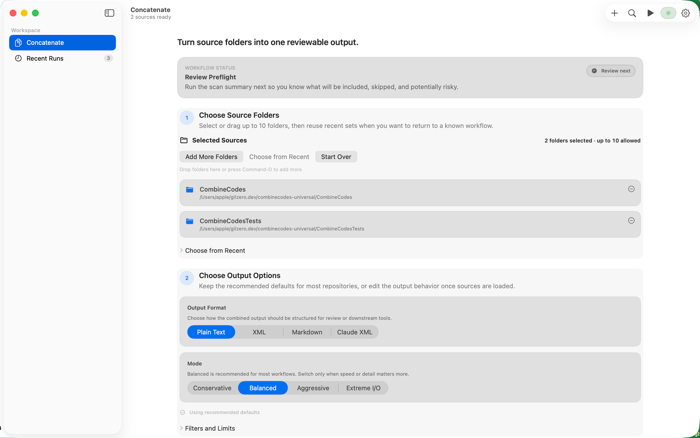
2. Pick options — choose the output format (Plain, XML, Markdown, Claude XML) and a performance profile. Advanced filters let you restrict by include/ignore globs or cap maximum file size.
3. Review preflight — see a scan summary with file counts, total size, file type mix, warnings, and a go/no-go verdict before you commit.
4. Combine — watch the run complete with live progress, elapsed time, and estimated remaining.
5. Review result — open the output, copy it to Downloads, or re-run the same setup with one click.
PRIVATE BY DESIGN
CombineCodes runs every scan, format, and database write locally. The app uses the macOS App Sandbox with only user-selected folder access and Downloads write. No analytics, no telemetry, no outgoing network traffic. Your code and your history stay on your ...


 +100宝石


 分享
分享









用户评价
立即分享产品体验
你的真实体验,为其他用户提供宝贵参考
💎 分享获得宝石
【分享体验 · 获得宝石 · 增加抽奖机会】
将你的产品体验分享给更多人,获得更多宝石奖励!
💎 宝石奖励
每当有用户点击你分享的体验链接并点赞"对我有用",你将获得:
🔗 如何分享
复制下方专属链接,分享到社交媒体、群聊或好友:
💡 小贴士
分享时可以添加你的个人推荐语,让更多人了解这款产品的优点!
示例分享文案:
"推荐一款我最近体验过的应用,界面设计很精美,功能也很实用。有兴趣的朋友可以看看我的详细体验评价~"
关注 Mergeek 公众号
领奖遇到问题?联系小门助手