


 +100宝石

产品功能
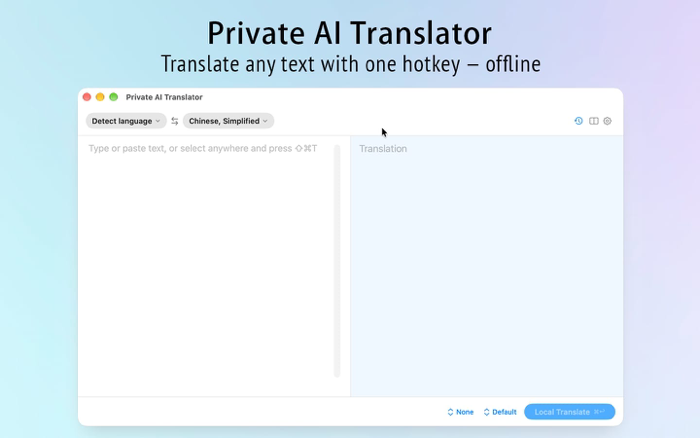
Translate anything on Mac—across any app, one shortcut, fully offline.
Private AI Translator lives in your menu bar. Select text, hit the shortcut, and get instant translations powered by a language model running locally on your Mac. No account. No API key. No character limits. No subscription. Zero network traffic during translation.
What sets it apart • Fully offline—works on planes, in hotels, or on managed corporate Macs • Zero setup: models are bundled with the app • Supports 36 languages with automatic source detection • Your translated content never leaves your device—no accounts, no analytics, no telemetry
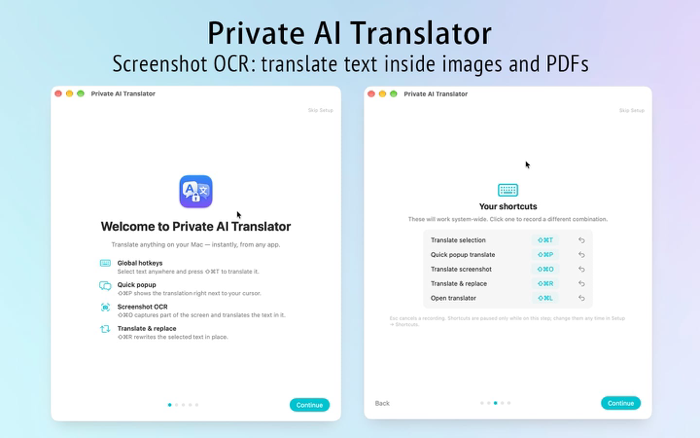
Seamless workflow integration • Translate selected text (⇧⌘T)—select text in any app and read the translation in the menu bar window • Quick bubble (⇧⌘P)—a small translation bubble appears next to your cursor • Translate and replace (⇧⌘R)—overwrite the selected content in place • Screenshot translation (⇧⌘O)—drag a region over any screen area, including PDFs or images, to translate the text
Output your way • Tone and context presets—formal, casual, email, technical, marketing—and custom options • Document translation preserves headings, lists, blank lines, and code blocks (for plain text files; use screenshot translation for PDFs and Word documents) • Read aloud, copy with one click, and revisit recent translations from the history menu • Clipboard integrity preserved—what you copy remains unchanged
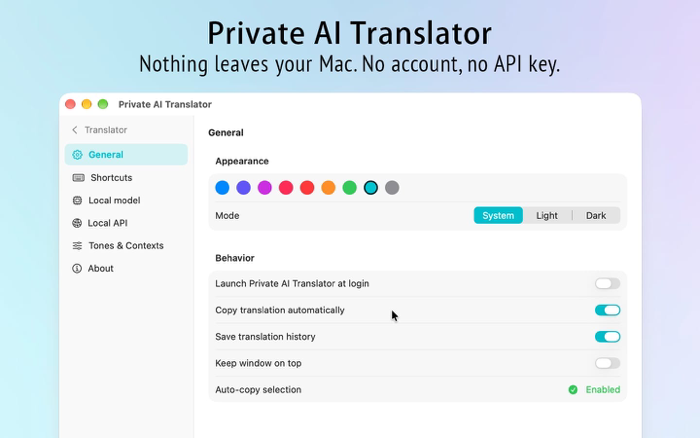
Total control • Accessibility and screen recording permissions are optional: translation windows, document translation, and copy-paste features work without them • All shortcuts are remappable, including function keys • Arrange panels vertically or horizontally, keep the window on top, and launch at login • Nine color themes supporting light, dark, and system-follow modes • Interface languages: English, Simplified Chinese, Traditional Chinese, Japanese, Korean, French, German, Italian, Spanish, Portuguese
For developers • Optional local /v1/chat/completions endpoint (http://127.0.0.1:11434/v1)—any compatible client, whether scripts or editor plugins, can leverage the loaded models. Disabled by default and bound only to localhost.
Supported Languages Arabic, Bengali, Burmese, Cantonese, Chinese (Simplified), Chinese (Traditional), Czech, Dutch, English, Filipino, French, German, Gujarati, Hebrew, Hindi, Indonesian, Italian, Japanese, Khmer, Korean, Malay, Marathi, Persian, Polish, Portuguese (Brazil), Russian, Spanish, Tamil, Telugu, Thai, Tibetan, Turkish, Ukrainian, Urdu, Uyghur, Vietnamese
System Requirements • macOS 14 Sonoma or later • Apple Silicon (M1 or newer)—language models run on GPU via MLX • ~1 GB after installation: built-in translation models enable immediate offline use without downloads • Menu bar app: click the bubble icon in the menu bar after launching, then select "Open Translation Window"
Clear Privacy Private AI Translator makes zero outbound network requests. It comes with its own models, requires no login, contains no ads, analytics, or tracking SDKs. Everything written stays on your Mac: your preferences, your history (opt-out clears all data), and files you explicitly save.
Ideal for: reading foreign emails and documents, working offline, translating screenshots, protecting sensitive customer and legal texts from third-party servers, and anyone who prefers not to paste work content into web-based tools.
分享「」体验,参与「」抽奖!
分享 1~3 张你对这个产品最满意的截图或效果图
分享「」体验,参与「」抽奖!
用你的故事点亮社区✨!你的真实体验,将会永久展示在 官方主页 📌,为其他朋友提供宝贵参考 💡。立即分享吧!🚀
请为产品评分
请选择问题回答,为大家提供宝贵参考
选择要回答的问题
温馨提示
你尚未上传产品截图。
上传截图可立即获得宝石积分奖励!
如果你赶时间,也可稍后修改评论,补上截图领取宝石。
温馨提醒
你尚未添加产品截图
⚠️ 不添加截图将降低抽奖权重

感谢参加,你已成功参加!
为了确保你能及时收到审核结果和领奖码通知

扫描二维码关注 Mergeek 公众号
在后台回复 「获奖通知」
完成上述操作,即可保障奖励发放成功






用户评价
立即分享产品体验
你的真实体验,为其他用户提供宝贵参考
💎 分享获得宝石
【分享体验 · 获得宝石 · 增加抽奖机会】
将你的产品体验分享给更多人,获得更多宝石奖励!
💎 宝石奖励
每当有用户点击你分享的体验链接并点赞"对我有用",你将获得:
🔗 如何分享
复制下方专属链接,分享到社交媒体、群聊或好友:
💡 小贴士
分享时可以添加你的个人推荐语,让更多人了解这款产品的优点!
示例分享文案:
"推荐一款我最近体验过的应用,界面设计很精美,功能也很实用。有兴趣的朋友可以看看我的详细体验评价~"
关注 Mergeek 公众号
领奖遇到问题?联系小门助手