产品功能

应用市场介绍

Link Grabber is a powerful link extractor and url finder that allows you to quickly and easily extract urls from web pages. With its user-friendly interface and advanced features, Link Grabber is the perfect tool for anyone looking to streamline their link extraction process.

Key Features:
1. Finder & Selection: Select an area on the webpage and see highlighted hyper-links inside (or one-click to find all urls on the page)
2. Extractor: Extract found urls to Excel, CSV, Clipboard, Bookmarks, and other options.
3. Multi-Page Grabber: Extract links from multiple webpages simultaneously. Simply click app icon and grab links from multiple pages by changing the selection Scope.
4. Link Crawler: From a few seed URLs, automatically crawl only what matters—map structure, audit pages, and extract links with depth and scope control.
5. Hover Copy mate: Hover mouse over the link on any page and press Ctrl+C combination to quickly copy links one by one
6. Organizer: Grab urls from text > review and filter right inside the Grabber extension
7. Grab Links from Text: Select any text on a webpage, right-click and choose "Grab Links from Selection" to instantly extract all URLs from plain text, emails, xml, sitemaps or mixed content. Works with URLs with or without protocols!

How does it work (one of options)?
1. Install and activate: Install the link grabber extension (and reload the webpage if already open).
2. Select links: Press the mouse + key combination (default is 'Command' + Left mouse button) to select the area on the webpage where you want to extract urls. Click Find All to find all urls on the page.
3. Process: Decide what to do with your extracted urls using quick action buttons shown right on the page: open, copy, download to CSV, save to bookmarks, review before processing, or find all urls.

Link Selection - Choose how you want to select:
• Find urls in selection
• Find All links on the page
• Find All links in all open pages
• Copy link on mouse hover
• Copy links of open tabs
• Extract URLs from text (right-click on selected text)

Processing - Decide what to do with your extracted data:
• Open links in new tab, in new window, in incognito tab
• Copy to Clipboard
• Add to Bookmarks
• Export to CSV/Text file
• Review and filter selected links in browser

Customization Options:
• Choose how to activate the link selection box: Mouse Button, Keyboard Key
• Filter: Exclude/Include urls with specific words
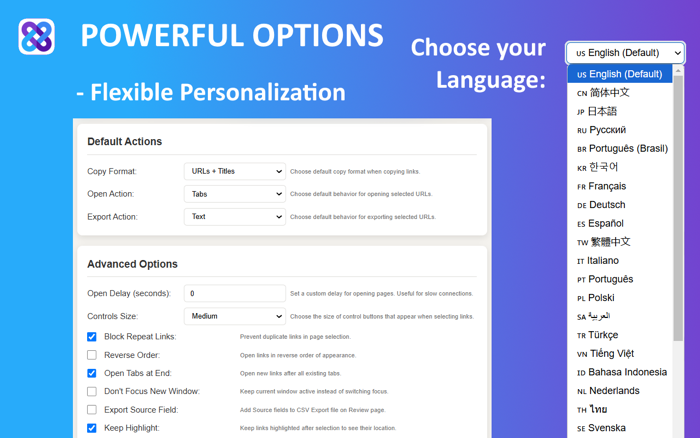
• Change deafult Copy\Open\Export action: Chose default Copy\Open\Export popup button behavior.
• Open Delay: Set a custom delay in seconds to have pages open step by step with this delay. Useful for users with poor internet connections.
• Block Repeating: Remove duplicates
• Open Tabs at the End: Open new tabs at the end of your browser
• Do Not Focus on New Window: Keep your focus on the current window
• Website Blocklist: Block grabber from running on specific websites
• Controls Size: Choose the size of the control buttons that appear when selecting links.
• Hover Copy links: Enable copying links by hovering over them and pressing Ctrl+C/Command+C
• Keep links highlight: Keep links highlighted after mouse selection on page - allows to see links location and manually unselect specific links.

Benefits:
• Time-saving: Extract urls in seconds, saving you hours of manual searching.
• Easy to use: Our user-friendly interface makes it easy to extract links, even for beginners.
• The only url extractor you will use: Link Grabber is a pro tool to help you extract URLs quickly and efficiently.

Usage examples:
• Extract links from text
• Find all links on a website
• Find external links in an Excel webpage
• Find all hyperlinks on the page filtered by a specific word
• Find broken urls (might be used as a URL checker using the include URL filter)

Share your option, let us know what you would like to see in this app - Contact Us at support@link-grabber.com

收起

用户评价

立即分享产品体验

你的真实体验,为其他用户提供宝贵参考

宝石
评论可得 100 宝石
宝石随心兑换应用高级会员,每周更新 前往查看 >>
活动动态 0 人参加
查看更多评论